How do you run code after a delay?
Call setTimeout with a function and a number of milliseconds. setTimeout(showReminder, 2000) asks the browser to call showReminder about two seconds from now. Your script does not stop and wait. The line after setTimeout runs straight away, and the function runs later on its own.
Pass the function itself, without brackets. setTimeout(showReminder(), 2000) calls showReminder immediately and hands its return value, usually undefined, to the timer. That mistake is common in hand-written and AI-written code, and the symptom is a delay that seems to do nothing. When the function needs arguments, wrap it in an arrow function: setTimeout(() => showReminder("Rye"), 2000).
The delay is a number in milliseconds. A thousand milliseconds is one second. Leaving the delay out means 0, and a string such as "2s" cannot be converted, so it also becomes 0. Open the Console and watch the order the messages print to see the later call land after everything else.
console.log("Oven on");
setTimeout(() => {
  console.log("Bread is ready");
}, 1000);
console.log("Kneading the next batch");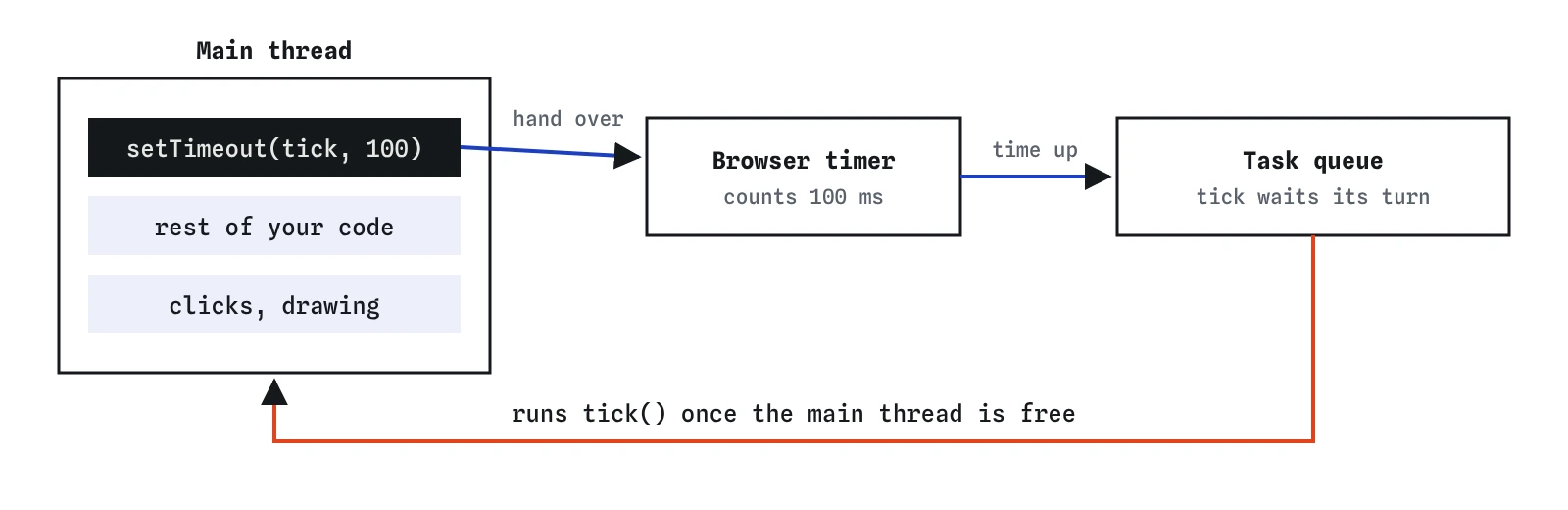
How do you cancel a timer before it runs?
setTimeout returns a number, the timer's id. Keep it in a variable and pass it to clearTimeout to cancel the call. If the timer has already fired, or the id is undefined, clearTimeout does nothing and throws no error, so it is safe to call whenever you are unsure.
A typical use is an undo window. When someone deletes an item from a to-do list, show an Undo button and schedule the real delete for five seconds later. If they press Undo, clear the timer and the delete never happens.
Store the id somewhere every function that needs it can reach. An id declared with const inside one listener is gone when that listener finishes, so a second listener cannot cancel it. A let at the top of the script is the usual place.
let deleteTimer;

function scheduleDelete() {
  deleteTimer = setTimeout(() => {
    console.log("Item deleted");
  }, 5000);
}

function undoDelete() {
  clearTimeout(deleteTimer);
  console.log("Kept it");
}

scheduleDelete();
undoDelete();
How do repeating timers work?
setInterval(fn, ms) calls the function again and again, every ms milliseconds, until you stop it with clearInterval(id). It is the right tool for a clock, a countdown or a slideshow that moves on by itself.
An interval never stops on its own. Leaving the page stops it, and so does clearInterval. Nothing else will. Every interval you start needs a plan for when it ends, written at the moment you start it. In a countdown the plan is a check inside the callback: when the number reaches zero, clear the interval.
For something that should happen a fixed number of times, you can also chain timeouts: each run schedules the next with setTimeout. That pattern makes stopping obvious, because you stop by not scheduling another one. It also never queues two runs on top of each other if one callback is slow.
let seconds = 3;
const timer = setInterval(() => {
  seconds -= 1;
  console.log(seconds);
  if (seconds === 0) {
    clearInterval(timer);
    console.log("Go");
  }
}, 1000);
Why is the delay only a minimum?
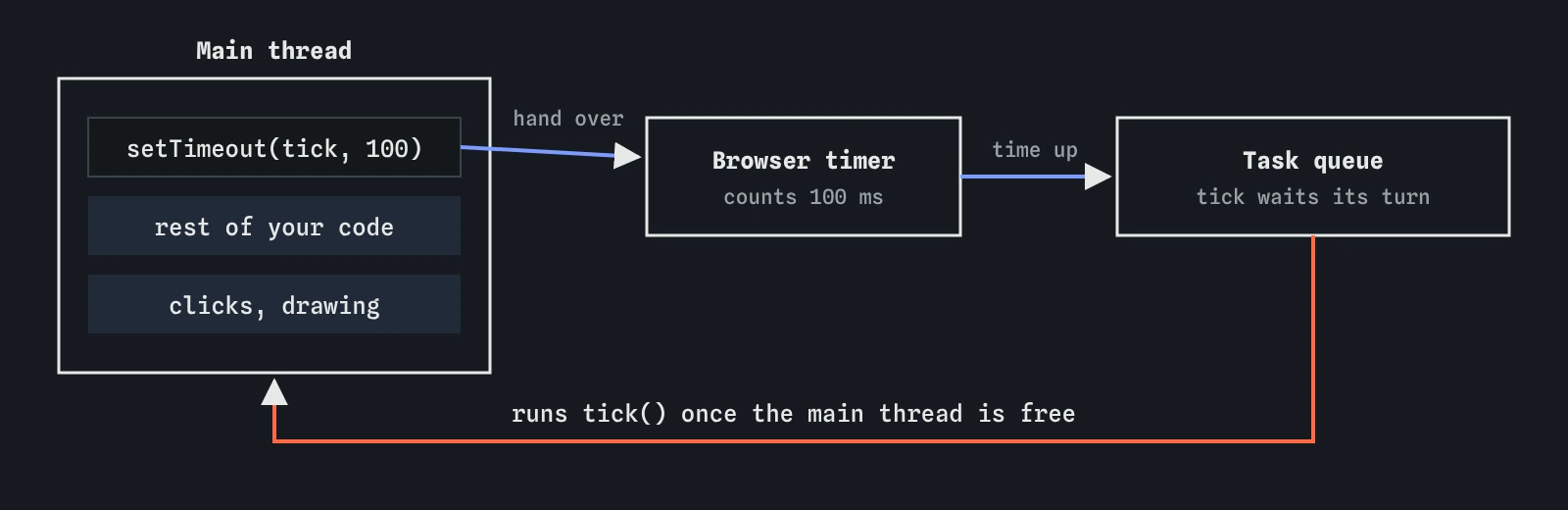
JavaScript in a page runs on one main thread. While your code is running, nothing else can: no clicks, no drawing, no timers. A timer callback waits in a queue until the current work is finished, then the browser picks the next job from the queue. That loop of picking the next job is called the event loop.
setTimeout(fn, 100) therefore means at least 100 milliseconds. If a loop somewhere takes half a second, the callback runs after half a second. Browsers also slow timers in background tabs, often to once per second or less, to save battery. Nested timers that fire very quickly are held to a minimum of about 4 milliseconds.
The practical rule: never use a timer to measure time. For a countdown that must be accurate, record Date.now() when it starts and compute the remaining time on each tick from the clock, so a late tick shows the right number instead of drifting.
const start = Date.now();
setTimeout(() => {
  console.log(`Waited ${Date.now() - start} ms`);
}, 0);
for (let i = 0; i < 2000000; i += 1) {}
console.log("Loop finished first");
How do timers keep a page responsive?
Because the main thread does one thing at a time, a long task freezes the page. Buttons stop responding and typing lags until it is done. Timers leave the speed of your code unchanged. What they give you is a way to split work into pieces. Each piece runs, the browser handles clicks and drawing in between, then the next piece runs.
For most pages you will never need this. The common case is the reverse: code that waits correctly. Timers, clicks and network replies all arrive as queued jobs, so your script never blocks while it waits for them. That is what makes a page feel responsive while it is counting down or waiting for data.
Use the Step lens on the countdown demo. You will see the click listener finish, the page sit idle, and then each tick run as a short separate job.
How do you debounce a search box?
A search that runs on every keystroke can fire ten requests while someone types one word. Debouncing waits until typing pauses. Each input event cancels the previous timer and starts a new one. Only when the visitor stops for, say, 300 milliseconds does the last timer survive and the search run.
The whole pattern is three lines: a shared let timer, clearTimeout(timer) at the start of the listener, and timer = setTimeout(...). Read the input's value inside the delayed function, so you search for what is in the box at that moment.
Pick the delay by feel. Around 200 to 400 milliseconds is common for search. Shorter feels instant and saves little work; longer feels sluggish. When reviewing AI code, check that clearTimeout receives the saved id and that the id lives outside the listener.
const search = document.createElement("input");
let searchTimer;

search.addEventListener("input", () => {
  clearTimeout(searchTimer);
  searchTimer = setTimeout(() => {
    console.log(`Searching for ${search.value}`);
  }, 300);
});
How do you stop intervals from piling up?
Every call to setInterval starts a new, independent interval. If a Start button creates one on each click, three clicks mean three intervals all changing the same number, and the countdown runs three times as fast. Clearing one leaves the others running.
There are two clean fixes. Disable the button while the timer runs and enable it again when you clear the interval. Or keep the id in a shared variable and call clearInterval on the old one before starting a new one. Either way, at most one interval exists at a time.
The same care applies to elements you remove. An interval that updates a card keeps running after the card is gone and keeps the old element in memory. Clear it when you remove the thing it updates.
const button = document.createElement("button");
let tickTimer;

button.addEventListener("click", () => {
  clearInterval(tickTimer);
  tickTimer = setInterval(() => console.log("tick"), 1000);
});
When should you use requestAnimationFrame?
For animation, requestAnimationFrame(fn) is better than an interval. It calls your function right before the browser draws the next frame, usually 60 times a second, and passes a timestamp. The browser pauses it in hidden tabs, which saves battery, and it never runs more often than the screen can show.
It runs once per call, so an animation calls it again at the end of each frame. Use the timestamp to work out how far things should have moved, so the motion stays smooth even when frames are late. cancelAnimationFrame(id) stops it.
Most movement on a page is better done in CSS with transitions and animations. Reach for requestAnimationFrame when JavaScript must compute each frame, such as a progress ring tied to a countdown or a small game.
const startTime = performance.now();

function frame(now) {
  const elapsed = now - startTime;
  if (elapsed < 500) {
    requestAnimationFrame(frame);
  } else {
    console.log("Animation done");
  }
}

requestAnimationFrame(frame);
Field notes
setTimeoutruns a function once after roughly the number of milliseconds you give.- Timers return an id that you pass to
clearTimeoutorclearIntervalto stop them. setIntervalkeeps calling a function until you clear it.- Each
setIntervalcall starts a separate timer, so clear the old one before starting another.
Easy to get wrong
The brackets call the function now and pass its result to the timer. Pass the function itself so the browser can call it later.
Each click starts another interval and they stack up. Save the id in a shared let timer and clear the old one first.
The delay must be a number of milliseconds. A string that is not a number becomes 0, so the code runs at once.
Without the saved id there is nothing to cancel, so every queued timer still fires.
Questions people ask
Does setTimeout with 0 run immediately?
No. It runs after the current code finishes and any already queued work has run. It is a way to say: as soon as you are free.
Do timers keep running in a background tab?
They keep running, but browsers slow them down, often to once a second or less. Base clocks and countdowns on Date.now() so they catch up when the tab comes back.
Can I pause a setTimeout?
There is no pause. Clear it, remember how much time was left, and start a new timeout for the rest when you resume.
Is setInterval or chained setTimeout better?
Both work. Chained timeouts are easier to stop and never overlap when a callback is slow; intervals are shorter to write for simple ticks.
Why does my countdown speed up after a few clicks?
Each click started a new interval. Disable the button while it runs, or clear the previous interval before starting another.