What is an array, and when do you need one?
An array is an ordered list of values held in one variable. Use one whenever you have several things of the same kind: the loaves on a menu, the birds seen today, the jobs on a to-do list. You write it with square brackets and commas between the items.
Arrays can hold any values, including numbers, strings, objects and other arrays. Most real arrays hold one kind of thing, which keeps the code that loops over them simple. A list of prices should hold numbers only, never a mix of 4 and "4".
Declare arrays with const even when you plan to add items. const stops the variable from pointing at a different array; it does not freeze the array's contents. push on a const array works fine.
const breads = ["Rye", "Sourdough", "Brioche"];
const prices = [4, 5, 6];
const empty = [];
breads.push("Spelt"); // allowed with const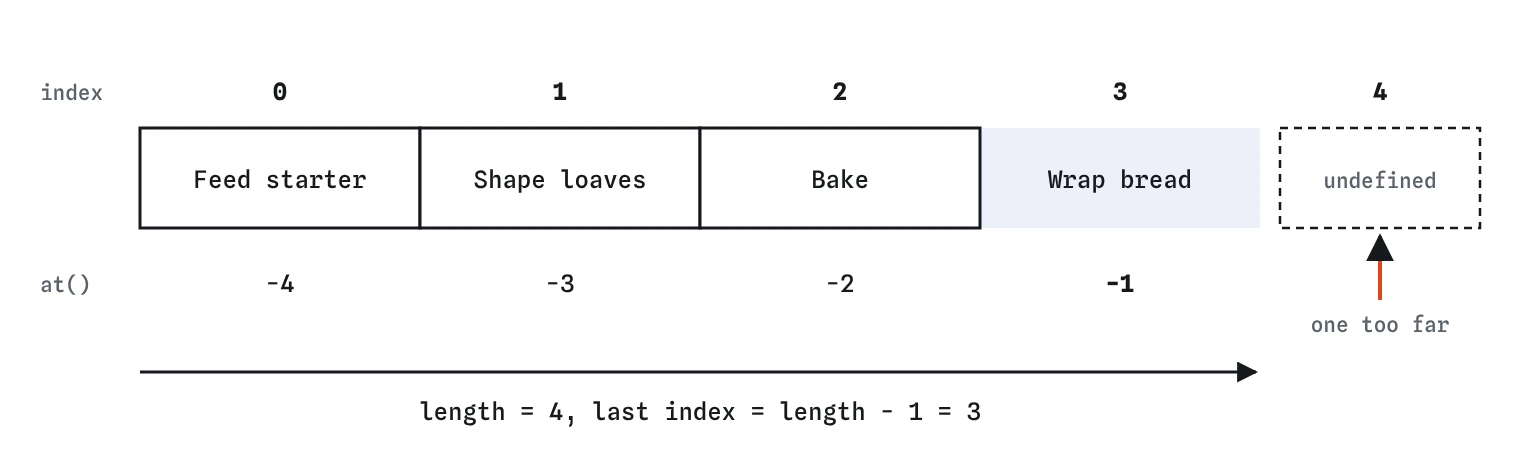
length - 1. at() also accepts negative numbers that count back from the end. Reading index 4 here gives undefined, not an error.Why do indexes start at 0?
Each item has a position number called its index, and the first index is 0. breads[0] is the first bread and breads[2] is the third. Think of the index as how many steps from the start, so the first item is zero steps away.
The length property is the number of items, which is always one more than the last index. That is why the last item is breads[breads.length - 1], and why loops use i < breads.length rather than <=.
Reading a position that does not exist gives undefined and no error. That silence is what makes off-by-one bugs sneaky: the demo shows Last job: undefined and nothing turns red. When you see undefined on a page, check the index first.
How do you read the last item?
The modern way is at(-1). The at method takes an index like square brackets do, and also accepts negative numbers that count from the end: -1 is the last item, -2 the one before. Supported in all current browsers since 2022.
The older way, arr[arr.length - 1], still works and you will see it everywhere. Square brackets do not understand negative numbers: arr[-1] looks for a property literally named "-1" and gives undefined. AI tools sometimes write arr[-1] because other languages allow it, so watch for it.
const jobs = ["Feed starter", "Shape loaves", "Bake"];
console.log(jobs.at(-1));             // "Bake"
console.log(jobs[jobs.length - 1]);   // "Bake"
console.log(jobs[-1]);                // undefined
How do push, pop, shift and unshift change an array?
These four add or remove one item at an end, and all of them change the original array. push(item) adds to the end and pop() removes and returns the last item. unshift(item) adds to the start and shift() removes and returns the first item.
A to-do list that serves jobs in the order they were added can push new jobs and shift the next one off the front. A stack of trays, where the last one in is the first one out, uses push and pop.
Both push and unshift can take several items at once and return the new length, not the array. Writing const list = jobs.push("Bake"); gives you a number, a common slip.
const queue = ["Rye order", "Bun order"];
queue.push("Cake order");
const next = queue.shift();
console.log(next, queue); // "Rye order" ["Bun order", "Cake order"]
How do you find something in an array?
includes(value) answers yes or no: is this value somewhere in the array? It is the clearest choice for questions like whether a bird is already on today's list. indexOf(value) returns the position of the first match, or -1 when there is none.
Both compare with strict equality, so [1, 2].includes("2") is false. They also cannot look inside objects: an array of bread objects never includes a new object that merely looks the same. For those, use find and findIndex, covered in the array methods lesson.
Always compare indexOf results with -1, as in indexOf(x) !== -1. Writing if (list.indexOf(x)) is false when the item sits at index 0, which hides the first item.
const seen = ["robin", "wren"];
if (!seen.includes("kestrel")) {
  seen.push("kestrel");
}
console.log(seen.indexOf("wren")); // 1
What is the difference between slice and splice?
The names are one letter apart and the behaviour is very different. slice(start, end) returns a new array with a copy of part of the original and leaves the original alone. The end index is not included, so slice(0, 3) gives items 0, 1 and 2.
splice(start, deleteCount, ...newItems) changes the original array in place. It removes items, inserts items, or both, and returns the removed items. Use it when you really mean to edit the list, such as deleting the to-do item someone clicked.
A way to remember: slice is like cutting a slice of cake for a plate, and the cake stays put on the counter; splice is surgery on the array itself. New in 2023, toSpliced does the same job as splice but returns a copy, if you want to keep the original.
const breads = ["Rye", "Spelt", "Brioche", "Bun"];
const firstTwo = breads.slice(0, 2); // breads unchanged
breads.splice(1, 1);                  // removes "Spelt" from breads
console.log(firstTwo, breads);
How do you copy and combine arrays with spread?
The spread syntax ... unpacks an array's items into a new pair of square brackets. [...breads] makes a copy, and [...breads, ...cakes] joins two arrays into a new one. Neither original changes.
You need to copy because arrays are shared by reference: const copy = breads; does not copy anything, it gives the same array a second name. Push to copy and breads changes too. The objects lesson shows this with a diagram.
Spread makes a shallow copy. If the array holds objects, the new array holds the same objects, so changing copy[0].price changes it in the original too. For a list of strings or numbers this never causes a problem.
const breads = ["Rye", "Spelt"];
const cakes = ["Lemon", "Carrot"];
const menu = [...breads, ...cakes];
const backup = [...breads];
Can arrays hold objects?
Yes, and most real data looks like this: a list where each item is an object with named fields. A bakery menu is an array of breads, each with a name and a price. You reach a field with an index and a dot: menu[0].price.
The objects lesson covers objects in full, and the array methods lesson shows how to filter, transform and total lists like this one without writing index loops.
const menu = [
  { name: "Rye", price: 4 },
  { name: "Brioche", price: 6 },
];
console.log(menu[1].name); // "Brioche"
Why does sort surprise people, and what is toSorted?
sort() rearranges the original array in place and returns that same array. Without arguments it converts every item to text and sorts alphabetically, so [12, 9, 30, 4].sort() gives [12, 30, 4, 9]. For numbers, pass a compare function: (a, b) => a - b for low to high, (a, b) => b - a for high to low.
Because sort changes the original, sorting a list just to display it can scramble data that other code relies on. toSorted() takes the same compare function and returns a sorted copy instead. It has been supported in all major browsers since 2023, along with toReversed(), a copying version of reverse().
When AI-written code calls .sort() on numbers with no compare function, or sorts a shared array right before displaying it, that is worth fixing. For text in other languages, (a, b) => a.localeCompare(b) sorts accented letters sensibly.
Field notes
- An array is an ordered list of values kept in one variable.
- Indexes start at 0, so the last item sits at length minus one.
at(-1)reads the last item without any index maths.pushadds to the end and changes the original array.
Easy to get wrong
The last index is length - 1. Reading length itself is one past the end and gives undefined.
Without a compare function sort compares text, so 100 lands before 9.
Assigning an array to a new variable does not copy it. Both names point at one array, so the push shows up in both.
indexOf returns 0 for the first item, which is falsy. includes returns a plain true or false.
Questions people ask
Is an array an object?
Yes. typeof [] is "object". Use Array.isArray(value) to check whether something is an array.
Can an array have gaps?
It can, for example if you set arr[10] on a short array. The missing positions read as undefined. Avoid creating gaps; use push to add items.
Which methods change the original array?
push, pop, shift, unshift, splice, sort, reverse and fill change it. slice, concat, toSorted, toReversed, toSpliced, map and filter return new arrays.
How do I empty an array?
If it is declared with let, assign a new empty array. If it is const and other code holds it, set arr.length = 0, which removes every item in place.