What problem do Sets and Maps solve?
Arrays and objects cover most everyday data. Two jobs keep coming up where they feel clumsy, though. The first is keeping a collection where each value appears once: the bird species seen on a walk, the tags on a product, the IDs already shown on screen. The second is looking up a value by a key that is not a tidy word: a count for each customer, a note for each element, a price for each item code typed by a person.
JavaScript has two built-in structures for these jobs. A Set is a collection of unique values. A Map is a collection of key and value pairs, where the key can be any value at all. Both have been in every browser for years, both keep things in the order you added them, and both have short, readable methods. You will see them in code from AI tools quite often, so knowing what they do pays off even before you write your own.
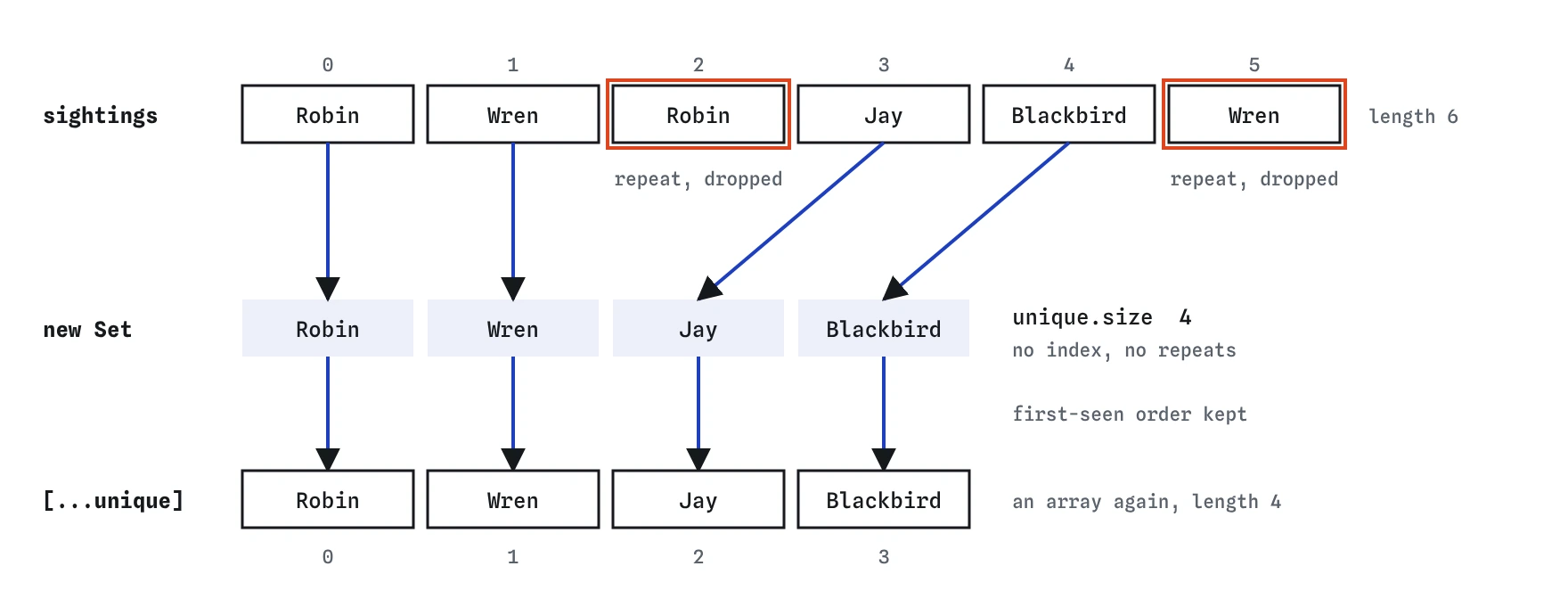
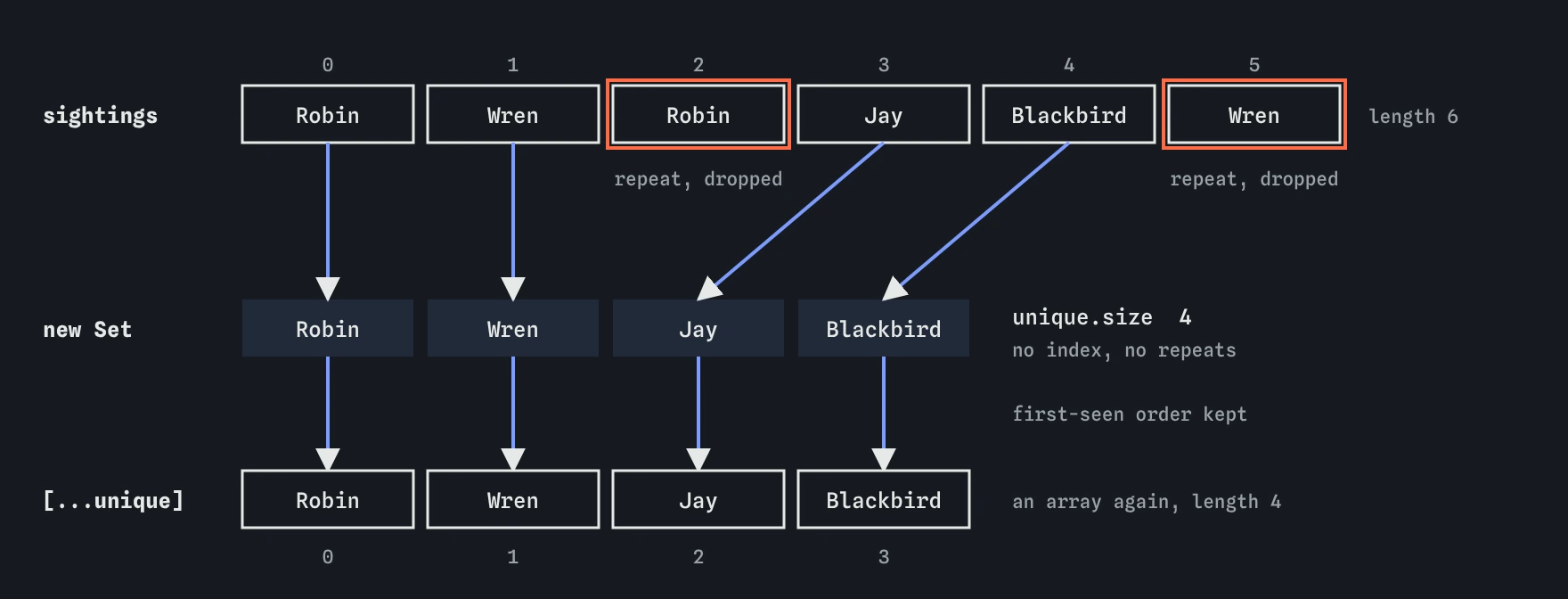
new Set(sightings) keeps the first Robin and the first Wren and drops the later copies. Spreading the Set with [...unique] gives a normal array again, in the order each bird was first seen.How do you make a Set and add to it?
Create an empty Set with new Set(), or pass in an array to start with. Every value from the array goes in, and any repeat is dropped. The Set compares values the same way === does, with one small extra: it treats NaN as equal to itself. So "Robin" and "Robin" count as one, while "Robin" and "robin" count as two, because the capital letter makes them different strings.
Four methods do almost all the work. add(value) puts a value in, and does nothing if it is already there. has(value) returns true or false. delete(value) takes a value out and tells you whether it was there. size is a property, so it has no brackets, and it tells you how many values the Set holds. There is also clear() to empty it. Try the code below in the demo with the Console open and watch each line print.
const seen = new Set(["Robin", "Wren"]);
seen.add("Jay");
seen.add("Robin"); // already there, nothing changes
console.log(seen.size); // 3
console.log(seen.has("Wren")); // true
seen.delete("Wren");
console.log(seen.has("Wren")); // false
How do you turn a Set back into an array?
A Set has no index. You cannot write seen[0], and it has no map, filter or join. When you need those, spread the Set into a new array with [...seen], or use Array.from(seen). Both give a normal array in the order the values were first added. That is why the demo shows Robin, Wren, Jay, Blackbird: each bird keeps the position of its first sighting.
This gives you the shortest way to remove duplicates from an array: [...new Set(list)]. It reads as "make a Set from the list, then spread it back out". It works well for strings and numbers. It does not merge objects that merely look the same, because two separate objects are never === to each other, even with identical contents. For a list of order objects, pick a key such as the order ID and keep a Set of IDs you have already seen.
const orders = ["rye", "sourdough", "rye", "bap"];
const kinds = [...new Set(orders)];
console.log(kinds.join(", ")); // rye, sourdough, bap
What is a Map, and how is it different from an object?
A Map stores pairs. You put a pair in with set(key, value), read it with get(key), check it with has(key), remove it with delete(key), and count pairs with size. That looks a lot like an object, and for many jobs a plain object is fine. The differences show up at the edges.
An object's keys are always strings (or symbols). If you use the number 7 as a key it becomes the string "7". A Map keeps the key exactly as given, so a number stays a number and you can even use an element or another object as a key. A Map has a size; for an object you would count with Object.keys(obj).length. A Map has no built-in properties that could clash with your keys, while every object inherits names such as toString and constructor. And a Map is designed for adding and removing entries often, which is the usual pattern for counters and caches.
- Use an object for a record with fixed, known fields: a bird with
name,colourandwingspan. - Use a Map for a lookup that grows and shrinks while the page runs, especially with keys typed by people or keys that are not strings.
- Use JSON with objects:
JSON.stringifyturns a Map into{}, so convert first withObject.fromEntries(map).
How do you count things with a Map?
Counting is the classic Map job. Loop over your data, read the current count with get, and store one more with set. The ?? 0 covers the first time you meet a key, when get returns undefined. Because set returns the Map itself, you will sometimes see calls chained in a row; that is a style choice, nothing more.
The bakery example below counts loaves from a list of orders. Notice that the keys come straight from the data, so the code does not need to know in advance which breads exist. Add a new kind of loaf to the list and it gets its own entry without any other change.
const sold = ["rye", "bap", "rye", "rye", "bap"];
const counts = new Map();
for (const loaf of sold) {
  counts.set(loaf, (counts.get(loaf) ?? 0) + 1);
}
console.log(counts.get("rye")); // 3
console.log(counts.size); // 2
How do you loop over a Set or a Map?
Use for...of. Looping over a Set gives you each value. Looping over a Map gives you each entry as a two-item array, [key, value], which you can unpack straight into two names in the loop head. Both loops go in insertion order, which makes output predictable.
Do not use for...in here. It walks the property names of an object, and the entries of a Map are not properties, so the loop runs zero times without any error. That silent nothing is one of the bugs in the Break It exercise. Maps also have keys(), values() and entries(), plus a forEach method, if you prefer those. To get an array out of a Map, spread it: [...counts] gives an array of pairs, and [...counts.keys()] gives the keys alone.
const prices = new Map([["bell", 6], ["lights", 18]]);
for (const [item, price] of prices) {
  console.log(`${item} costs £${price}`);
}
Are there newer Set methods?
Yes. Since 2024, current browsers support methods that combine two Sets: union, intersection, difference, symmetricDifference, plus the checks isSubsetOf, isSupersetOf and isDisjointFrom. Each returns a new Set or a boolean and leaves the originals alone. For a bird club, saturday.intersection(sunday) gives the species seen on both walks, and saturday.difference(sunday) gives the ones only seen on Saturday.
They are handy, and they read like the sentence you would say aloud. If your page has to support very old browsers, check first; otherwise they are safe to use in 2026. Older code does the same thing with spreads and filter, such as [...a].filter(x => b.has(x)), so you will meet both styles.
When should you pick an array, object, Set or Map?
Start from the question your code asks most often. If it asks "what is at position 3?" or needs to keep repeats, use an array. If it asks "what is this bird's colour?" for a fixed set of fields, use an object. If it asks "have I seen this before?", use a Set. If it asks "what goes with this key?" for keys that come and go, use a Map.
Do not reach for a Set or Map only because they feel more advanced. An array of five items checked with includes is perfectly fine, and it turns into JSON without any extra step. The gains from has show up when collections get large or when you check membership inside a loop, because a Set answers in roughly the same time however many items it holds. In the demo, open the Step lens and watch unique fill up: the second Robin and the second Wren arrive and nothing changes.
Field notes
- A Set keeps each value only once and drops repeats without any error.
- Turn a Set back into an array with
[...set]to usemaporjoin. - A Map stores key and value pairs with
set,getandhas. - Pick the structure that fits the question your code asks most.
Easy to get wrong
Sets and Maps count with size. There is no length, so the first line prints undefined with no error to warn you.
Brackets read properties of the Map object, and your entries are not properties. Use get and set for Map entries.
Two objects with the same contents are still two different objects, so a Set keeps both. Put a simple key such as the ID into the Set instead.
Questions people ask
Does a Set keep its order?
Yes. Values come out in the order they were first added. Adding a value that is already there does not move it, and deleting then re-adding puts it at the end.
Can I save a Set or Map to localStorage?
Not directly, because JSON.stringify turns both into {}. Convert first: JSON.stringify([...set]) for a Set, or JSON.stringify(Object.fromEntries(map)) for a Map with string keys. Rebuild them with new Set(array) and new Map(Object.entries(obj)) when you read the data back.
Is a Set faster than an array?
For checking whether a value is present, usually yes once the collection grows, because has does not scan every item the way includes does. For a handful of items you will not notice a difference, so choose whichever makes the code easier to read.
What is a WeakMap?
A Map whose keys must be objects and which does not stop those objects from being cleaned up from memory. Libraries use it to attach private data to elements. You rarely need it in beginner code.