Why do the page and the data drift apart?
A shopping list page has two copies of the same information: the array in your script and the rows on the screen. Early code usually updates both by hand. The Add handler pushes into the array and also builds an <li>. The Remove handler deletes a row and hopes it also removes the right array entry. The count at the bottom gets updated in some places and forgotten in others.
Each handler is a chance for the two copies to disagree. In the demo starter, Add builds a row but never touches items, so the count is wrong and clicking the new row throws. These bugs are hard to spot because the page looks right until someone does things in an unusual order.
The fix is a rule about direction: keep one copy that is the truth, and make the other one a drawing of it.
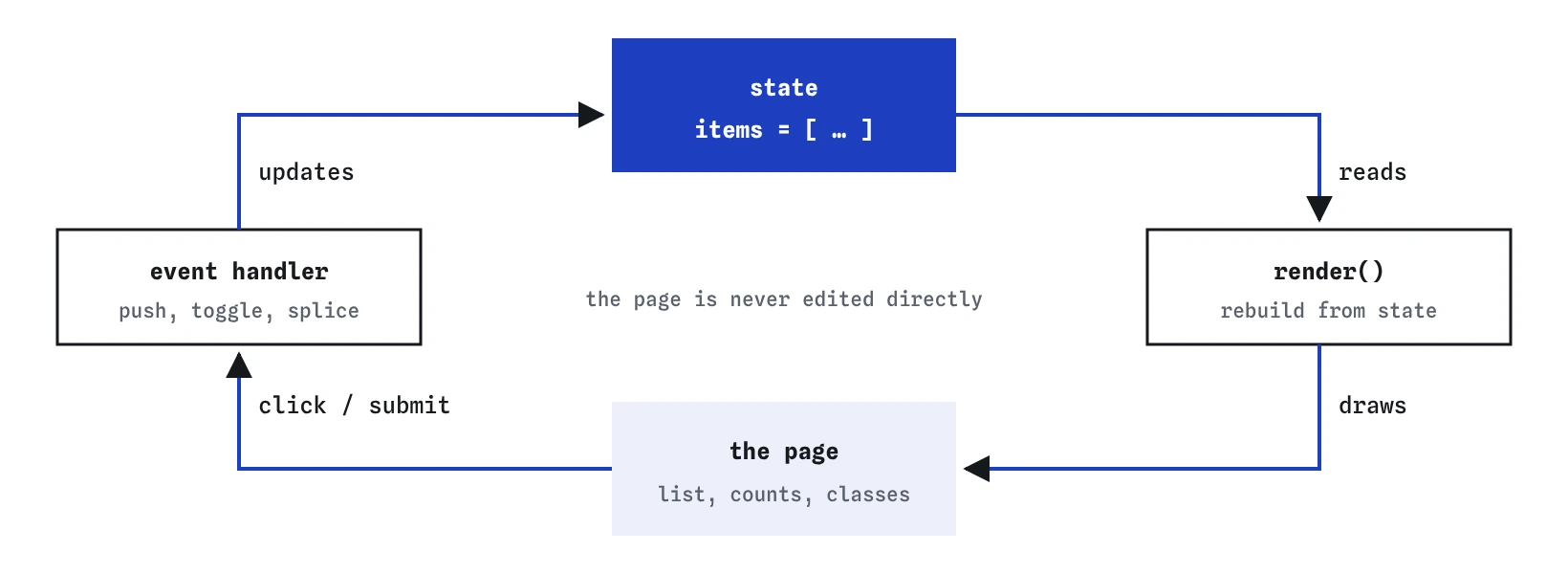
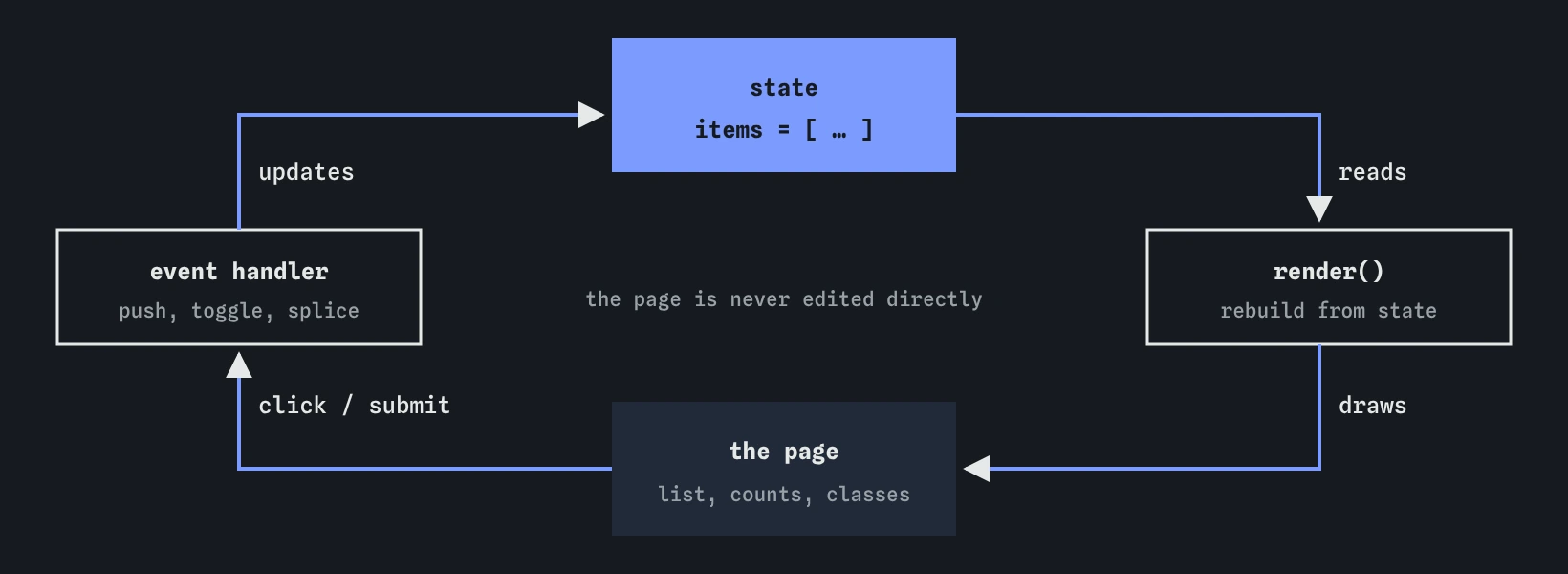
render() reads state and redraws the page, and the page only ever reflects state. Nothing edits the page and the data separately.What is state?
State is the data that describes what the page should show right now. For a shopping list, that is an array of objects, each with a name and a bought flag. It is the single source of truth: if you want to know whether Eggs are bought, you read items, never the page.
Keep state small and plain. Store the facts, such as each item's name and whether it is bought, and work out everything else from them. The number left to buy is items.filter((item) => !item.bought).length. Storing it separately as leftCount creates one more copy that can go stale.
Plain arrays and objects are easy to log, inspect with the Step lens, save with JSON.stringify and load again later. The state for a whole small app often fits on one screen of the Console.
const items = [
  { name: "Flour", bought: false },
  { name: "Eggs", bought: true },
  { name: "Butter", bought: false },
];

const left = items.filter((item) => !item.bought).length;
console.log(left); // 2
What does a render function do?
render() reads state and rebuilds the part of the page that depends on it. It clears the list, creates one row for each item, sets classes from the data and updates the count. It never decides anything about the data; it only draws.
Because it starts from empty every time, the result depends only on the current state. Call it once or ten times and you get the same page. That is what makes it trustworthy: if items is right, the screen is right.
Forgetting to clear first is the classic bug. Without list.replaceChildren(), each call appends a full new set of rows under the old ones, and the list doubles on every click.
function render() {
  list.replaceChildren();
  items.forEach((item, index) => {
    const li = document.createElement("li");
    li.dataset.index = index;
    li.classList.toggle("bought", item.bought);
    li.textContent = item.name;
    list.append(li);
  });
  const left = items.filter((item) => !item.bought).length;
  document.querySelector("#left").textContent = `${left} left to buy`;
}
How should event handlers change the page?
Every handler follows the same two steps: change state, then call render(). The handler never creates rows, removes rows or toggles classes itself. If a handler touches the page directly, the next render will overwrite that change, because render only knows what is in state.
That makes handlers short and easy to check. Adding is a push. Toggling flips one boolean. Removing is a splice. Each one is a single line about data, followed by the same render() call.
In the Break It exercise, the toggle handler adds the bought class to the row and then calls render(), which rebuilds the row from unchanged data and wipes the class out. Watch it in the Changes lens: the outline flashes and the row goes back.
form.addEventListener("submit", (event) => {
  event.preventDefault();
  items.push({ name: input.value, bought: false });
  input.value = "";
  render();
});
How do toggle and remove find the right item?
Each row needs to say which item it came from. render() stores the array index on the row with li.dataset.index = index. A single delegated click listener on the list reads it back with Number(li.dataset.index), as in the event delegation lesson.
With the index, toggling is items[index].bought = !items[index].bought; and removing is items.splice(index, 1);. Both are followed by render(), which renumbers every row, so indexes never point at the wrong item after a removal.
Indexes work well for a list that is fully redrawn each time. When items can be reordered, filtered or saved and reloaded, give each one a stable id instead, for example from crypto.randomUUID(), and find it with items.findIndex((item) => item.id === id).
list.addEventListener("click", (event) => {
  const li = event.target.closest("li");
  if (!li) return;
  const index = Number(li.dataset.index);
  if (event.target.closest(".remove")) {
    items.splice(index, 1);
  } else {
    items[index].bought = !items[index].bought;
  }
  render();
});
Isn't rebuilding everything slow?
For lists of tens or a few hundred rows, rebuilding on each click takes a fraction of a millisecond, far below anything a visitor can notice. Simple, correct code is the better trade at this size.
Rebuilding does have side effects. Focus and text selection inside the list are lost, because the old elements are gone. If a row contains an input the visitor is typing in, rebuilding it on every keystroke will throw away the cursor. Keep text inputs outside the re-rendered area, as the demo does with the form, or move focus back after rendering.
When lists grow to thousands of rows, or rows hold expensive content like images and charts, you update only the rows that changed. That bookkeeping is exactly what frameworks take on for you.
How does saving fit in?
Once all changes flow through state, saving is one more line. Write localStorage.setItem("items", JSON.stringify(items)) inside a save() function and call it right after each change, or at the end of render(). On load, read the saved array with a fallback, then call render() once.
This works because state is plain data. You never need to read rows back off the page to save them; the page was only ever a picture of items.
function update(change) {
  change();
  localStorage.setItem("items", JSON.stringify(items));
  render();
}

update(() => items.push({ name: "Sugar", bought: false }));
Why is this what frameworks automate?
React, Vue, Svelte and similar libraries are built on this same idea: the page is a function of state. You describe what the list looks like for any given items, and you change state with calls like setItems(...). The framework then works out which elements actually changed and updates only those, keeping focus and scroll position where they were.
Learning the pattern by hand first makes framework code much easier to read. When an AI hands you a React component, look for the state (a useState call), the handlers that change it, and the JSX that draws it. A bug where the screen does not update after a change usually means state was edited in place, such as items.push(...) without a new array, so the framework never noticed the change.
How do you debug state bugs?
Log state, then look at the page. If items is right and the page is wrong, the bug is in render() or render was never called. If items is wrong, the bug is in a handler. That split halves the search every time.
Use the Step lens to watch items change as each handler runs, and the Events lens to confirm which listener responded. A useful habit while building is a console.log(structuredClone(items)) at the top of render(), which records a snapshot of the state each time the page is drawn.
When reading AI-generated code, search for places that create, remove or restyle elements outside the render function. Each one is a second copy of the truth and a likely future bug.
Field notes
- State is the data that says what the page should show right now.
- A
render()function rebuilds that part of the page from state. - Handlers change state first and then call
render(). - If state is right and the page is wrong, look in
render().
Easy to get wrong
Changing only the page leaves state unchanged, so the next render puts the old look back and counts stay wrong.
State changed but the page was never redrawn. Every state change needs a render afterwards.
Without clearing first, each render adds a full copy of the list under the old rows.
A stored copy of a derived value drifts as soon as one handler forgets it. Work it out from state inside render.
Questions people ask
Do I need a framework to use this pattern?
No. A state array, a render() function and handlers that change state then render is plain JavaScript. Frameworks add efficient updates and structure for bigger apps.
Should state be const or let?
Use const when you change the array in place with push and splice. Use let if you replace it with a new array, for example items = items.filter(...).
Where do form input values belong?
For a simple form, read the input when it is submitted, as the demo does. Larger apps sometimes keep typed text in state too, which helps with live validation.
Can I have more than one piece of state?
Yes. A filter such as show = "all" and the items array can sit together in one state object. render() reads both to decide what to draw.