How do you make a new element?
document.createElement("li") returns a brand new, empty <li> element. It exists in memory and you can set its text, classes and attributes, but it is not on the page. Nothing changes on screen until you insert it somewhere.
The argument is a bare tag name: "li", "button", "article". Passing "<li>" with angle brackets throws an error, because the brackets are HTML syntax and the method wants only the name.
Once you have the element, treat it like any element you found with querySelector. Set textContent for its text, classList.add for classes, setAttribute or properties like href and type for attributes. Doing all this before inserting is good practice: the browser draws the finished element once, and the Step lens shows each property arriving on a detached element before it reaches the page.
const button = document.createElement("button");
button.type = "button";
button.textContent = "Add to basket";
button.classList.add("buy");
console.log(button.isConnected); // false: not on the page yet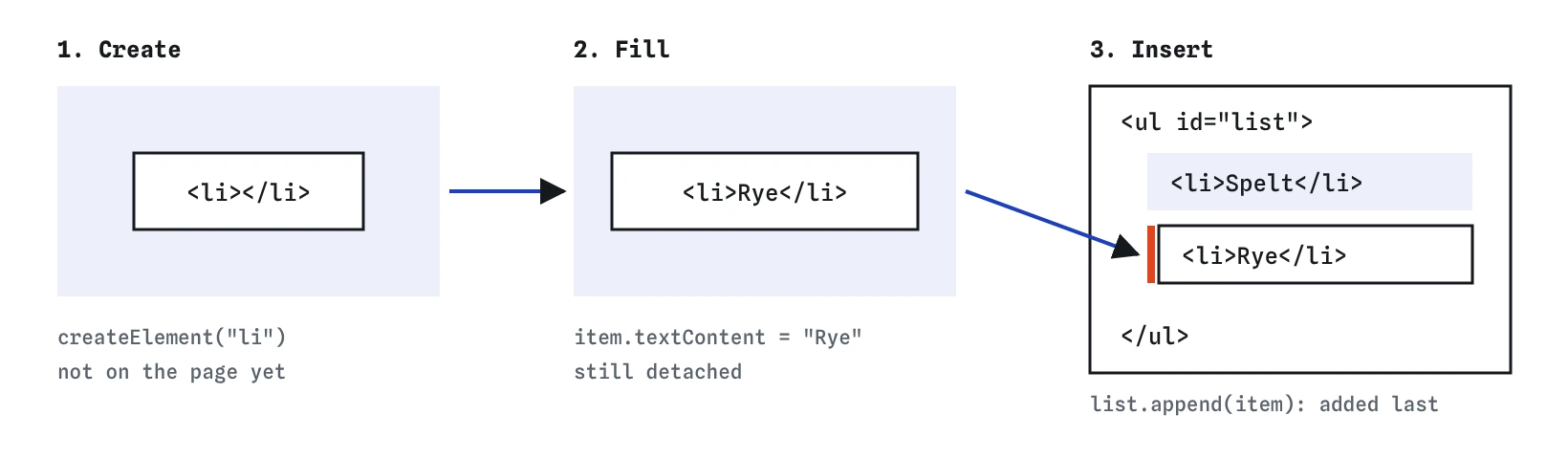
Where can you insert it?
Four methods put a node next to or inside an existing element. They take any number of arguments, and each argument can be an element or a plain string, which becomes a text node.
These methods are fairly new compared with the old appendChild and insertBefore, and have worked in every browser since 2018. Prefer them; they read more clearly and accept several nodes at once. You will still see appendChild in older tutorials and AI output, and it does the same job for a single node.
If the node you insert is already on the page, it moves. An element can only be in one place, so inserting it somewhere new takes it out of its old position. To get a second copy you need cloneNode, covered below.
const list = document.querySelector("#list");
const first = document.createElement("li");
first.textContent = "Bagels (new)";
list.prepend(first);

const note = document.createElement("p");
note.textContent = "Baked at 6am.";
list.after(note);parent.append(node)adds it as the last child.parent.prepend(node)adds it as the first child.el.before(node)puts it just beforeel, as a sibling.el.after(node)puts it just afterel, as a sibling.
How do you build a list from an array?
Most generated content comes from data: an array of breads, a list of bird sightings, the results of a search. The pattern is the same each time. Loop over the array, create an element for each item, fill it, and append it.
The const item = document.createElement("li") line belongs inside the loop. If you create one element above the loop and append it three times, you end up with a single item that moved twice, because appending an element that is already in the list moves it.
Build each item with textContent, never by gluing data into an HTML string. Bread names are harmless, but the same code later shows customer notes or search terms, and innerHTML with outside text can run injected markup. The demo task uses exactly this loop; run it with the Step lens to watch each <li> get created, filled and attached.
const birds = [
  { name: "Wren", count: 3 },
  { name: "Jay", count: 1 }
];
const list = document.querySelector("#sightings");

for (const bird of birds) {
  const item = document.createElement("li");
  item.textContent = `${bird.name}: ${bird.count}`;
  list.append(item);
}
Why build everything first and append once?
Every time you insert into the live page, the browser may need to recalculate layout. For three items it makes no difference. For a few hundred rows in a table, appending one at a time can cause visible stutter.
There are two easy ways to batch the work. The first is to collect the new elements in an array and pass them all to one append call with spread syntax: list.append(...items). The second is a DocumentFragment, a lightweight container that is never shown. You append items to the fragment, then append the fragment to the page; its children move into place in one step and the empty fragment is left behind.
Both approaches give the same result. The array version is usually clearer in modern code, and map makes it short.
const breads = ["Rye", "Spelt", "Sourdough"];
const items = breads.map((bread) => {
  const item = document.createElement("li");
  item.textContent = bread;
  return item;
});
document.querySelector("#list").append(...items);
How do you reuse markup with a template?
Building a card with a heading, a price, an image and a button takes a dozen lines of createElement. When the structure is larger than one element, write it once in HTML inside a <template> element and copy it from JavaScript.
The browser parses a template's contents but never displays them, never loads its images and never runs its scripts. In JavaScript, template.content holds the parsed markup as a fragment. Call template.content.cloneNode(true) to get a fresh copy, fill in the parts with querySelector and textContent, and append the copy.
The true matters. cloneNode(true) is a deep clone that copies all the children. cloneNode() with no argument copies only the outer node, so the copy is empty and every querySelector on it returns null. Event listeners are not copied by cloneNode, so add them after cloning or use event delegation, which a later lesson covers.
<!-- index.html -->
<template id="loaf-card">
  <article class="loaf">
    <h2 class="name"></h2>
    <p class="price"></p>
  </article>
</template>

// script.js
const template = document.querySelector("#loaf-card");
const copy = template.content.cloneNode(true);
copy.querySelector(".name").textContent = "Rye";
copy.querySelector(".price").textContent = "4.50";
document.querySelector("main").append(copy);
How do you remove elements and rebuild a list?
el.remove() takes an element out of the page. The element still exists in memory if a variable points to it, so you can insert it again later, but it is gone from what the visitor sees. Remember the parentheses: el.remove without them refers to the method and does nothing.
When the data changes, the simplest reliable approach is often to throw away the old list and build it again from the array. list.replaceChildren() with no arguments removes every child. With arguments, it removes the old children and inserts the new ones in one step, which makes it a neat partner for map.
Older code clears a list with list.innerHTML = "". That works too, but replaceChildren says what it does and keeps all your DOM work in one style. If you forget to clear before rebuilding, every render adds a second copy of everything, one of the most common bugs in hand-made lists.
function render(breads) {
  const items = breads.map((bread) => {
    const item = document.createElement("li");
    item.textContent = bread;
    return item;
  });
  list.replaceChildren(...items);
}

render(["Rye", "Spelt"]);
render(["Rye", "Spelt", "Seeded"]); // three items, no duplicates
What should you check in AI-written DOM code?
AI tools often produce long template literals assigned to innerHTML, with data dropped straight into the string. For fixed markup that is fine. For anything that includes user input, names from a server or text from a URL, switch to a <template> or createElement plus textContent.
Also look for render functions that never clear the container, createElement calls placed outside the loop, cloneNode() without true, and lists where <div> elements are appended straight into a <ul>. Each of these produces a page that looks almost right in a quick test and breaks later.
To check your own work, use the Changes lens: new elements are outlined as they are added, so duplicates or missing items stand out. In the Console, list.children.length tells you how many elements are inside, and list.childNodes.length also counts stray text nodes.
Field notes
createElementmakes a new element that is not on the page yet.- Set its text with
textContent, then insert it with a method likeappend. - To build a list, loop over the array and append one element per item.
remove()takes an element off the page, and you can rebuild a list from data.
Easy to get wrong
One element can only be in one place. Appending the same element again moves it, so the list ends with a single item showing the last bread.
Text from visitors can contain HTML, and innerHTML would run it. Re-assigning innerHTML also rebuilds every existing item and drops their listeners.
Without true the clone is shallow and has no children, so every querySelector on it returns null.
Mentioning a method does not call it. The parentheses run it.
Questions people ask
What is the difference between append and appendChild?
appendChild takes exactly one node and returns it. append takes any number of nodes or strings and returns nothing. Use append in new code.
Can I create an element with its text in one step?
Not with createElement alone. A small helper function that creates, sets textContent and returns the element keeps loops short.
Do removed elements keep their event listeners?
Yes, as long as you still hold the element in a variable. If you insert it again, its listeners work again. Once nothing refers to it, the browser frees the memory.
When should I use a template element instead of createElement?
Use a template when each item has more than two or three elements inside it. The structure stays readable as HTML, and the script only fills in the changing parts.
Is innerHTML ever fine?
For markup you wrote yourself with no outside data in it, yes. The risk comes from inserting text you did not write.