What is the DOM?
When the browser reads your HTML, it builds a tree of objects in memory, one object for every element and every piece of text. That tree is the Document Object Model, or DOM. The page you see is drawn from the tree, and JavaScript can read and change it. Change an object in the tree and the browser redraws that part of the page.
The HTML file itself never changes. If your script adds a list item, the file on the server still has three items; the tree in this tab has four. Reload and the tree is rebuilt from the file. This is why DevTools' Elements panel can show things that are not in View Source: Elements shows the live tree, View Source shows the original text.
Every element object has properties you can read, such as textContent, id and className, and methods you can call. The starting point is the document object, which stands for the whole page. Every lookup below begins with document. and a method name.
console.log(document.title);
console.log(document.body.children.length);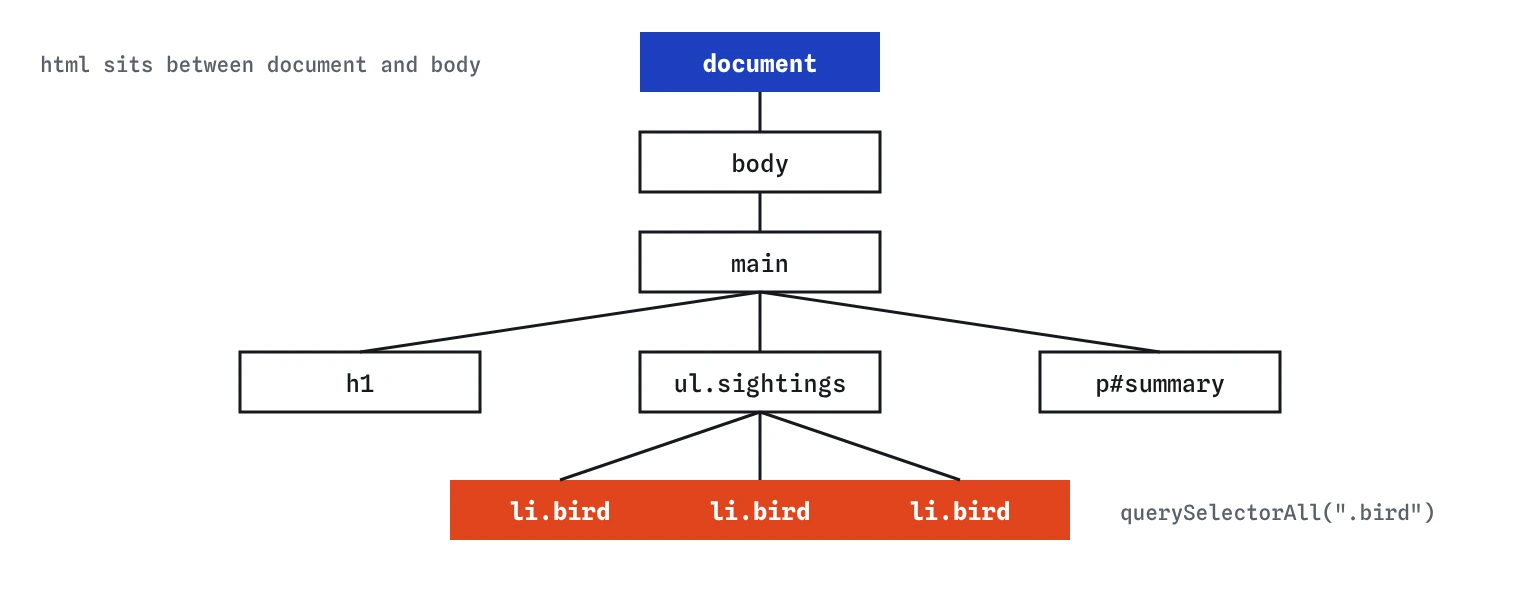
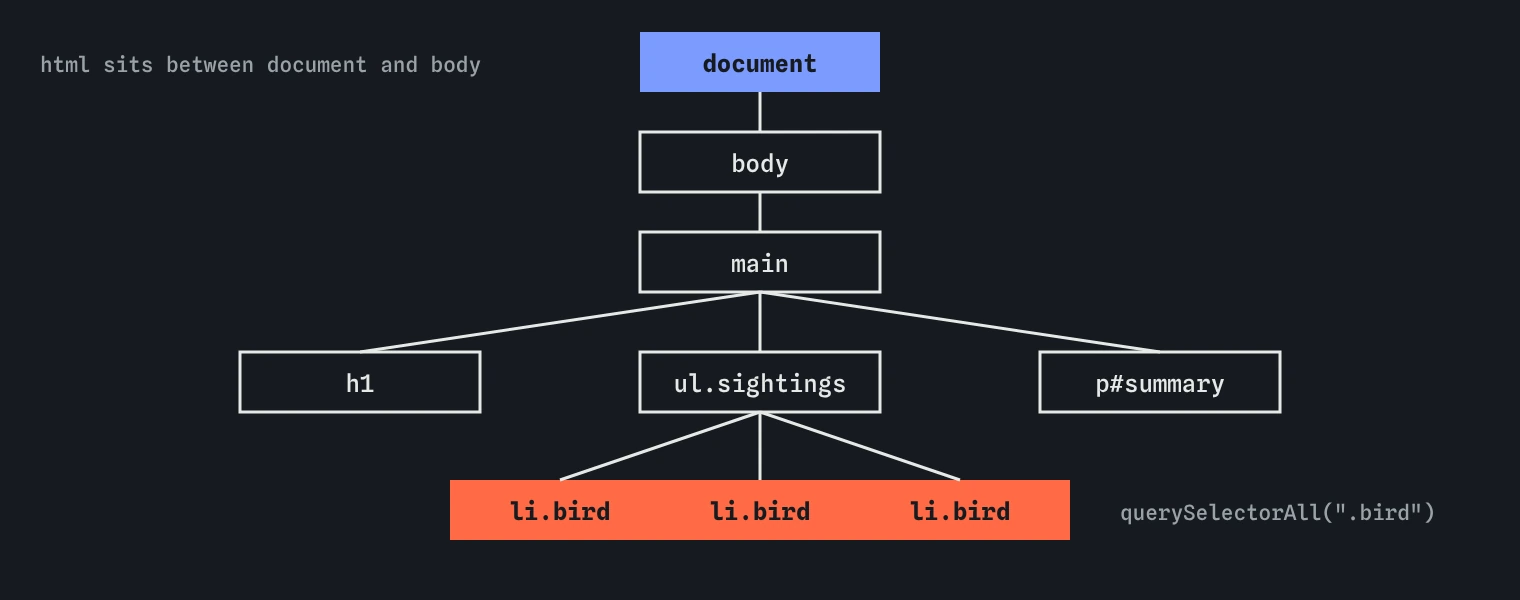
querySelectorAll(".bird") walks the tree and returns the three highlighted list items in page order.How does querySelector find one element?
document.querySelector(selector) takes any CSS selector as a string and returns the first element that matches, reading the page from top to bottom. Everything you know from CSS works: "#summary" for an id, ".bird" for a class, "h1" for a tag, ".sightings li" for a descendant, "input[type='email']" for an attribute.
The result is the element object itself, so you can store it in a const and use it later. Finding an element is fast, but storing it reads better than repeating the selector, and it gives the element a name that says what it is for.
If you need a particular match, make the selector more specific instead of picking from a list: ".bird.rare" or "li:nth-child(2)". Keep selectors short. A long chain like "main > ul > li:first-child > span" breaks the moment someone wraps the list in a <div>. Classes and ids written for the script are steadier.
const heading = document.querySelector("h1");
const firstBird = document.querySelector(".sightings .bird");
const rare = document.querySelector(".bird.rare");
console.log(heading.textContent, firstBird.textContent, rare.textContent);
How do you find every match?
document.querySelectorAll(selector) returns every matching element in page order, as a NodeList. A NodeList is like an array: it has length, you can read items with [0], and it has forEach. It does not have map or filter. When you need those, convert with Array.from(list) or spread it: [...list].
The list is a snapshot. If your code adds another .bird item afterwards, the NodeList you already have does not grow. Run querySelectorAll again when you need the current set.
When nothing matches, you get an empty NodeList with length 0, never null. That makes loops safe: looping over zero items does nothing. Use the Step lens on a forEach and watch the bird variable take each element in turn.
const birds = document.querySelectorAll(".bird");
birds.forEach((bird) => {
  console.log(bird.textContent);
});
const names = [...birds].map((bird) => bird.textContent);
console.log(names.join(", "));
When should you use getElementById?
document.getElementById("summary") finds the element with that id. Notice there is no #: it takes the id itself, not a selector. Passing "#summary" is a common mistake, and it returns null because no id contains a hash sign.
It is slightly faster than querySelector("#summary"), though the difference only shows in loops that run thousands of times. Many codebases use querySelector everywhere so there is one way to do it. Both are fine; be consistent in a file.
You will also meet older methods in AI-written and older code: getElementsByClassName and getElementsByTagName. They return live HTMLCollections that update as the page changes and have no forEach. Prefer querySelectorAll in new code.
const summary = document.getElementById("summary");
summary.textContent = "Updated by id";
How do you search inside one element?
querySelector and querySelectorAll exist on every element too, and on an element they search only inside it. list.querySelectorAll("li") finds the items in that list and ignores any other list on the page. This keeps code working when a page has several similar sections, such as a card per bird walk.
element.closest(selector) goes the other way. It checks the element itself, then its parent, then the parent's parent, up to the top, and returns the first one that matches, or null. It is the usual way to get from a clicked button to the card it sits in. You will use it a lot in the events lesson.
Other ways to move around the tree exist: parentElement, children, nextElementSibling. They depend on the exact HTML structure, so prefer closest and scoped querySelector calls, which keep working if a wrapper element is added.
const list = document.querySelector(".sightings");
const firstItem = list.querySelector("li");
const container = firstItem.closest("main");
console.log(firstItem.textContent, container.className);
What happens when nothing matches?
querySelector and getElementById return null when nothing matches. The finding line does not fail. The error comes later, on the line that uses the result: Cannot read properties of null (reading 'textContent'). Beginners look at the line in the error and find nothing wrong, because the real mistake is in the selector a few lines up.
When you see that message, log the variable right after the query. If it shows null, compare the selector with the HTML: a missing dot or hash, a typo, a class added by a different spelling, or an element that lives in another page.
If an element is optional, say so in code. const banner = document.querySelector(".banner"); if (banner) { ... } reads clearly. Optional chaining, banner?.remove(), is shorter for a single call. Do not sprinkle ?. on every query, though; if an element must exist, an error is better than a page that fails silently.
const banner = document.querySelector(".banner");
console.log(banner); // null: there is no .banner on this page
if (banner) {
  banner.textContent = "Walk cancelled";
}
Why does the script need to run after the HTML?
The browser reads HTML from top to bottom. When it meets a <script> tag, it stops and runs the script before reading further. A script in the <head> runs before the body exists, so every query returns null.
The modern fix is the defer attribute: <script src="script.js" defer></script> in the head. The file downloads alongside the HTML and runs after the whole document has been read. Scripts loaded with type="module" are deferred automatically. The older fix, putting the script tag just before </body>, also works.
This editor runs script.js after the HTML, so your queries always find the elements. On a real site, if every query returns null, check where the script tag sits before checking the selectors.
<head>
  <script src="script.js" defer></script>
</head>
How do you check what a selector finds?
Open DevTools on any page and type a query into the Console: document.querySelectorAll(".bird"). The result lists every element, and hovering an item highlights it on the page. Chrome also offers $("sel") and $$("sel") as console shortcuts; they only work in DevTools, so do not copy them into scripts.
In the Elements panel, Ctrl+F (Cmd+F on a Mac) accepts a CSS selector and counts matches. It is a quick way to test a selector before you use it in code.
When reading AI-written DOM code, check that each selector exists in the HTML, that ids do not carry a # inside getElementById, that a single querySelector is not used where every match was needed, and that the script tag uses defer or sits at the end of the body.
Field notes
- The DOM is the tree of objects the browser builds from your HTML.
querySelectorreturns the first element that matches a CSS selector.querySelectorAllreturns every match as a list with alength.- When nothing matches, you get
null, and the error appears where you use it.
Easy to get wrong
querySelector returns a single element, which has no forEach or length. Use querySelectorAll for every match.
getElementById takes the bare id. The # belongs to selectors only, and with it the method returns null.
A NodeList has forEach and no map. Spread it into an array first.
Without defer, the script runs before the body exists and every query returns null.
Questions people ask
Is the DOM the same as the HTML?
The DOM starts as a copy of the HTML, turned into objects. Scripts and the browser can change it afterwards, so it can differ from the file. DevTools' Elements panel shows the DOM.
Should I use querySelector or getElementById?
Either works for ids. querySelector handles any selector, so many people use it everywhere for consistency.
Why does querySelectorAll not update when I add elements?
It returns a static snapshot. Query again after changing the page to get the new set.
Can I use pseudo-classes like :checked in a query?
Yes. document.querySelectorAll("input:checked") returns every ticked box. Pseudo-elements like ::before cannot be selected, because they are not in the DOM.
Why is my element null even though it is in the HTML?
Either the selector does not match exactly, or the script ran before the element was parsed. Log the query result and check where the script tag is.