Why is 0.1 + 0.2 not exactly 0.3?
JavaScript stores every ordinary number in the same format: 64-bit binary floating point. Whole numbers up to about 9 quadrillion are stored exactly. Many decimals are not, because binary cannot write 0.1 exactly, the same way decimal cannot write one third exactly. The stored value is a tiny bit off, and adding two such values can make the error show.
That is why 0.1 + 0.2 gives 0.30000000000000004. Python, Java and C# do the same thing with their default number type. It is a property of the format, and it only shows up in two places: when you show the number to people, and when you compare decimals with ===.
For display, format the number (covered below). For comparisons, check that the difference is tiny, or work in whole units. Shops often store prices in cents: 1999 instead of 19.99. Adding whole numbers is exact, and you divide by 100 only when showing the result.
console.log(0.1 + 0.2);            // 0.30000000000000004
console.log(0.1 + 0.2 === 0.3);    // false

const cents = 1999 + 450;
console.log(cents / 100);          // 24.49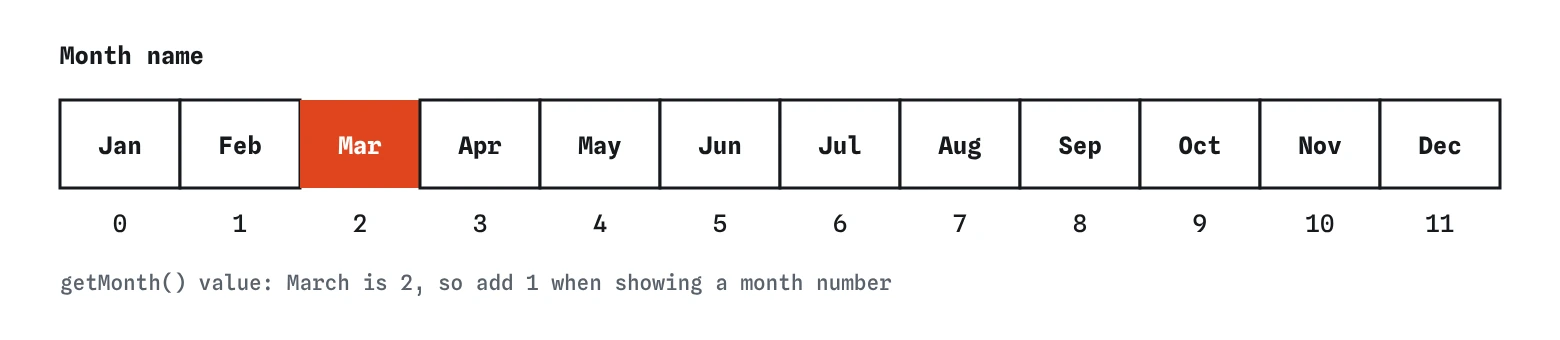
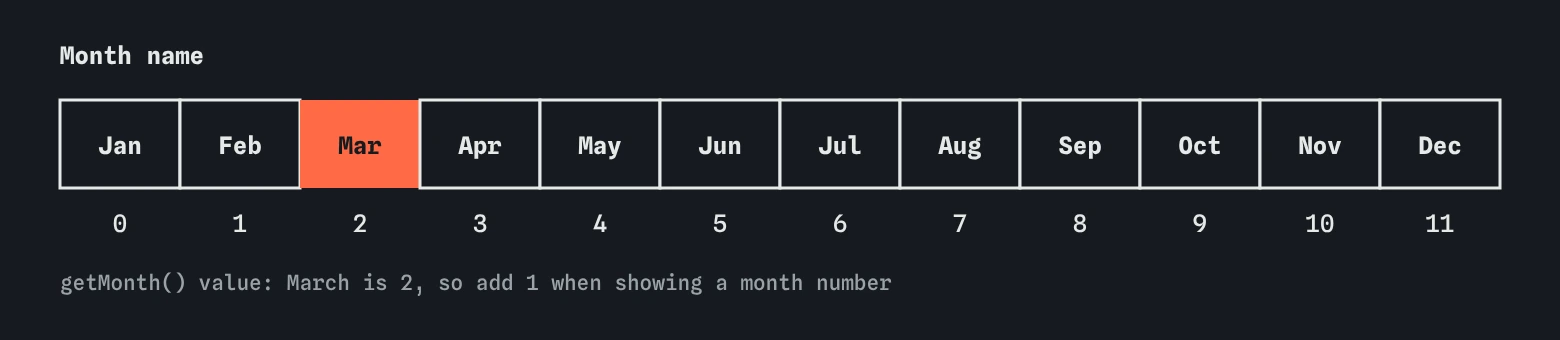
Date numbers months from 0. March 14 gives getMonth() of 2 while getDate() gives 14, because days count from 1.How do you round numbers?
The Math object holds number helpers. Math.round(x) goes to the nearest whole number, with .5 going up. Math.floor(x) always goes down and Math.ceil(x) always goes up. Use ceil for questions like how many boxes do 25 croissants need at 6 per box: Math.ceil(25 / 6) is 5, because a partial box is still a box.
Math.min and Math.max take any number of arguments and return the smallest or largest. With an array, spread it in: Math.max(...prices). A neat use is clamping a value into a range: Math.min(Math.max(qty, 1), 10) keeps a quantity between 1 and 10.
num.toFixed(2) rounds for display and returns a string with exactly two decimals. Because it returns text, do your arithmetic first and call toFixed last. Adding two toFixed results joins them as strings.
console.log(Math.round(4.5));      // 5
console.log(Math.floor(4.9));      // 4
console.log(Math.ceil(25 / 6));    // 5
console.log(Math.max(...[3, 9, 4])); // 9
console.log((2.345).toFixed(1));   // "2.3"
How do you get a random number?
Math.random() returns a decimal from 0 up to, but never including, 1. To pick a whole number from a range, scale it and round down: Math.floor(Math.random() * 6) + 1 gives a dice roll from 1 to 6.
To pick a random item from an array, use the array length as the scale: list[Math.floor(Math.random() * list.length)]. Floor matters here. Using Math.round makes the first and last items half as likely and can produce an index one past the end.
Math.random is fine for games and shuffled quiz questions. It is predictable enough that it must never be used for passwords, tokens or anything security related. For those, browsers provide crypto.getRandomValues and crypto.randomUUID().
const birds = ["Wren", "Robin", "Jay"];
const pick = birds[Math.floor(Math.random() * birds.length)];
console.log(`Bird of the day: ${pick}`);
How do you turn text into a number?
Values from form fields, URLs and localStorage arrive as strings. "3" + 1 is "31", so convert before doing maths. There are three common tools, and they differ in how forgiving they are.
Whichever you use, test the result with Number.isNaN(value). NaN means not a number, and it has an odd property: it is not equal to anything, including itself, so value === NaN is always false. The older global isNaN converts its argument first, so isNaN("hello") is true for a string, which is rarely what you meant.
const typed = "12 eggs";
console.log(Number(typed));           // NaN
console.log(parseInt(typed, 10));     // 12
console.log(Number.isNaN(Number(typed))); // trueNumber(text)needs the whole string to be a number.Number("3.5")is 3.5,Number("3 kg")isNaN. It turns an empty string into 0, which can hide a blank field.parseInt(text, 10)reads digits from the start and stops at the first non-digit.parseInt("3 kg", 10)is 3. Always pass 10 as the second argument so the base is clear.parseFloat(text)does the same but keeps the decimal part:parseFloat("2.75 m")is 2.75.- A form field of type number still gives a string through
.value; use.valueAsNumberor one of the functions above.
How do you format prices and big numbers?
Intl.NumberFormat formats numbers the way people in a given place expect. Create a formatter once with a locale and options, then call .format(number) as often as you like. With style: "currency" and a currency code it rounds to the right number of decimals and adds the symbol.
The locale changes separators and symbol placement. en-US writes 1,234.50, while de-DE writes 1.234,50. If you leave the locale out, the browser uses the visitor's settings. That is right for a real page, and it is why the checks here always pass "en-US": the result must be identical on every computer.
Without the currency style, the formatter still adds thousands separators, which is the clean way to show big counts like 12,480 birds. num.toLocaleString("en-US") is a shortcut that does the same thing for a single use.
const usd = new Intl.NumberFormat("en-US", { style: "currency", currency: "USD" });
console.log(usd.format(1234.5));   // $1,234.50

const count = new Intl.NumberFormat("en-US");
console.log(count.format(12480)); // 12,480
How does the Date object work?
new Date() with no arguments holds the current moment. new Date("2026-03-14T12:00:00Z") holds a fixed moment; the Z means UTC. Inside, a Date is one number: milliseconds since the start of 1970 in UTC. Everything else, the year, the hour, the weekday, is worked out from that number and a time zone.
Methods like getFullYear(), getMonth(), getDate() and getHours() use the visitor's local time zone. Their getUTC versions use UTC. The same moment can be a different calendar day in Tokyo and in Chicago, so if your result must be fixed, use the UTC methods or say which time zone you mean.
Months start at 0. January is 0 and December is 11, while days of the month start at 1. This catches everyone at least once. Avoid getYear(), an old method that returns the year minus 1900.
const walk = new Date("2026-03-14T12:00:00Z");
console.log(walk.getUTCFullYear()); // 2026
console.log(walk.getUTCMonth());    // 2 (March)
console.log(walk.getUTCDate());     // 14
How do you show a date to people?
Intl.DateTimeFormat formats dates as Intl.NumberFormat formats numbers. Pick a locale and options such as dateStyle: "long", or name the parts you want: weekday, month, day. Add timeZone to choose the zone the date is shown in.
date.toLocaleDateString(locale, options) takes the same options for one-off use. Passing a locale and a time zone makes the output stable; leaving them out gives the visitor's own format, which is usually what a real page wants.
Avoid building dates by hand from getMonth() + 1 and slashes. People in different countries read 03/04 differently, and the formatter already knows each convention.
const walk = new Date("2026-03-14T12:00:00Z");
const fmt = new Intl.DateTimeFormat("en-US", { dateStyle: "long", timeZone: "UTC" });
console.log(fmt.format(walk)); // March 14, 2026

console.log(walk.toLocaleDateString("en-US", { weekday: "long", timeZone: "UTC" })); // Saturday
What is Temporal?
Temporal is a new built-in date and time API designed to replace the awkward parts of Date. It has separate types for a calendar date with no time (Temporal.PlainDate), a wall-clock time, and an exact moment in a named time zone. Months start at 1, values cannot be changed after creation, and date maths such as adding a month is built in.
Browser support is still arriving in 2026. Firefox shipped it first, and other browsers are adding it, so check before relying on it in a public page, or use the official polyfill. Date with Intl remains the safe choice everywhere today.
When AI tools write date code, look for months off by one, local getters where UTC was needed, and string parsing of formats like "03/14/2026", which browsers do not all read the same way. ISO strings like "2026-03-14T12:00:00Z" are the reliable input format.
if (typeof Temporal !== "undefined") {
  const day = Temporal.PlainDate.from("2026-03-14");
  console.log(day.add({ months: 1 }).toString()); // 2026-04-14
} else {
  console.log("Temporal is not available in this browser yet.");
}
Field notes
- Many decimals are stored inexactly, so small rounding errors can appear.
- Form values arrive as text, so convert them before doing any maths.
Intl.NumberFormatformats numbers as currency for a chosen locale.Intl.DateTimeFormatshows dates in a style that suits the reader.
Easy to get wrong
toFixed returns a string, so adding two of them joins the text. Do the maths with numbers and format once at the end.
NaN is not equal to anything, itself included, so the comparison is always false. Number.isNaN is the reliable test.
Months count from 0, so March shows as 2. Add 1 for people, or format with Intl.DateTimeFormat.
Rounding can produce list.length, one past the last index, and makes the ends less likely. Math.floor gives every index the same chance.
Questions people ask
Should I store money as decimals?
For totals that must be exact, store whole cents and divide only when showing the value. For simple display of a few prices, decimals with formatting are fine.
Why does my date show a day earlier than I expected?
A date-only string like "2026-03-14" is read as midnight UTC. Shown in a time zone behind UTC, that moment is still the 13th. Use UTC getters, a timeZone option, or a time of noon.
What is the biggest number JavaScript can store exactly?
Number.MAX_SAFE_INTEGER, which is 9,007,199,254,740,991. Above it, whole numbers lose precision. Use BigInt (write 10n) for larger whole numbers.
Is Intl available everywhere?
Yes. Intl.NumberFormat and Intl.DateTimeFormat work in every current browser and in Node.js.
Can I subtract two dates?
Yes. Subtracting gives the difference in milliseconds. Divide by 1000 * 60 * 60 * 24 for days, and be careful around daylight saving changes in local time.