Why is innerHTML with user input dangerous?
innerHTML takes a string and reads it as HTML. That is handy for markup you wrote yourself. The trouble starts when part of the string came from someone else: a comment box, a name field, a URL, data from an API, or text stored by another visitor. Whatever tags they typed become real elements on your page.
Try it in the demo. Post the comment <b>hi</b> and it shows in bold. Bold text is harmless, but the same door lets in an image tag with an onerror attribute, which runs JavaScript as soon as the image fails to load. Browsers do not run a plain <script> tag inserted through innerHTML, yet attackers do not need one. Event handler attributes, javascript: links and a few other tricks all work. If that comment is saved and shown to every visitor, the attacker's code runs in their browsers too.
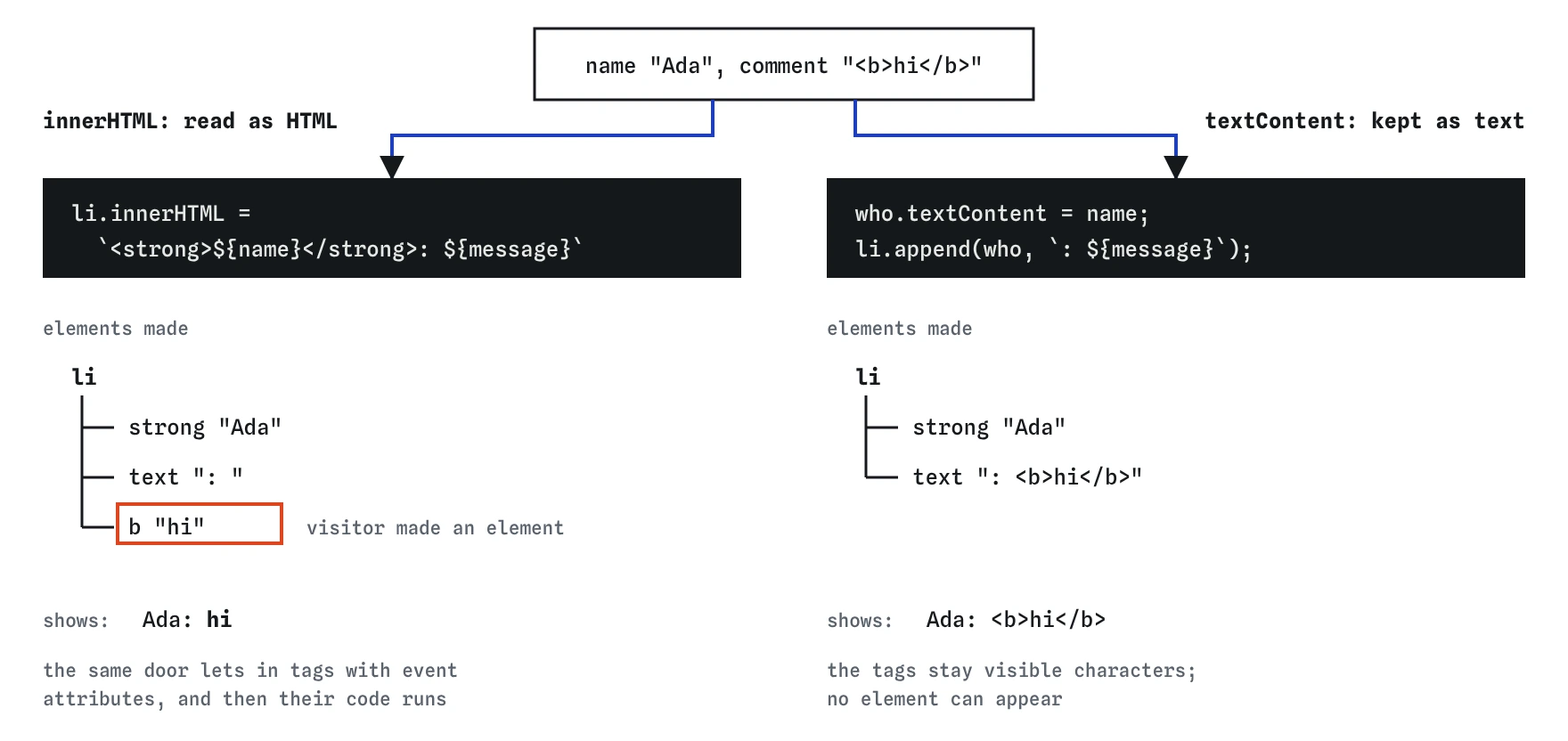
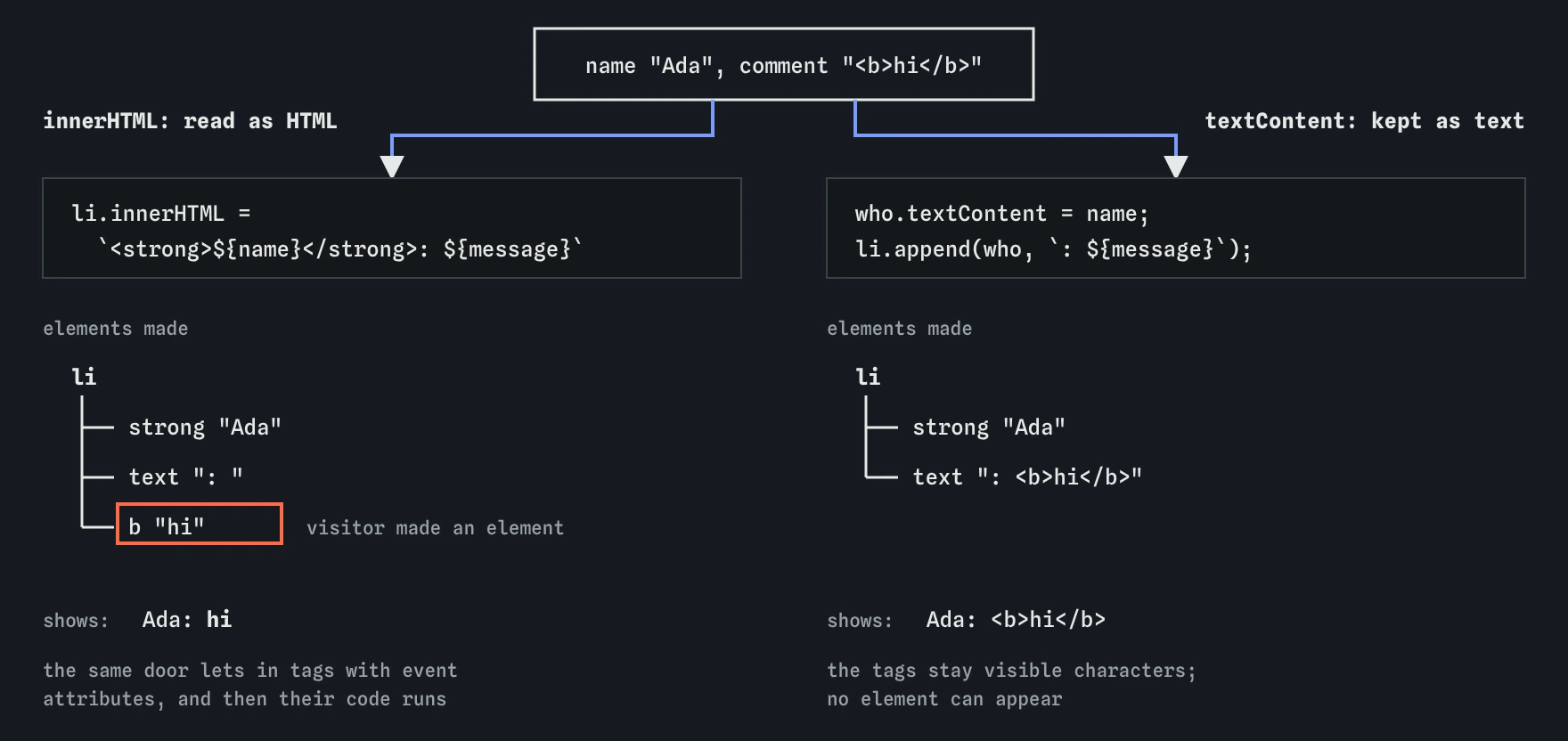
innerHTML the visitor decides what elements exist, so <b>hi</b> turns into a real b. With textContent and append only your code makes elements, and the comment stays plain text.What is cross-site scripting (XSS)?
Cross-site scripting, usually shortened to XSS, is the name for this whole family of bugs: text from an untrusted source ends up running as code on your page. Once it runs, the script has the same powers as your own JavaScript. It can read what is on the page, change it, send requests as the logged-in visitor, read anything in localStorage, and send data off to another site.
XSS sits near the top of most web security lists year after year, and it often starts from one innocent line such as el.innerHTML = comment. AI tools write that line often, because it is short. When you read generated code, any innerHTML, outerHTML, insertAdjacentHTML or document.write that includes a variable deserves a second look. Ask where the variable's value came from. If any part of it came from a person or from outside your code, treat it as untrusted.
How does textContent keep you safe?
textContent sets the text of an element and never reads it as HTML. A < stays a visible less-than sign, an & stays an ampersand, and no element or attribute can appear. For showing a visitor's words, that is all you need, and it is also a little faster than innerHTML because the browser skips the HTML parser.
The same goes for append with a string, createTextNode, an input's value and setAttribute for ordinary attributes such as alt or title. Each of these treats the value as data. The demo solution uses this pattern: li.append(who, : ${message}) adds an element you built and a plain string, side by side, and the string is shown exactly as typed.
How do you build markup without innerHTML?
When you need structure, such as a bold name followed by a comment, build it from pieces. Create each element with document.createElement, fill its text with textContent, set attributes with properties or setAttribute, then put the pieces together with append. The structure comes from your code and only the text comes from the visitor, so there is no way for their text to change the structure.
It is a few more lines than a template string, and that is a fair trade. For repeated items, write a small function that takes the data and returns the finished element, and the extra lines stay in one place. Open the Changes lens after posting a comment in the demo and you will see exactly one li with one strong inside, whatever was typed.
function commentItem(name, message) {
  const li = document.createElement("li");
  const who = document.createElement("strong");
  who.textContent = name;
  li.append(who, `: ${message}`);
  return li;
}
What does escaping mean?
Escaping means replacing the characters that have meaning in HTML with codes that only display as text: < becomes <, > becomes >, & becomes &, and quotes become " and '. After escaping, the browser shows the characters instead of acting on them.
You will see hand-written escape functions in older code and in templates. They work when they cover all five characters and are applied to every value in every place. The risk is the one value someone forgets to wrap. With the DOM methods above the browser does the escaping for you, every time, so prefer them. Keep an escape function for the rare case where you really must produce an HTML string, such as building a whole email template.
function escapeHtml(text) {
return text
.replaceAll("&", "&")
.replaceAll("<", "<")
.replaceAll(">", ">")
.replaceAll('"', """)
.replaceAll("'", "'");
}What if you really need to show user HTML?
Sometimes the point is to allow some formatting, such as a bird report written in a rich text editor with bold and links. Then you need a sanitizer: code that parses the HTML, keeps the safe tags and removes scripts, event handler attributes and dangerous links.
Browsers are adding one. element.setHTML(html), part of the HTML Sanitizer API, parses the string and strips anything that could run script before inserting it. As of late 2026 it has shipped in recent versions of some major browsers, while support elsewhere is still arriving, so check a current support table and keep a fallback before you depend on it. Do not confuse it with setHTMLUnsafe, which does no cleaning at all.
The long-standing option is DOMPurify, a small, widely used open-source library. You pass it a string and it returns a cleaned string, which you can then assign to innerHTML. Whatever you use, sanitize right before inserting, keep the library up to date, and never write your own sanitizer with a regex. HTML is too forgiving for a pattern to catch every trick.
How do you make links from user input safe?
Links carry their own risk. Setting link.href with textContent-style care is not enough, because the address itself can be the attack: a URL starting with javascript: runs code when clicked. Addresses with data: can also be abused. Escaping does nothing here, because those addresses contain no special HTML characters at all.
The fix is an allow-list. Parse the text with new URL(text), which throws for anything that is not a valid absolute address, and then accept only the http: and https: protocols. Everything else gets shown as plain text. Checking with startsWith("http") is weaker, because it lets through strings that only look like addresses, so let the URL parser decide. If the link goes to another site, add rel="noopener" when you also open it in a new tab.
function safeUrl(text) {
  try {
    const url = new URL(text);
    return url.protocol === "http:" || url.protocol === "https:" ? url.href : null;
  } catch {
    return null;
  }
}
What habits keep a page safe?
A few small rules cover nearly every case. Treat any value you did not type into your own code as untrusted, including data from your own server, because it may have come from a visitor originally. Show text with textContent. Build structure with createElement. Check link addresses with new URL and an allow-list. Keep innerHTML for fixed strings you wrote.
On larger sites, a Content Security Policy header adds a second layer by telling the browser which scripts may run at all, and trusted types can stop risky assignments to innerHTML across a whole codebase. These are good backups, never a reason to skip the habits above. Check on the server too: anything you only check in the browser can be skipped by someone sending requests directly.
- Untrusted text goes in with
textContentorappend. - Structure comes from
createElement, never from a string with variables inside. - Links pass through
new URLand allow only http and https. - User HTML goes through
setHTMLor DOMPurify, never straight intoinnerHTML.
Field notes
innerHTMLtreats a string as HTML, so visitor text can become real elements.- XSS is when untrusted text ends up running as code on your page.
textContentalways shows text as text, tags and all.- Build structure with
createElementand fill each part withtextContent.
Easy to get wrong
If bird.name came from a form or an API, any tags in it become live elements. Building the heading and setting its text keeps the name as plain text.
A string check can be fooled by text that only looks like a URL. Parsing with new URL and checking protocol lets the browser decide what the address really is.
Removing script tags with a pattern misses event handler attributes, odd casing and many other tricks. If you only need text, use textContent; if you need HTML, use a real sanitizer.
Questions people ask
Is innerHTML ever fine?
Yes, for strings written entirely by you, such as clearing a list with list.innerHTML = "" or inserting a fixed snippet. The danger comes only when a variable holding outside text is mixed in.
Do frameworks like React protect me?
Mostly. They escape text in curly braces automatically. They also offer an escape hatch for raw HTML, with a deliberately alarming name, and they do not check link addresses for you, so the URL rule still applies.
Is data from my own API safe to put in innerHTML?
Not if any of it was typed by a person at some point. A name stored last week is still visitor input today. Show it with textContent like any other untrusted text.
Can I test my page for XSS myself?
Try typing harmless markup such as <b>test</b> or <i>x</i> into every field and see whether it turns into formatting anywhere on the site. If it does, that spot builds HTML from user text and needs fixing.