What does an operator do?
An operator takes one or more values and produces a new value. + takes two numbers and gives their sum, > takes two values and gives true or false, and the not operator flips a boolean. The values an operator works on are called operands.
Most of the work in a script is operators combined with variables: totals, comparisons, fallbacks for missing data. Learning the dozen common ones, and the order they run in, removes a large share of everyday bugs.
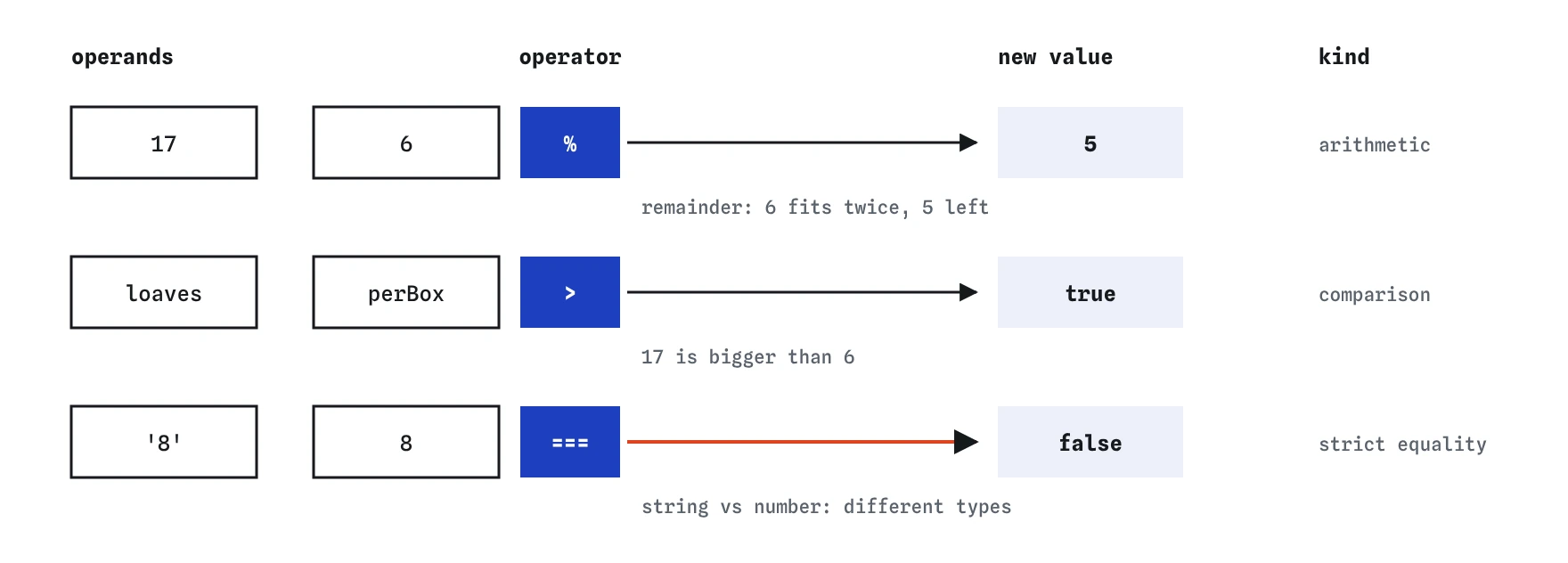
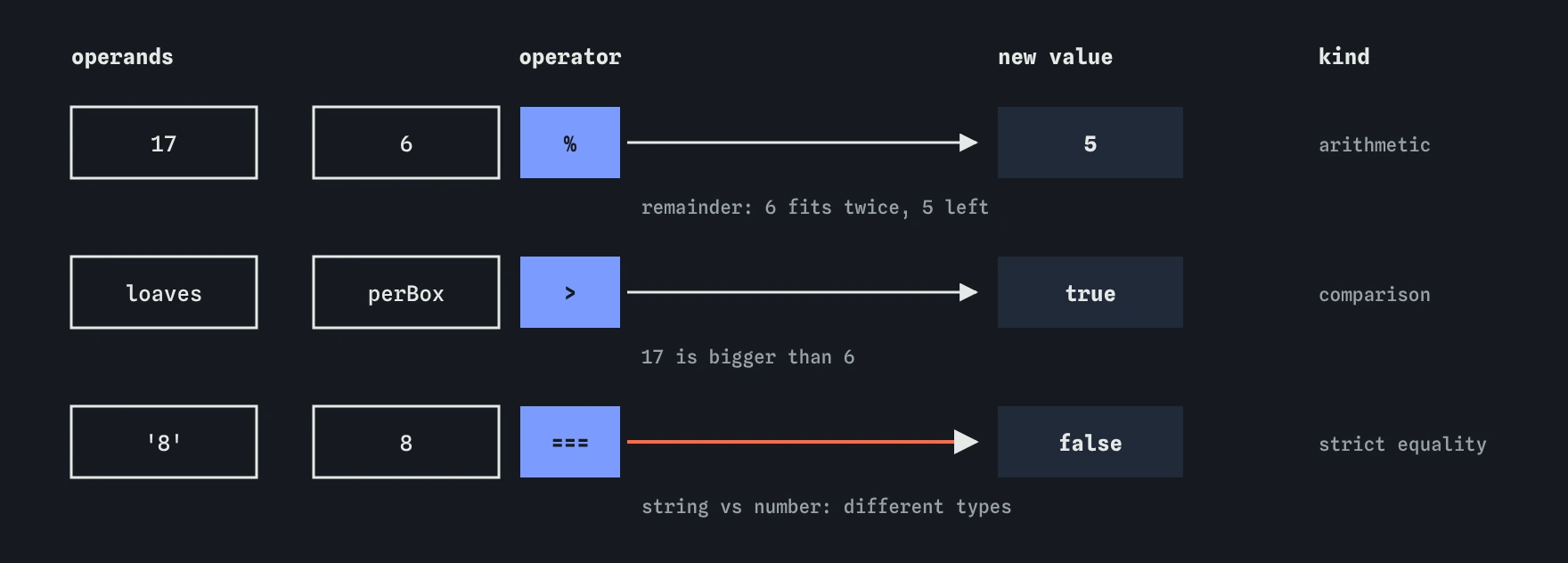
%, a boolean from > and ===.How does arithmetic work in JavaScript?
The maths operators are + add, - subtract, * multiply, / divide, % remainder and ** power. Division always gives a decimal when needed: 7 / 2 is 3.5. Dividing by zero gives Infinity instead of an error.
% gives what is left over after dividing. 17 % 6 is 5, because 6 fits twice into 17 with 5 left. It is useful for every-other-row patterns (index % 2 === 0 for even rows) and for splitting minutes into hours and minutes.
** raises to a power: 2 ** 3 is 8. Remember from the types lesson that + with a string joins text. The other maths operators convert strings to numbers, which can hide a missing Number() until an addition shows up.
const loaves = 17;
const perBox = 6;
const fullBoxes = Math.floor(loaves / perBox); // 2
const leftOver = loaves % perBox;              // 5
What are the assignment shorthands?
Updating a variable from its own value is so common that it has short forms. total += 4.5 means total = total + 4.5. The same pattern works for -=, *=, /=, %= and **=. With strings, += appends text to the end.
count++ adds one and count-- subtracts one. They are mostly used in loops. Write them on their own line; mixing them inside bigger expressions, as in total = count++ * 2, makes code hard to read because the update and the read happen at different moments.
All of these change the variable, so it must be declared with let. Using them on a const throws a TypeError.
let basketTotal = 0;
basketTotal += 4.5;   // 4.5
basketTotal += 3.25;  // 7.75
let visits = 0;
visits++;             // 1
Why use === instead of ==?
=== checks that two values are the same type and the same value. !== is its opposite. They never convert anything, so '8' === 8 is false, because one is a string and one is a number.
== and != are the loose versions. They try to convert both sides to a common type first, using rules that are hard to remember: '' == 0 is true, '0' == false is true, and null == 0 is false. Code that relies on those rules works until the data changes shape.
Use === and !== everywhere. If you need to compare a string from a form with a number, convert it yourself with Number() so the code shows exactly what happens. The one pattern some teams allow is value == null, which matches both null and undefined; ?? and ?. usually do that job more clearly.
console.log('8' === 8);         // false
console.log(Number('8') === 8); // true
console.log('' == 0);           // true (why == is avoided)
How do the size comparisons work?
>, <, >= and <= compare numbers the way you expect and return a boolean. The equals sign always comes second: >= is valid, => is the arrow of an arrow function and means something else entirely.
Comparing two strings uses dictionary-like order based on character codes, so 'apple' < 'banana' is true. That catches people out with numbers stored as text: '10' < '9' is true, because the character 1 comes before 9. Convert to numbers before comparing sizes.
Because a comparison is a value, you can store it. const freeDelivery = total >= 8; is clearer than an if that sets true or false, and it stays correct when total changes.
const total = 9;
const freeDelivery = total >= 8;    // true
console.log('10' < '9');            // true (text order)
console.log(10 < 9);                // false
How do you combine conditions with && || and the not operator?
a && b is true when both sides are true. a || b is true when at least one side is. The not operator, written !isOpen, flips a value: true becomes false and false becomes true.
Both && and || stop early. If the left side of && is falsy, the right side never runs, because the answer is already decided. That is called short-circuiting, and it is why you see code like isMember && showDiscount().
They also return one of their operands rather than a strict boolean. a || b returns a if it is truthy, otherwise b. That made || the old way to set defaults, as in name || 'Guest'. The catch is that || replaces every falsy value, including 0 and the empty string, which are often real answers.
const isOpen = true;
const hasBread = false;
console.log(isOpen && hasBread); // false
console.log(isOpen || hasBread); // true
console.log(!hasBread);          // true
What do ?? and ?. do?
The nullish coalescing operator ?? gives the right-hand value only when the left is null or undefined. Zero, false and the empty string pass through unchanged. Use it for defaults: order.note ?? 'No note' and shop.staff ?? 'unknown' both behave correctly when the real value is 0 or an empty note.
Optional chaining ?. reads a property only if the thing before it exists. shop.owner?.name gives undefined instead of throwing when owner is null. It works on method calls too: list?.at(0). Chain them as deep as you need, then finish with ?? to supply a fallback.
Both arrived in 2020 and work in every current browser. Do not scatter ?. everywhere by habit, as AI-generated code often does. If a value should always exist, a loud error when it is missing helps you find the real bug, while ?. would hide it.
const shop = { staff: 0, owner: null };
console.log(shop.staff ?? 'unknown');        // 0
console.log(shop.staff || 'unknown');        // 'unknown'
console.log(shop.owner?.name ?? 'No owner'); // 'No owner'
In what order do operators run?
JavaScript follows the usual maths order. ** runs first, then *, / and %, then + and -. Comparisons come after maths, then ===, then &&, then || and ??, and assignment happens last. Operators at the same level run left to right, except ** and assignment, which run right to left.
You do not need to memorise the full table. Use parentheses whenever the order is not obvious to a reader. (10 + 20) / 2 makes the intent clear and costs nothing. JavaScript also forces the issue in one case: mixing ?? with && or || without parentheses is a SyntaxError.
When a result looks wrong, open the Step lens or log the parts of the expression separately. Splitting a long line into two named steps, such as subtotal and withTax, is often clearer than any amount of parentheses.
const average = (10 + 20) / 2;     // 15
const wrong = 10 + 20 / 2;         // 20
const withTax = (4.5 * 2) * 1.2;
Field notes
- An operator takes one or more values and produces a new value.
- Use
===to compare, because it checks both type and value without converting. >=means greater than or equal, and the equals sign always comes second.&&needs both sides true, while||needs only one.
Easy to get wrong
A single = assigns a value instead of comparing. On a const it throws, and on a let it silently overwrites the variable.
== hides the conversion from string to number. Converting yourself and using === makes the comparison exact and readable.
|| treats 0 as missing. ?? replaces only null and undefined, so a real zero survives.
Division runs before addition, so only b is halved. Parentheses group the sum first.
Questions people ask
Is `x++` the same as `x += 1`?
On a line by itself, yes. Inside a larger expression x++ gives the old value and then adds one, which is why it is easier to read on its own line.
Can I use `?.` when assigning?
No. shop.owner?.name = 'Ada' is a SyntaxError. Optional chaining is only for reading.
Why does `0.1 + 0.2 === 0.3` give false?
Decimal fractions are stored in binary and lose a tiny amount of precision. Compare money in whole pennies, or round before comparing.
What does the remainder of a negative number give?
% keeps the sign of the left side, so -7 % 3 is -1. Add the divisor and take the remainder again if you need a positive result.