What do animations add beyond transitions?
A transition needs a trigger: a value changes, and the browser animates from the old value to the new one. An animation runs on its own. It starts when the element gets an animation declaration, it can have as many in-between steps as you like, it can loop, and it can play backwards.
Use a transition for feedback to something the user did, such as a button changing colour on hover or a menu opening. Use an animation when something should move without a state change: a loading indicator, a banner that slides in on page load, a badge that pulses to draw attention, or a multi-step sequence that a single start and end value cannot describe.
How do you write @keyframes?
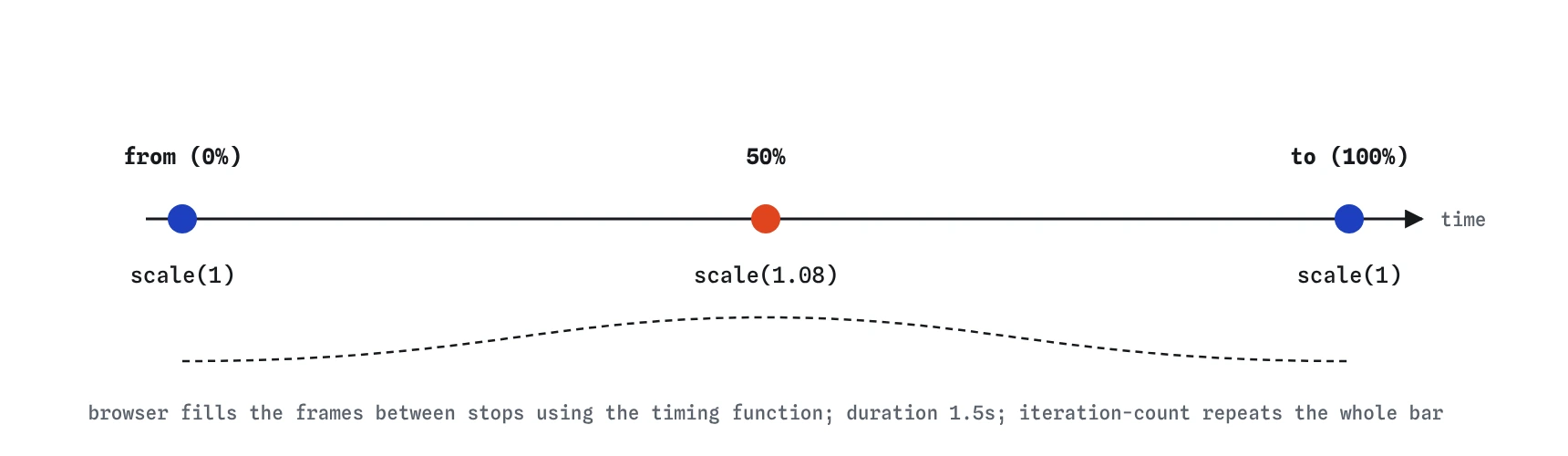
A @keyframes rule has a name and a list of stops. Each stop is a percentage of the animation's length, with from meaning 0% and to meaning 100%. Inside each stop you write ordinary declarations. The browser works out every frame between stops.
You can leave out from or to. A missing stop takes the element's own current value, so a from { opacity: 0; } block on its own fades an element in to whatever opacity it normally has. You can also group stops that share values, as in 0%, 100% { transform: scale(1); }.
Names are case-sensitive identifiers. Pick a name that describes the motion, such as rise or pulse, and avoid names that clash with CSS keywords like none or initial, which are not allowed.
@keyframes pulse {
  0%,
  100% {
    transform: scale(1);
  }

  50% {
    transform: scale(1.08);
  }
}
Which properties control the playback?
Eight longhand properties describe how the keyframes play. Each has a sensible default, so you usually only set two or three.
In DevTools, the Animations panel in Chrome and Edge shows every running animation as a bar on a timeline. You can slow it to 10% speed, scrub through it and see which keyframes apply at each moment.
animation-namepicks the@keyframesblock. The default isnone, so nothing runs until you set it.animation-durationsets the length of one cycle. The default is0s, which plays the whole thing in no time.animation-timing-functionsets the pace between each pair of stops, such asease-in-outorlinear. It applies per segment, so 0% to 50% and 50% to 100% each get the full curve.animation-delaywaits before the first cycle. A negative delay starts partway through, which is handy for staggering several loading dots.animation-iteration-countsets how many cycles run: a number such as3, orinfinite.animation-directioncan benormal,reverse,alternate(forwards, then backwards) oralternate-reverse.animation-fill-modedecides what shows before the start and after the end:none,forwards,backwardsorboth.animation-play-stateisrunningorpaused.
How does the animation shorthand read its values?
The animation shorthand accepts all eight values in any order, with two rules. The first time value is the duration and the second is the delay. The name is whatever identifier is not a known keyword. So animation: rise 0.6s ease-out 0.2s both; reads as name rise, duration 0.6 seconds, ease-out, delay 0.2 seconds, fill mode both.
Because the name is matched by elimination, avoid naming keyframes after keywords such as ease or infinite. You can run several animations at once by separating them with commas, for example a fade and a separate slow drift with different durations.
A missing unit breaks the whole declaration. animation: rise 0.6 ease-out is invalid, so the browser drops it and nothing moves. That is the first thing to look for when an animation does not run.
.banner {
  animation:
    rise 0.6s ease-out both,
    drift 8s linear infinite;
}
What does animation-fill-mode actually fix?
Outside the time an animation is running, the element shows its normal styles. That causes two visible glitches. With a delay, the element sits in its normal state, then jumps to the first keyframe when the animation starts. After a one-off animation ends, it snaps back from the last keyframe to its normal styles.
backwards applies the first keyframe during the delay. forwards keeps the last keyframe after the end. both does both, which is what most entrance animations want. A tidier option for an entrance is to make the last keyframe match the normal styles, so the end causes no jump at all and you only need backwards.
Be careful with forwards on an element whose styles also change on hover: the held keyframe wins over normal declarations, so the hover rule appears to stop working.
Which properties should you animate?
Each frame, the browser may need to redo layout, repaint pixels, or only recombine existing layers. Animating width, height, top or margin forces layout every frame and moves neighbouring elements with it, which stutters on slower phones. Animating transform and opacity is the cheap case: the browser can usually hand the layer to the graphics card and move or fade it without touching layout or paint.
So slide with transform: translateY(), grow with scale(), and fade with opacity. Colour changes need a repaint, which is acceptable for small elements. If an animation looks jerky, the Performance panel in DevTools shows long purple Layout blocks for layout work and green blocks for paint.
How do you respect prefers-reduced-motion?
Some people get dizzy, nauseous or distracted by movement on screen, and they turn on a reduce motion setting in their operating system. The prefers-reduced-motion: reduce media query reports it. Inside it, remove animations that slide, scale, spin or parallax. A short opacity fade is usually fine to keep, and so is a loading spinner that tells people something is happening, slowed down if possible.
Another approach is to only add motion inside @media (prefers-reduced-motion: no-preference). Visitors who never set anything still get the animation, and nobody gets motion by accident. Whichever way you choose, give looping decorative animations a way to stop, such as pausing them with animation-play-state: paused on hover or with a button that toggles a class.
@media (prefers-reduced-motion: reduce) {
  .banner {
    animation: none;
  }
}
What are scroll-driven animations?
Normally an animation's progress is tied to time. The animation-timeline property ties it to scrolling instead. With animation-timeline: scroll(), progress follows how far the page or a scroll container has scrolled, which suits a reading progress bar. With animation-timeline: view(), progress follows an element as it crosses the visible area, which suits a card fading in as it scrolls into view.
You still write normal keyframes and set animation-name. The duration is ignored for timing, though some browsers want a value present, so animation-duration: auto or 1ms is common. Chrome and Edge have supported this since 2023 and Safari added it in 2025. Firefox support is still limited in 2026, so treat scroll-driven effects as an enhancement and make sure the content reads fine without them. Wrapping the rules in @supports (animation-timeline: view()) keeps other browsers on the static version.
.progress {
  transform-origin: left;
  animation: grow linear;
  animation-timeline: scroll();
}

@keyframes grow {
  from {
    transform: scaleX(0);
  }
}
What should you check in AI-written animation CSS?
Generated CSS often defines keyframes that no element uses, or names an animation that does not match any keyframes because of a spelling difference. Search for each @keyframes name and make sure it appears in an animation declaration, character for character.
Also look for animated left, top or width where a transform would do, infinite on decorative effects with no reduced motion fallback, and durations without units. Check that entrance animations with a delay use a fill mode, or the element will flash in its final state before the animation starts.
Field notes
- An animation runs by itself, while a transition needs a value to change first.
@keyframeshas a name and stops written as percentages, withfromandtofor the ends.- In the shorthand, the first time is the duration and the second is the delay.
- Respect
prefers-reduced-motionfor people who find movement on screen unpleasant.
Easy to get wrong
Keyframes on their own do nothing. An element has to name them with animation or animation-name and give a duration.
Durations need a unit. Without one the shorthand is invalid and the whole animation is dropped.
Animating left recalculates layout every frame. A transform moves the element on its own layer and stays smooth.
With a delay and no fill mode the banner shows in its final state, then jumps to the first keyframe when the delay ends.
Questions people ask
Can I restart a CSS animation?
Removing the animation and adding it again restarts it. In practice you toggle a class with JavaScript, or change animation-name to none and back on the next frame.
Why does my animation ignore my hover styles?
Values from a running animation, or held by forwards, override normal declarations. Let the animation end on the element's normal values, or avoid holding the last frame.
Can I animate a gradient or display?
Gradients cannot be interpolated directly, but you can animate a custom property registered with @property that the gradient uses. display switches instantly at a point in the animation.
How many animations are too many?
One clear motion per screen area is a good limit. Several things moving at once compete for attention and make the page harder to read.