What paints on top when nothing has a z-index?
Boxes overlap more often than you might think: negative margins, absolute badges, dropdown menus, sticky headers. When they do, the browser follows a fixed paint order. First it paints the backgrounds and borders of the root, then block boxes in source order, then floats, then inline content such as text, and finally positioned elements, again in source order.
Two rules fall out of that order. Later elements paint over earlier ones when everything else is equal. And a positioned element, anything with position set to relative, absolute, fixed or sticky, paints above every non-positioned box in the same context, even one that comes after it in the HTML. That second rule explains the demo: the photo has position: relative, so it covers the note even though the note comes later.
Why does z-index do nothing on my element?
The z-index property only applies to positioned boxes and to flex and grid items. On a plain static block it is ignored, and DevTools greys it out in the Styles pane with a tooltip explaining why. Adding position: relative is the usual fix, because it makes the box positioned without moving it.
Flex and grid items are the exception. A child of a display: flex or display: grid container accepts z-index while staying static, which is handy when grid items overlap on purpose. A value of auto is the default and means the box does not take part in z-index sorting with a number of its own; it paints at layer 0 among its positioned siblings.
The value is a whole number with no unit. Negative values are allowed and push a box behind its parent's other content. A value with px on the end, which AI tools sometimes write, is invalid and dropped.
.note {
  position: relative;
  z-index: 1;
}
What is a stacking context?
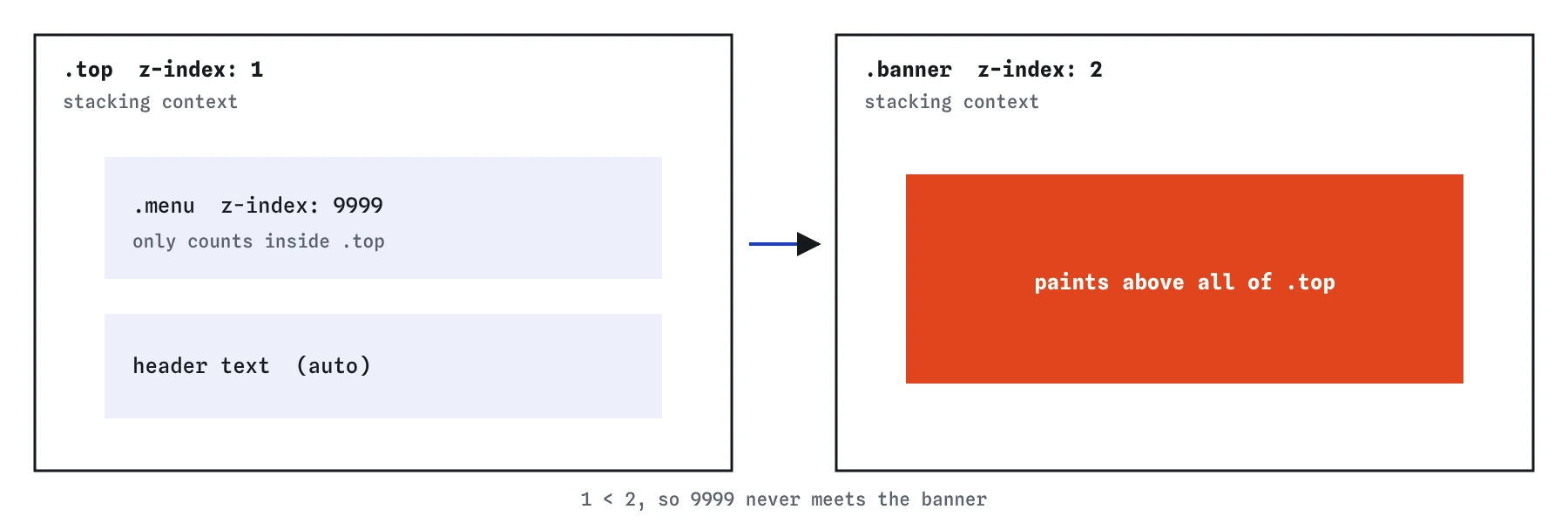
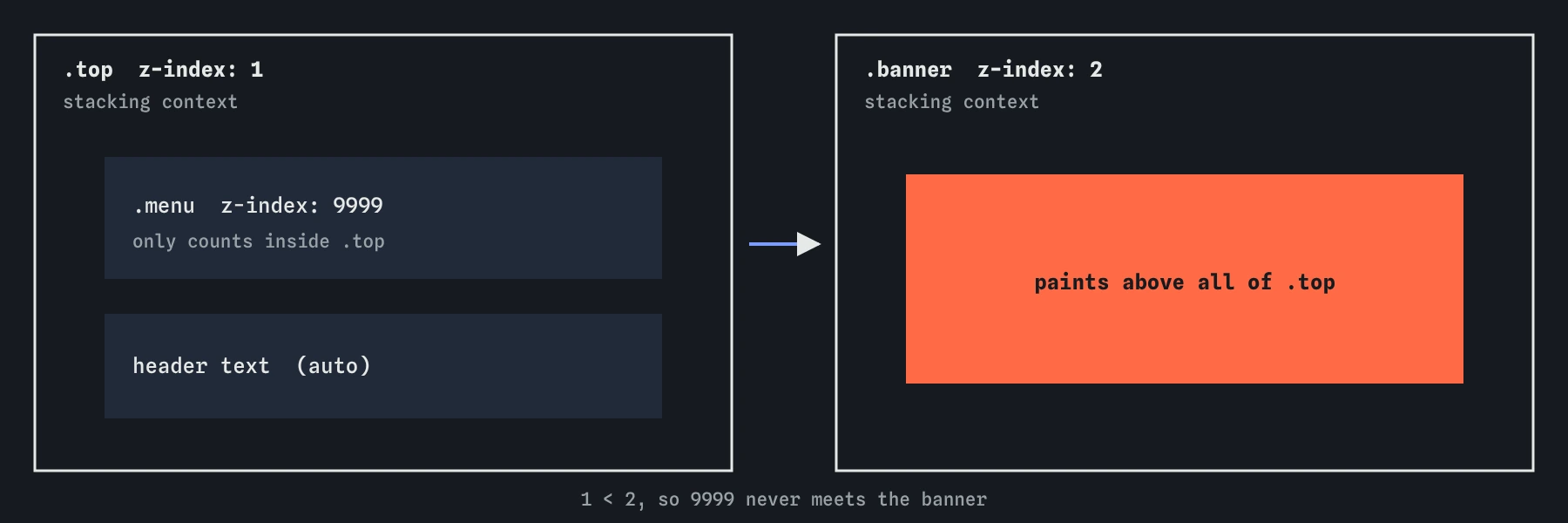
A stacking context is a group of boxes that are layered together and then placed into their parent context as a single unit. Inside the group, children sort themselves by z-index. Outside, the whole group is one layer with the z-index of the element that created it. A child can never escape upward out of its group, however large its number.
Think of it as a sheet of paper with stickers on it. You can rearrange stickers on the sheet freely, and you can lift the whole sheet above or below other sheets, but a sticker cannot move to a different sheet. The root html element is the first sheet. Every new stacking context is another sheet inside the one that contains it.
This is why z-index bugs feel random. The number on the element you are looking at is often irrelevant. The deciding value is the z-index of its nearest stacking context ancestor compared with the thing it overlaps.
Which properties create a stacking context?
Several properties create a new stacking context, some of them unexpected. The common ones are listed below. Many come from visual effects, because the browser has to paint the whole group as one image before it can fade, blur or move it.
The last one, isolation: isolate, exists only for this purpose. It creates a stacking context and does nothing else, which makes it the clearest choice when you want a component's internal z-index values to stay internal. It is supported in all current browsers.
position: relativeorabsolutetogether with az-indexother thanauto.position: fixedorsticky, even with no z-index.- A flex or grid item with a z-index other than
auto. opacitybelow 1.- Any
transform,filter,backdrop-filter,perspective,clip-pathormaskother than none. mix-blend-modeother than normal,will-changenaming one of those properties, andcontain: paint.isolation: isolate.
Why doesn't z-index: 9999 fix it?
When a dropdown menu hides behind the next section, the reflex is to give the menu z-index: 9999. It fails when the menu sits inside a stacking context that is itself below the section. The menu wins against its siblings inside the header and loses with the header against everything outside.
To fix it, find the stacking context ancestor and work at that level. In DevTools, select the menu and walk up the tree, checking each ancestor's computed position, z-index, opacity, transform and filter. Chrome and Edge also have a 3D View panel with a z-index mode that draws the layers. Once you find the ancestor that forms the context, either raise that ancestor above the section or remove whatever created the context, such as a leftover transform: translateX(0) from an animation.
Raising numbers on the inner element only feels productive. If 10 does not work, 9999 will not work either.
.site-header {
  position: relative;
  z-index: 10;
}

.site-header .menu {
  position: absolute;
  z-index: 1;
}
How do you keep a component's layers to itself?
A card with an image, an overlay gradient and a caption might use z-index 1, 2 and 3 internally. Without a stacking context on the card, those values compete with the rest of the page: the caption with z-index 3 could paint over your site header with z-index 2 when the page scrolls.
Add isolation: isolate to the card. Now the card's internal values only sort among themselves, and the whole card is one layer at z-index auto in the page. You can use small, readable numbers inside every component and stop worrying about collisions. The same trick fixes negative z-index backgrounds that vanish behind the page: an isolated parent keeps the z-index: -1 child in front of the parent's own siblings.
.recipe-card {
  position: relative;
  isolation: isolate;
}

.recipe-card::before {
  content: "";
  position: absolute;
  inset: 0;
  z-index: -1;
  background-color: #fbeee0;
}
What does a sane z-index scale look like?
Most sites need only a handful of global layers: raised content, sticky headers, dropdowns, overlays, modals and toasts. Put them in custom properties on :root with gaps between them, and use those names everywhere instead of raw numbers. Anyone reading z-index: var(--z-modal) knows what the box is meant to sit above.
Keep the scale for page-level layers only. Inside components, use isolation and small local numbers. The native dialog element opened with showModal() and the popover attribute go into the browser's top layer, which sits above every z-index, so modals built on them do not need a number at all.
:root {
  --z-raised: 1;
  --z-sticky: 100;
  --z-dropdown: 200;
  --z-overlay: 300;
  --z-toast: 400;
}

.site-header {
  position: sticky;
  top: 0;
  z-index: var(--z-sticky);
}
What should you look for in AI-written CSS?
Generated stylesheets tend to sprinkle large z-index values across unrelated components: 999 on a header, 9999 on a menu, 99999 on a cookie banner. Each one was a patch for a stacking problem that was never understood. Replace them with the named scale and check each one still needs to exist; many sit on static elements and do nothing.
Also look for transform: translateZ(0) or will-change: transform added as a performance hint. Both create stacking contexts and fixed-position containing blocks, which is a common hidden cause of trapped menus. Remove them unless an animation actually needs them. Finally, check for z-index with units or decimals; both are invalid and silently ignored.
Field notes
- When nothing sets z-index, the browser stacks boxes in a fixed paint order.
- A
z-indexonly counts on positioned boxes and on flex or grid items. - A stacking context layers a group of boxes together as one unit inside its parent.
- A huge value like 9999 cannot lift a box out of a stacking context that sits lower.
Easy to get wrong
On a static block outside a flex or grid container, z-index is ignored. It needs a position.
When the menu is trapped in its parent's stacking context, raise the parent. The child's number only counts inside the parent.
Z-index is a plain integer. A unit makes the declaration invalid, so the browser drops it.
If you want a stacking context, ask for one directly. The transform hack also changes how fixed children are positioned.
Questions people ask
Does opacity really change stacking?
Yes. Any opacity below 1 creates a stacking context and paints the element in the positioned layer, so fading a box can change what overlaps it.
Can a child appear behind its parent?
Only if the parent does not form a stacking context. A child with a negative z-index then paints behind the parent's background. If the parent forms a context, the child stays above the parent's background.
Do I need z-index for a dialog?
Not when you open a dialog element with showModal(). It goes into the top layer, which always paints above the rest of the page.
What does z-index: auto mean?
The box does not create a stacking context through z-index and paints at level 0 among positioned siblings, in source order.