How do named grid areas work?
The grid-template-areas property lets you draw the layout as text. Each quoted string is one row, and each word in it is one cell. Repeat a name across neighbouring cells to make an area cover them. An item then claims an area with grid-area and the bare name, without quotes.
The rules are strict. Every row must have the same number of cells. Every area must be a rectangle, so an L shape is invalid. A dot, or several dots in a row, marks an empty cell. If any of these rules is broken, the whole declaration is invalid and the browser ignores it, which makes every item fall back to auto-placement at once.
Areas also create named lines: an area called body gives you lines body-start and body-end, which you can use in grid-column if you ever need to.
.page {
  display: grid;
  grid-template-columns: 200px 1fr;
  grid-template-areas:
    "head head"
    "side body"
    "foot foot";
}

.foot {
  grid-area: foot;
}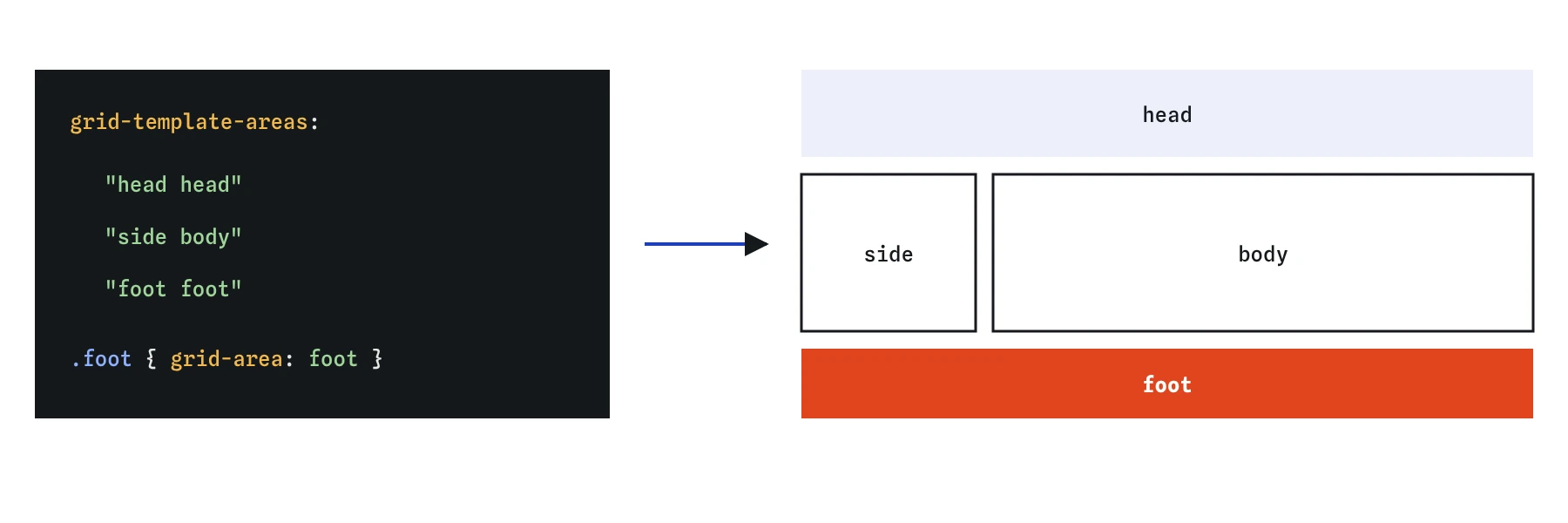
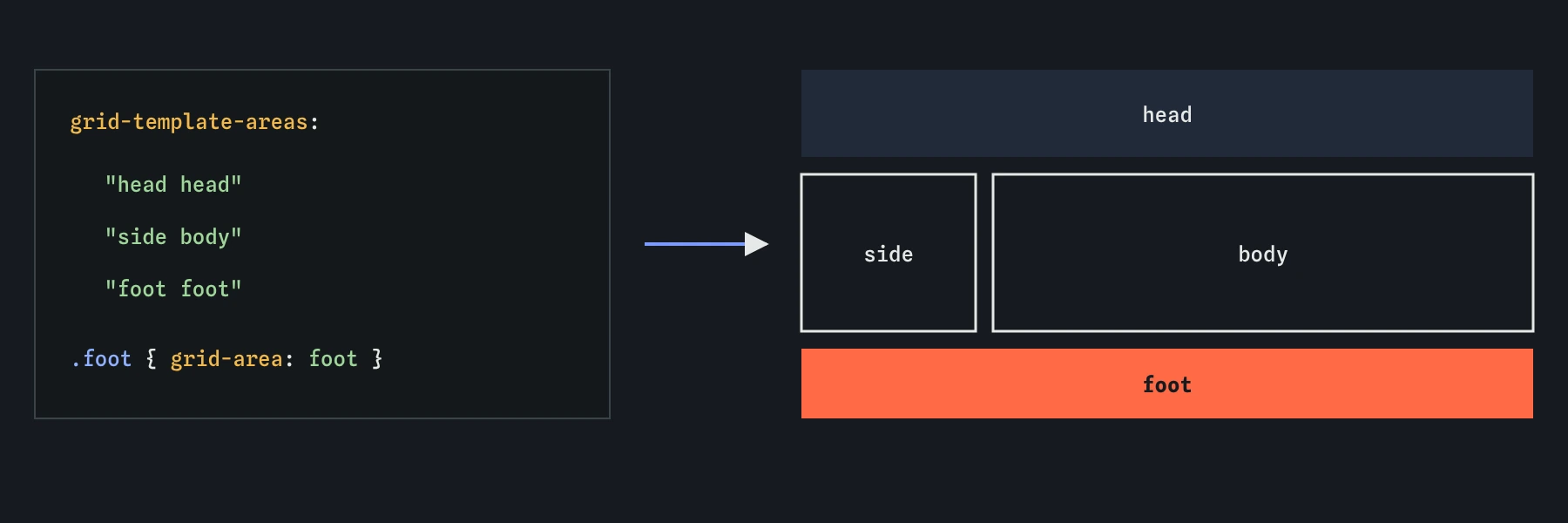
grid-template-areas is one row and each word one cell. Repeating a name across cells makes one rectangular area, and an item claims it with grid-area.What does a full page layout look like?
A classic page has a header, a navigation column, the main content, an aside and a footer. With grid, the HTML stays a flat list of landmarks in a sensible reading order, and the CSS decides where each one goes. Column sizes go in grid-template-columns, row sizes in grid-template-rows, and the map in grid-template-areas.
Setting the middle row to 1fr and the container to min-height: 100vh (or 100dvh on phones, to allow for the browser bar) pushes the footer to the bottom on short pages. The auto rows for header and footer stay as tall as their content.
body {
  display: grid;
  grid-template-columns: 180px 1fr 220px;
  grid-template-rows: auto 1fr auto;
  grid-template-areas:
    "head head head"
    "nav main aside"
    "foot foot foot";
  min-height: 100dvh;
}
How do you rearrange the layout on small screens?
Named areas make responsive layouts short. On a phone, redefine the template as a single column and the items follow; you do not touch the item rules at all. A media query or container query on the layout swaps one map for another.
Remember that moving areas changes only the visual order. If the nav comes after the main content in the HTML, a keyboard user still meets it in that order. Write the HTML in the order that makes sense for reading and tabbing, then use the template for looks.
@media (width < 700px) {
  body {
    grid-template-columns: 1fr;
    grid-template-areas:
      "head"
      "nav"
      "main"
      "aside"
      "foot";
  }
}
How do you make a responsive grid without media queries?
The pattern repeat(auto-fit, minmax(160px, 1fr)) makes a card grid that picks its own column count. The browser fits as many 160px columns as the container allows, then stretches them with 1fr to fill the row. At 340px wide you get two columns; at 1000px you get five or six. No breakpoints, and it responds to the container width, so it works the same in a sidebar or a full page.
One catch: if the container is narrower than the minimum, a single column still overflows. Use minmax(min(160px, 100%), 1fr) so the minimum never exceeds the container width. The min() function is supported in all current browsers.
.cards {
  display: grid;
  grid-template-columns: repeat(auto-fit, minmax(min(160px, 100%), 1fr));
  gap: 16px;
}
What is the difference between auto-fit and auto-fill?
Both keywords create as many tracks as fit. They differ only when there are fewer items than tracks. With auto-fill, the empty tracks stay in the grid, so two cards in a wide container keep their minimum-ish width and leave blank space on the right. With auto-fit, the empty tracks collapse to zero and the 1fr cards stretch to fill the row.
Use auto-fit when a short row should spread out, such as three feature tiles on a landing page. Use auto-fill when every card should stay the same size whatever the count, such as a product gallery where a final row of two should line up with the full rows above. The difference is easy to see in the Layout lens: auto-fill still draws the empty columns.
What does subgrid solve?
Cards in a grid row often have a title, a description and a price. Each card is its own box, so if one title wraps onto two lines, its price ends up lower than its neighbours' prices. Subgrid fixes that. A grid item with grid-template-rows: subgrid uses its parent's row tracks instead of creating its own, so the title rows, text rows and price rows line up across every card.
The card has to span as many parent rows as it has parts, usually with grid-row: span 3, and the parent defines those rows, often with grid-auto-rows or a row template. Subgrid works for columns too, which helps line up form labels across nested fieldsets. It has been supported in all major browsers since 2023.
.menu {
  display: grid;
  grid-template-columns: repeat(auto-fill, minmax(180px, 1fr));
  gap: 16px;
}

.dish {
  display: grid;
  grid-row: span 3;
  grid-template-rows: subgrid;
}
How do you align items inside their cells?
By default every grid item stretches to fill its cell or area in both directions. Two properties on the container change that for all items: justify-items aligns along the row (inline) axis, and align-items along the column (block) axis. Both accept start, end, center and stretch. The shorthand place-items sets align then justify, and place-items: center is the shortest way to centre content in a box.
On a single item, use justify-self and align-self, or place-self. Unlike flexbox, grid does support justify-self, because each item has its own cell. Separately, justify-content and align-content move the whole set of tracks when the tracks are smaller than the container, for example a fixed-width grid centred on the page.
.badge-box {
  display: grid;
  place-items: center;
  min-height: 160px;
}
What goes wrong in AI-written grid layouts?
Generated templates often have rows with different cell counts or a non-rectangular area, which voids the whole template; check each string has the same number of words. Watch for quoted names in grid-area, which are invalid, and for names that do not match between the template and the items.
AI tools also stack media queries at four or five breakpoints for a card grid that auto-fit and minmax() would handle alone, and they use auto-fill and auto-fit interchangeably. Test with three items in a wide container to see which you got. Finally, look for fixed height on cards inside a subgrid or auto row; it defeats the alignment you set up.
Field notes
grid-template-areaslets you draw the layout as text, one quoted string per row.- An item joins an area through
grid-areawith the matching name. - On small screens you can redefine the template and leave the item rules alone.
repeat(auto-fit, minmax(160px, 1fr))builds a card grid that picks its own column count.
Easy to get wrong
Area names in grid-area are identifiers, not strings. Quotes make the declaration invalid.
Every row needs the same number of cells, or the whole template is ignored.
Auto-fit needs a definite minimum to work out how many columns fit. A bare 1fr is invalid here.
CSS keywords use American spelling. centre is dropped and items stay stretched.
Questions people ask
Can an area name be used twice in different places?
Only if the cells form one rectangle. Two separate patches with the same name make the template invalid.
Does auto-fit need a media query for phones?
No, as long as the minimum fits the screen. Wrap it in min(…, 100%) to be safe on very narrow containers.
Can I use subgrid in production?
Yes. Chrome, Edge, Firefox and Safari have all supported it since 2023.
What is the difference between justify-items and justify-content in grid?
justify-items aligns each item inside its own cell. justify-content moves the whole grid of tracks inside the container when there is space left over.