What does fluid sizing mean?
A fixed size stays the same on every screen. A size inside a media query jumps at each breakpoint. A fluid size changes smoothly with the viewport, so a heading is a little bigger on a tablet than on a phone and a little bigger again on a laptop, with no visible jump.
The trick is to tie part of the value to the viewport with vw units, then fence it in with a minimum and a maximum. Three CSS functions do the fencing: clamp(), min() and max(). They work anywhere a length works: font sizes, padding, margins, gaps and widths. All three are supported in every current browser.
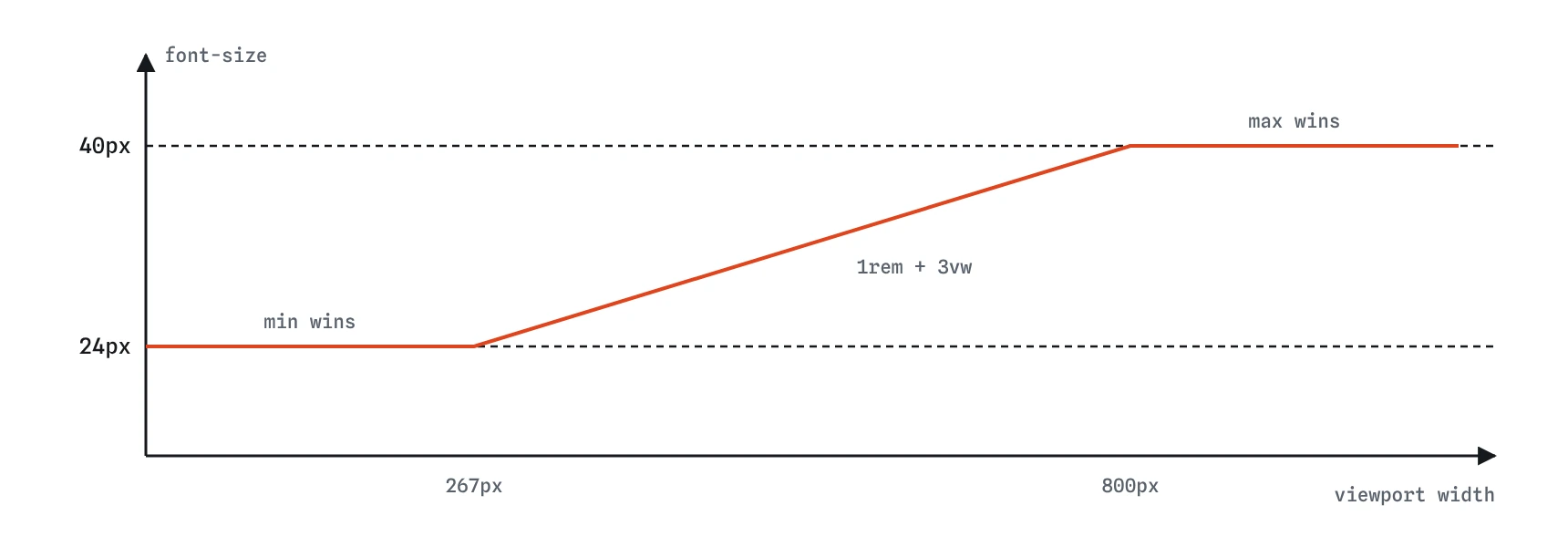
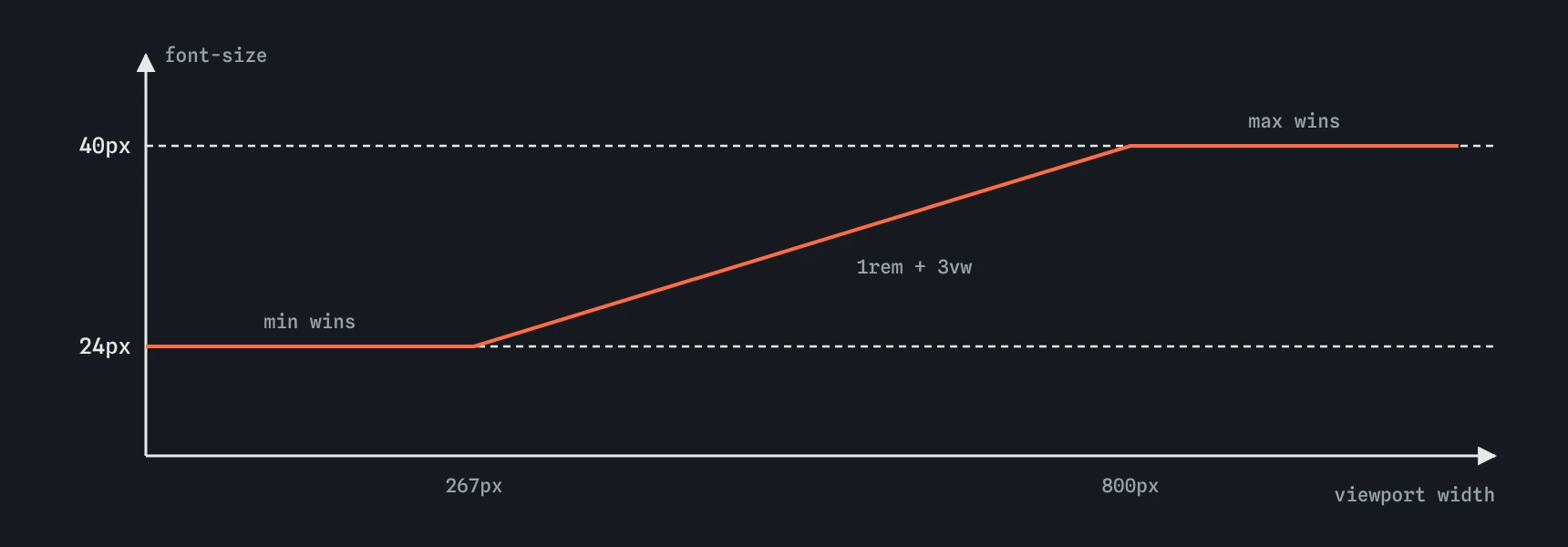
clamp(1.5rem, 1rem + 3vw, 2.5rem) the heading sits at 24px until the preferred value passes it, grows in a straight line, then stops at 40px. The breakpoints fall where 1rem + 3vw meets each bound.How does clamp() work?
clamp(MIN, PREFERRED, MAX) returns the preferred value, but never less than the minimum and never more than the maximum. The preferred value is the one that moves, usually a mix of rem and vw. On a narrow phone it falls below the minimum, so you get the minimum. On a wide monitor it overshoots the maximum, so you get the maximum. In between, it slides.
With clamp(1.5rem, 1rem + 3vw, 2.5rem) and a 16px root size, the heading is 24px until the viewport reaches about 267px, then grows by 3px for every 100px of width, and stops at 40px once the viewport passes 800px. You can work those points out by setting the preferred value equal to each bound.
If the minimum is larger than the maximum, the minimum wins. That is a common typo and gives a size that never changes.
.title {
  font-size: clamp(1.5rem, 1rem + 3vw, 2.5rem);
}
Why does a pure vw font size break zoom?
One vw is 1% of the viewport width. When a reader presses Ctrl and plus, the browser zooms by making CSS pixels bigger, which also makes the viewport narrower in CSS pixels. A 5vw heading therefore stays the same physical size, or even shrinks, while everything else grows. The reader cannot enlarge it, which fails the WCAG requirement that text can be resized to 200%.
Pure vw text also ignores the default font size people set in browser settings, and it becomes unreadably small on narrow phones and absurdly large on wide screens.
The fix is to put a rem term in the preferred value and to use rem for the bounds. The rem part grows with zoom and font settings, the vw part adds the fluid slope, and the clamp keeps it all in range. Test it by zooming to 200% and checking that the heading actually gets bigger.
/* avoid */
h1 {
  font-size: 5vw;
}

/* prefer */
h1 {
  font-size: clamp(1.5rem, 1rem + 3vw, 2.5rem);
}
How do min() and max() differ from clamp()?
min() takes any number of values and uses the smallest. That makes it a ceiling. width: min(100%, 60ch) means the column fills its container on a phone, where 100% is smaller, and stops at 60 characters on a wide screen, where 60ch is smaller. It replaces the older pair of width: 100% plus max-width: 60ch in one line.
max() uses the largest value, so it works as a floor. padding-inline: max(16px, 5vw) gives at least 16px of side padding on phones and more on bigger screens.
clamp(a, b, c) is the same as max(a, min(b, c)), a floor and a ceiling together. Use min() or max() when you only need one of the two limits. The names feel backwards at first: min() sets a maximum, and max() sets a minimum.
.wrap {
  width: min(100%, 60ch);
  padding-inline: max(16px, 5vw);
}
How do you make spacing fluid?
Spacing benefits from the same treatment as type. Section padding of 16px feels right on a phone and cramped on a desktop, while 64px feels right on a desktop and wastes a third of a phone screen. padding-block: clamp(1rem, 4vw, 4rem) covers both.
Gaps in grid and flex layouts work the same way. A gallery with gap: clamp(8px, 2vw, 24px) keeps photos tight on a phone and airy on a large display. Spacing can use plain vw in the preferred value because zoom is less of an issue for whitespace than for text, though rem bounds still keep things proportional to the type.
Keep fluid spacing to the large gaps between sections and blocks. Small gaps inside a button or between a label and its input read best as fixed rem values.
.section {
  padding-block: clamp(1rem, 4vw, 4rem);
}

.gallery {
  gap: clamp(8px, 2vw, 24px);
}
How do you build a small fluid type scale?
Store each step of the scale in a custom property on :root, then refer to the properties wherever you set a font size. The body size grows only slightly, and each larger step grows a little more, so headings gain contrast on wide screens without the body text getting huge.
Keep the scale short. Four or five steps cover a bakery or portfolio site: small print, body, a subheading, a heading and a display size. If you need to tune it, you change one line in :root and every heading follows.
Online calculators such as Utopia generate these values from a minimum and maximum viewport and size, and are worth using for larger scales. The output is still ordinary clamp() you can read and adjust.
:root {
  --step-0: clamp(1rem, 0.95rem + 0.25vw, 1.125rem);
  --step-1: clamp(1.25rem, 1.1rem + 0.75vw, 1.6rem);
  --step-2: clamp(1.5rem, 1.2rem + 1.5vw, 2.25rem);
  --step-3: clamp(1.9rem, 1.4rem + 2.5vw, 3.2rem);
}

h1 {
  font-size: var(--step-3);
}
When do you still need a media query?
Fluid sizes handle gradual change. They cannot rearrange a layout, so moving from one column to two, hiding a navigation drawer or swapping an image still needs a media query or container query. In practice fluid sizing removes most of the small breakpoints that only nudged font sizes and padding, leaving a few for real layout changes.
Fluid values also combine with container units. Inside a container, clamp(1rem, 5cqi, 1.5rem) scales with the component instead of the whole window.
How do you check fluid sizes?
Open DevTools, select the element and look at the Computed tab: it shows the final size in pixels for the current width. Drag the responsive mode width from 320px to 1400px and watch the value move and then stop at each bound. Then zoom to 200% and confirm the text grows.
When reading AI-generated CSS, look for font-size set in vw alone, clamps with px bounds that ignore user settings, minimums larger than maximums, and missing commas inside clamp(), min() or max(). A missing comma makes the whole declaration invalid, so the browser silently keeps the previous value.
Field notes
- A fluid size changes gradually with the viewport instead of jumping at breakpoints.
clamp(MIN, PREFERRED, MAX)keeps the preferred value between a floor and a ceiling.- Text sized only in
vwshrinks as you zoom, so mix inremto respect zoom. min()sets a ceiling andmax()sets a floor.
Easy to get wrong
Pure vw text does not grow with zoom and has no limits, so it fails readers who need bigger text.
max() picks the larger value, so on wide screens the column becomes 100% wide. min() gives the 60ch ceiling you wanted.
When the minimum is bigger than the maximum, the minimum always wins and the size never changes.
Pixel bounds ignore the user's default font size. rem bounds respect it.
Questions people ask
Can clamp() be used for widths?
Yes. Any length or percentage property accepts it, including width, gap, margin and padding.
Why mix rem and vw instead of using vw alone?
The rem part keeps the text responding to zoom and font settings. The vw part adds the gentle growth.
Should body text be fluid?
Only slightly. Body text between about 16px and 18px works well. Large swings in body size feel odd to read.
Do I need calc() inside clamp()?
No. Math functions accept expressions directly, so clamp(1rem, 1rem + 2vw, 2rem) works without calc().