What does a media query do?
A media query is a condition wrapped around ordinary CSS rules. The browser checks the condition against the device and the window, and while it is true the rules inside apply as if they were written outside. When it turns false, for example because the visitor rotates a phone or narrows a window, the rules stop applying instantly. You do not reload anything.
The rules inside a media query have no extra specificity. A .shop rule inside @media has the same weight as a .shop rule outside it, so source order decides between them. That is why media queries usually go after the base rules they adjust: the later rule wins when both apply.
Most queries test the width of the viewport. Others test user settings like dark mode or reduced motion, the kind of pointer the visitor has, or whether the page is being printed.
@media (width >= 600px) {
  .shop {
    grid-template-columns: 1fr 1fr;
  }
}
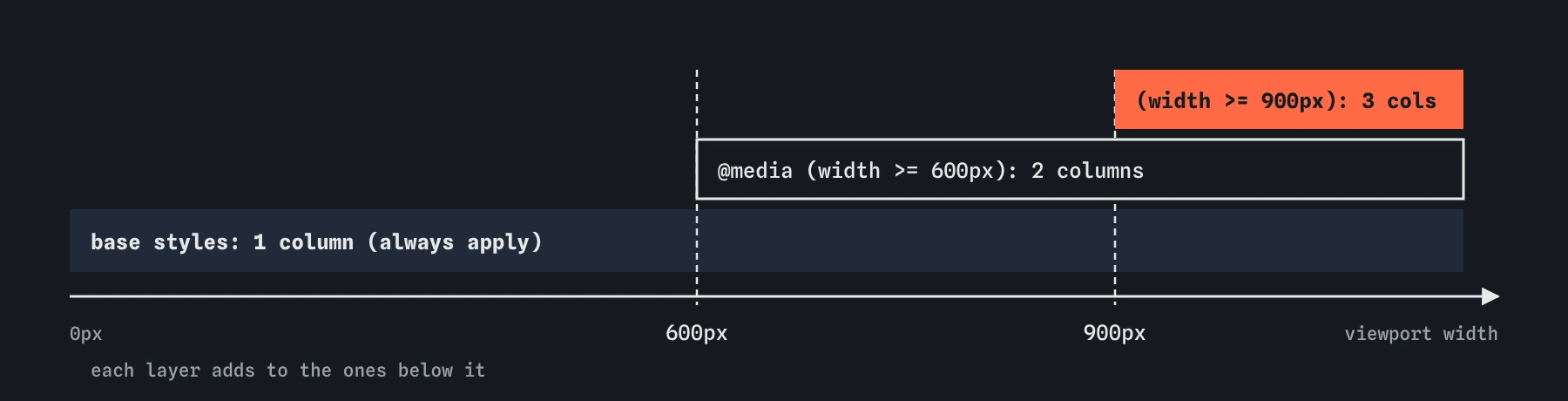
width >= query adds a layer on top once there is room, and wider layers override only what they need to.How do you write a width condition?
The modern range syntax reads like maths: (width >= 600px) means the viewport is 600px or wider, and (400px <= width < 900px) matches a band between two sizes. It is supported in all current browsers since 2023, and it removes the old off-by-one confusion about whether a breakpoint value is included.
The older form is (min-width: 600px), which means exactly the same as (width >= 600px). There is also (max-width: 599px) for the other side. You will see the old form in almost every existing codebase and in most AI-generated CSS, and it still works everywhere. Pick one style per project so your teammates do not have to translate.
You can combine conditions with and, and list alternatives with a comma, which works as or. The word screen before a condition, as in @media screen and (min-width: 600px), limits the rules to screens and excludes print. You rarely need it unless you also write print styles.
@media (400px <= width < 900px) {
  .menu {
    columns: 2;
  }
}
Why start with the small screen?
Mobile-first means the base CSS, outside any query, describes the narrow layout. You then add width >= queries that layer on extra columns, larger gaps or side-by-side panels when there is room. Narrow layouts are usually the simpler ones: one column, full width, normal flow. Starting there means fewer declarations to undo.
Desktop-first does the reverse. You write a three-column layout and then use max-width queries to turn columns off, reset widths and remove floats on small screens. Every override is a chance to miss one property, and the small screen, which many of your visitors use, gets the most patched-up CSS.
A mobile-first stylesheet also fails gracefully. If a query is mistyped and dropped, visitors on large screens see a working single-column page instead of a broken one.
How do you choose breakpoints?
Pick breakpoints from your content, never from a list of phone models. Narrow the browser window slowly and watch the layout. The point where a line of text gets uncomfortably long, a card squeezes its button onto two lines, or a two-column grid leaves one column too thin is your breakpoint. Device sizes change every year; your content's needs do not.
Most small sites need two or three breakpoints. If you find yourself writing ten, the layout is probably fighting the content, and flexible tools like flex-wrap, repeat(auto-fit, minmax(200px, 1fr)) in grid, or clamp() for sizes may remove the need for some queries entirely.
Consider em units for breakpoints. A query like (width >= 40em) grows with the user's default font size, so someone with large text gets the roomier narrow layout sooner. Inside a media query, em always refers to the browser's default font size, never to the page's own font-size rules.
@media (width >= 40em) {
  .recipe {
    display: grid;
    grid-template-columns: 1fr 2fr;
  }
}
How do dark mode and reduced motion queries work?
The prefers-color-scheme feature reports whether the visitor has chosen a light or dark appearance in their operating system or browser. The neatest pattern is to keep colours in custom properties and swap only the properties inside the query. Every rule that reads var(--bg) then updates at once.
The prefers-reduced-motion: reduce feature is true when the visitor has asked the system to cut down animation, often because motion makes them dizzy or sick. Inside it, shorten or remove transitions and animations that move things across the screen. Fades and colour changes are usually fine to keep.
Both features are supported in every current browser. You can test them without changing your system: Chrome and Firefox DevTools have a rendering panel that emulates dark mode and reduced motion.
:root {
  --bg: #fffdf8;
  --ink: #222;
}

@media (prefers-color-scheme: dark) {
  :root {
    --bg: #1b1b1b;
    --ink: #eee;
  }
}
What do hover and pointer tell you?
The hover feature asks whether the main input can hover. A mouse can; a finger on a touchscreen cannot. Use (hover: hover) around effects that only make sense with a mouse, such as revealing a caption on hover, so touch users are never left with content they cannot reach.
The pointer feature describes how precise the main pointer is. (pointer: coarse) means a finger, so you might give buttons more padding there. (pointer: fine) means a mouse or stylus. The any-hover and any-pointer versions check every connected input, which helps on laptops with touchscreens.
Never hide important information behind hover alone, even inside a query. Keyboard users and screen reader users do not hover either.
@media (pointer: coarse) {
  .button {
    padding: 12px 20px;
  }
}
How do print styles work?
A @media print block applies when the page is printed or saved as a PDF. A recipe site benefits most: hide the navigation, the comments and the share buttons, switch to black text on white, and make sure the ingredients list does not split across pages with break-inside: avoid.
You can preview print styles in DevTools by emulating the print media type, which is quicker than sending pages to a printer.
@media print {
  nav,
  .share {
    display: none;
  }
}
Why do my media queries do nothing on a phone?
Without the viewport meta tag, phone browsers pretend the screen is about 980px wide and shrink the whole page to fit. Your (width >= 600px) query is then true on a phone, and your mobile layout never appears. Every responsive page needs <meta name="viewport" content="width=device-width, initial-scale=1"> in its head.
If the tag is present and a query still fails, check the syntax first. A missing parenthesis, a missing space after and, or a misspelled selector inside the block makes the browser ignore the rules without any error. In DevTools, the Styles panel shows the active @media condition above each rule that came from a query, and the device toolbar lets you drag the width and watch rules switch on and off.
When reading AI-generated CSS, look for desktop-first max-width stacks with many overrides, breakpoints named after specific phones, and queries that repeat the whole rule when only one property changes. Each of those makes the stylesheet harder to maintain. Container queries, covered next, handle components that need to respond to their own space.
<meta name="viewport" content="width=device-width, initial-scale=1">Field notes
- A media query wraps normal CSS rules that apply only while its condition is true.
- The range syntax reads like maths, for example
(width >= 600px). - Mobile-first means the base CSS is the narrow layout and queries add to it.
- Choose breakpoints where your content starts to look wrong, never from phone models.
Easy to get wrong
Media features must be in parentheses. Without them the whole query is invalid and every rule inside is ignored.
A media query holds rules, and each rule still needs a selector. A bare declaration inside the block is thrown away.
Queries add no specificity, so a later base rule overrides them. Put media queries after the rules they change.
Targeting one phone's exact size breaks on the next phone. Choose breakpoints where your content needs them.
Questions people ask
Should I use min-width or the new range syntax?
Both work in all current browsers. The range syntax (width >= 600px) is clearer, especially for bands between two sizes. Stay consistent within one project.
How many breakpoints does a site need?
Usually two or three. Add one only when the content looks wrong at some width, and prefer flexible layouts that adapt without a query.
Do media queries measure the screen or the window?
Width features measure the viewport, which is the browser window's content area. Resizing a desktop window triggers them just like switching devices.
Can I put a media query inside a rule?
Yes, with CSS nesting, which works in all current browsers. A @media block written inside .shop { } applies to .shop without repeating the selector.