How does native CSS nesting work?
Nesting lets you write a rule inside another rule, so related styles sit together. Inside a nested rule, & stands for the parent selector. .card { & h2 { } } means .card h2, and .card { &:hover { } } means .card:hover. Native nesting is supported in all major browsers since 2023, so you no longer need Sass for it.
The space matters. & .featured with a space matches a .featured element inside the card. &.featured without a space matches the card itself when it also has that class. This is the most common nesting slip, and it fails silently.
For descendant selectors you can leave out the &: .card { h2 { } } works in every current browser. Many teams still write & everywhere so the relationship is visible at a glance. Media queries can be nested too, which keeps the narrow and wide versions of a component in one place.
.card {
  padding: 16px;

  & h2 {
    margin-top: 0;
  }

  &:hover {
    border-color: #b5442c;
  }

  @media (width >= 40em) {
    padding: 24px;
  }
}
@layer reset, base, components, utilities;, a plain .btn in components beats .card button in base, and any unlayered rule beats them all.When does nesting help, and when does it hurt?
Nesting helps when the inner rules only make sense with the outer one: a card's heading, its hover state, its focus ring, its wide-screen variant. Reading one block tells you everything about the component.
Deep nesting hurts. Each level adds the parent's selector, so four levels deep you have a selector like .page .main .card .title span, with high specificity and a hard dependency on the exact HTML structure. Moving the card into a sidebar breaks it, and overriding it needs an even longer selector. Keep nesting to one or two levels, mostly for states and direct parts.
A nested selector behaves as if the parent were wrapped in :is(). That means it takes the specificity of the strongest selector in a parent list. #hero, .banner { & p { } } gives every nested p ID-level specificity, even inside .banner. Avoid IDs in parent rules that have nested children.
What is @layer for?
Cascade layers group your CSS into named layers with a fixed priority. You declare the order once, usually at the top of the main stylesheet, with a statement like @layer reset, base, components, utilities;. Then you put rules into a layer with an @layer name { } block, anywhere in your CSS or in other files.
The order statement is what counts. Blocks can appear in any order below it; the first time a layer is named fixes its position. If you skip the statement, layers are ordered by first appearance, which is easy to get wrong when files are loaded in a different sequence. Layers are supported in all current browsers since 2022.
@layer reset, base, components, utilities;

@layer base {
  body {
    font-family: system-ui, sans-serif;
  }
}
How do layers beat specificity?
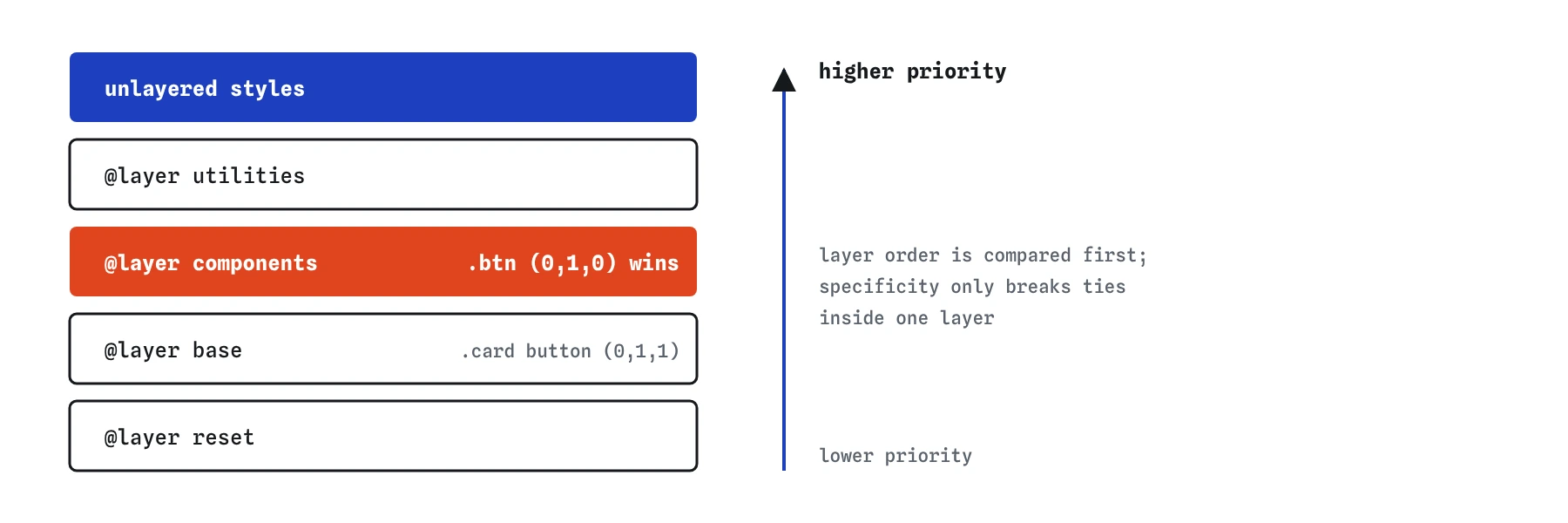
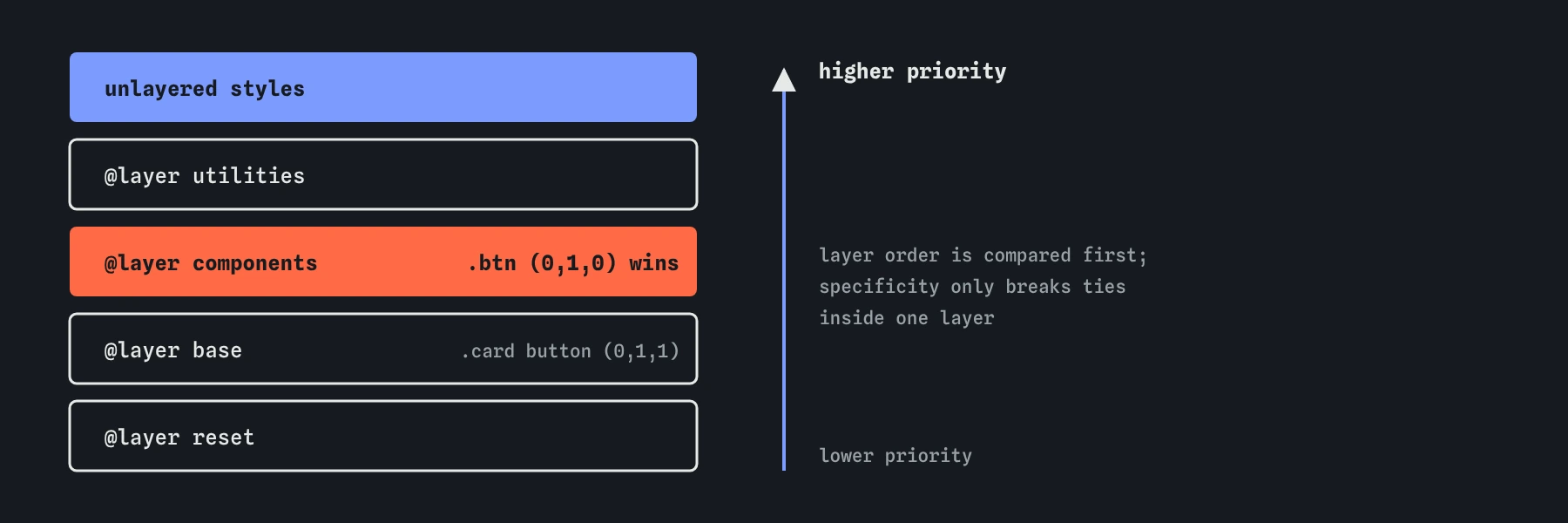
When two declarations compete, the cascade checks origin and importance first, then layers, and only then specificity. So a declaration in a later layer wins over one in an earlier layer, however specific the earlier selector is. In the demo, .btn in components beats .card button in base, even though .card button has the higher specificity.
Specificity still decides inside a single layer, and source order still breaks ties after that. Layers do not make specificity disappear; they put a bigger rule above it.
Styles that are not in any layer form an implicit final layer that beats all named ones. This is useful for quick one-off overrides and dangerous for third-party CSS: a library loaded without a layer will override your whole layered system. Import it into a low layer instead.
Important declarations reverse the order. A !important in reset beats a !important in utilities. That lets a reset protect a few critical values, but in daily work it is one more reason to avoid !important.
What layers should a project have?
A common set has four layers, from lowest to highest:
@layer reset, base, components, utilities;

@layer utilities {
  .text-center {
    text-align: center;
  }
}reset: removes browser defaults, such as margins onbodyand list padding. Element selectors only.base: your defaults for elements: body font, link colours, heading sizes, focus styles.components: classes for cards, buttons, navigation and forms.utilities: small single-purpose classes like.visually-hiddenor.mt-0that must win over components.
How do you import a file into a layer?
@import can place a whole file into a layer: @import url("reset.css") layer(reset);. This is the cleanest way to tame a third-party stylesheet, because everything in it lands below your own layers no matter how specific its selectors are.
Imports must come before every other rule except @charset and @layer statements, so put the order statement first and the imports right after it. Each import is a separate request unless your build tool bundles them.
@layer reset, vendor, base, components;

@import url("reset.css") layer(reset);
@import url("datepicker.css") layer(vendor);
How does @supports protect new features?
@supports applies its rules only when the browser understands a declaration. The condition goes in parentheses, exactly like a media feature: @supports (display: grid). You can combine conditions with and, or and not, and test selectors with selector(), as in @supports selector(:has(a)).
The pattern is to write a working fallback first, outside the query, and add the improvement inside. Browsers that do not know the feature skip the block and keep the fallback. Without parentheses the query is invalid and every browser skips it, which looks exactly like lack of support, so test it in a browser you know supports the feature.
Most layout features are now universal, so @supports is most useful for recent additions such as anchor positioning, field-sizing or scroll-driven animations.
.gallery {
  display: flex;
  flex-wrap: wrap;
}

@supports (display: grid) {
  .gallery {
    display: grid;
    grid-template-columns: repeat(auto-fit, minmax(200px, 1fr));
  }
}
How do you see layers and nesting in tools?
The editor's Why? lens understands nesting and layers: it shows the full selector a nested rule produces and names the layer each winning declaration came from, so you can see when layer order, rather than specificity, decided the result.
In Chrome and Edge DevTools, the Styles pane groups rules under their layer name and shows the expanded selector for nested rules. Firefox and Safari show the layer next to each rule. When a rule loses unexpectedly, check its layer before you start adding specificity.
AI tools often write layered CSS with the order statement missing, leave a stray unlayered rule that overrides everything, or nest four levels deep to mirror the HTML. Flatten the deep nesting and declare the order at the top.
Field notes
- Inside a nested rule,
&stands for the parent selector. - Cascade layers have a priority order that you declare once with
@layer. - A declaration in a later layer beats an earlier layer, whatever the specificity.
- A common setup orders layers from reset upward to the most specific styles.
Easy to get wrong
The space makes it a descendant selector. Without the space it matches the card that also has the class.
Without an order statement, layers rank by first appearance. Declare the order once at the top so it never depends on file order.
The condition needs parentheses. Without them the block is invalid and silently ignored.
Deep nesting creates long, specific selectors tied to the exact HTML. One class is easier to reuse and override.
Questions people ask
Do I still need Sass for nesting?
Not for nesting. Every current browser supports it natively. Sass still offers mixins and loops, but custom properties and nesting cover most daily needs.
Do layers replace specificity?
They sit above it. Layer order is compared first, and specificity still decides between rules in the same layer.
Why does my unlayered CSS win over everything?
Unlayered styles count as the last layer. Put them in a named layer if they should rank lower.
Can I nest @layer inside another layer?
Yes. Nested layers are named with a dot, like components.forms, and are ordered within their parent layer.
Is @supports needed for flexbox and grid?
No longer for the basics. Every current browser supports them. Use it for features added in the last few years.