What are you building?
A product card for a small bakery: a photo of the loaf, a little tag that says it was baked today, the name, a one-line description, the price and a link to add it to an order. The HTML is finished and you leave it alone. All the work is in the stylesheet.
Cards like this appear on almost every shop, menu and listing page, so the skills carry straight over to real work. Nothing here is new. Every property you need came up in the Foundations, The box and Text groups. The difference is that nobody tells you which line to write next. You decide the order, you choose the values, and you check the result yourself.
The finished card should be no wider than 280px, sit on a warm background, have rounded corners and a soft shadow, show a full-width photo, give the text comfortable padding, make the price easy to spot and turn the link into a clear button. If the photo fails to load, the card should still look tidy, because the width and height attributes reserve its space.
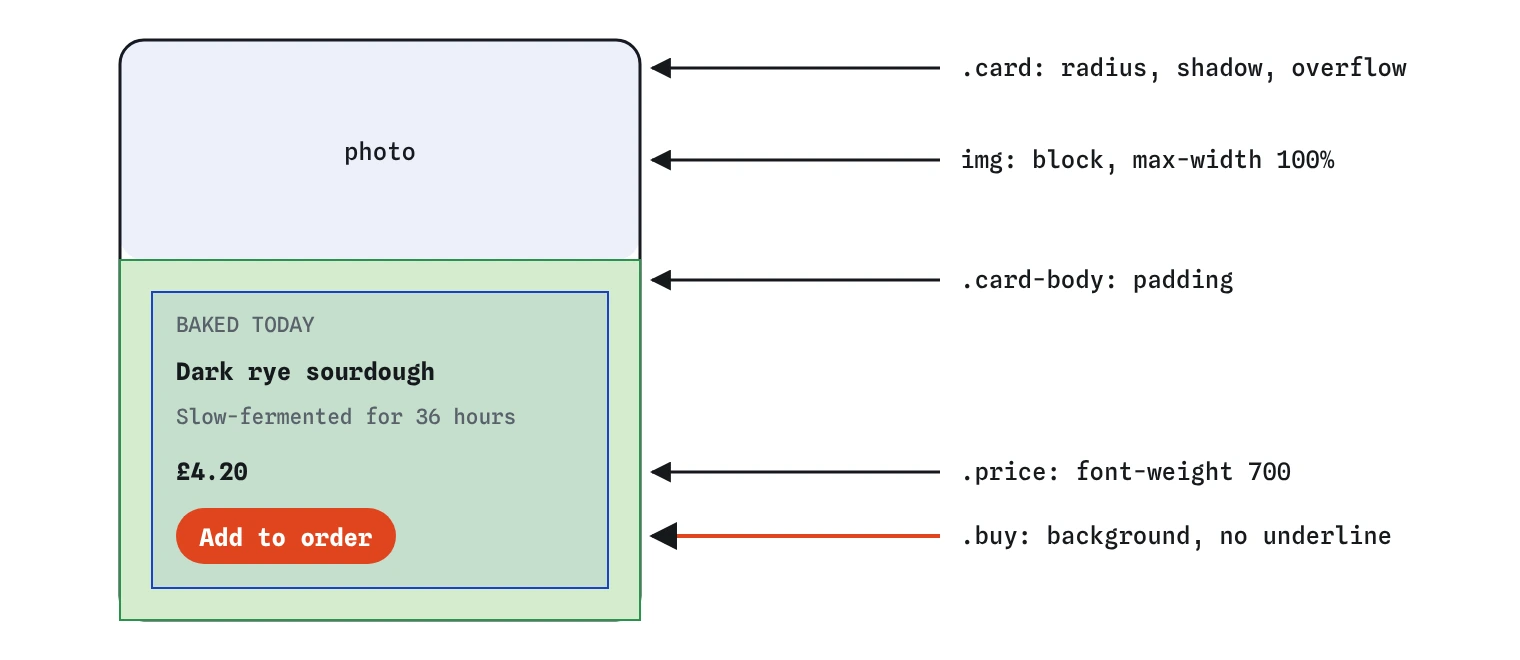
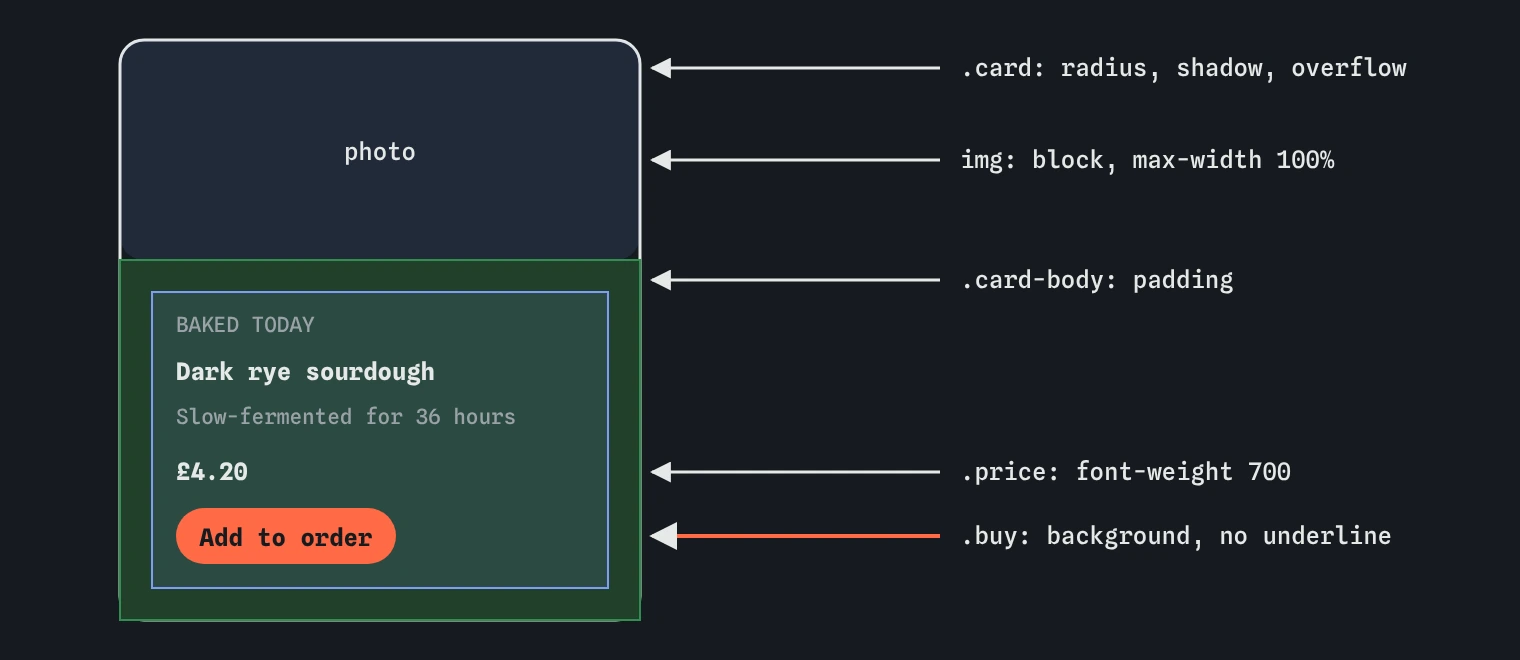
.card box that owns the shape and shadow, and the padded .card-body that holds the text. Putting padding on the inner box lets the photo run edge to edge.How should you plan before typing?
Spend two minutes with the HTML before writing any CSS. Name each box you can see: the outer .card, the image, the .card-body, and inside it the tag, heading, description, price and link. Then decide which box owns which job. The outer card owns the shape: the border, the radius, the shadow and the background. The body owns the breathing room: the padding. Each text element owns its own type.
Next, write down the few values that repeat. The accent colour shows up on the tag and on the button. The ink colour is used for all the text. The radius might appear on the card and, smaller, on the button. Those become custom properties on :root, which keeps the card consistent and makes a later colour change a one-line edit.
Finally, pick an order and stick to it: tokens first, then the outer box, then the image, then the body padding, then the text from top to bottom, then the button. Check the preview after each block. Small steps make it obvious which rule caused a surprise.
- Tokens on
:root: ink, paper, accent, radius, spacing. - Outer box: background, border, radius, shadow,
overflow: hidden. - Image:
display: blockandmax-width: 100%. - Body: padding from the spacing token.
- Text: tag, heading, description, price.
- Button: padding, background, colour, no underline.
Which earlier lessons does each part use?
If you get stuck on a part, go back to the lesson that taught it rather than guessing. This map shows where each piece came from.
- Tokens and
var(): Custom properties, with colour values from Colors. - Picking the right element: Selectors, and The cascade and specificity when a rule seems ignored.
- Padding on the body and the gap above the price: The box model and Spacing.
- The 280px limit and the flexible image: Sizing.
- Rounded corners and the thin edge: Borders and outline.
- The cream fill and page colour: Backgrounds and gradients.
- The lift off the page: Shadows.
- Clipping the photo to the rounded corners: Overflow and scrolling.
- The font stack, sizes and weight: Fonts.
- Uppercase tag, letter spacing and line height: Text styling.
- The button-style link: Links and lists.
Why does the photo need special care?
An image is inline by default, so it sits on the text baseline and leaves a few pixels of gap below it. display: block removes that gap. max-width: 100% with height: auto lets the 600px photo shrink to the card width while keeping its proportions.
Rounded corners on the card do not automatically round the photo, because a child can paint outside its parent's border. overflow: hidden on .card clips anything that spills past the rounded edge, so the top corners of the photo follow the curve. Without it you get a rounded card with a square photo poking out of it, which is the most common way this card looks almost right.
How do you make the text read well?
Give the text a hierarchy a shopper can scan in a second. The tag is small, uppercase and spaced out with letter-spacing, in the accent colour, so it reads as a label. The heading is the largest text on the card with a tight line-height around 1.2. The description is normal size with a looser line height around 1.5. The price is bold and a little larger, because it is the thing people look for.
Browsers give paragraphs and headings default margins, and inside a small card those add up to a lot of empty space. Set the margins yourself, small and deliberate: a few pixels between tag and heading, a bit more before the price. Keep text colour contrast at 4.5:1 or better against the card background, including the accent colour on the tag.
.tag {
  margin: 0;
  color: var(--color-accent);
  font-size: 0.75rem;
  text-transform: uppercase;
  letter-spacing: 0.08em;
}
How do you check your own work?
Use the three lenses on the preview. The Box lens shows each element's padding, border and margin, so you can confirm the padding sits on .card-body and the photo has none. It also exposes stray default margins on the paragraphs. The Layout lens shows that the card is a block in normal flow and that the button is inline-block, which is why its vertical padding pushes other lines away. The Why? lens tells you which rule set a value and which rules lost, which is the fastest way to find a selector that never matched.
Then test it like a visitor. Shrink the preview to its narrowest width and confirm nothing overflows. Turn off the image by changing its src to a broken path and check the card still holds together. Press Tab to reach the button and make sure focus is visible. Read the price from arm's length. If any of these fail, fix that one thing and check again.
What are the common ways it goes wrong?
Most broken cards fail in the same handful of ways, and each one has a quick tell.
- Padding on
.cardinstead of.card-bodyframes the photo with an unwanted border of background. - A missing semicolon after
border-radiusswallows the next declaration, so the shadow vanishes too. - A token name typed differently in
var()and in:rootsilently gives you the initial value, usually transparent. - A heavy shadow such as
0 0 20px blacklooks muddy. Low opacity and a small vertical offset look natural. - Removing the link underline without adding a background leaves text that no longer looks clickable.
- A fixed
width: 280pxis fine here, butmax-widthis safer because it lets the card shrink inside a narrower parent.
What can you add once it works?
When every requirement passes, try a few stretch goals. Each one reuses something you already know and makes the card closer to what a real shop would ship.
- Add a hover state on
.buythat darkens the background, and a:focus-visibleoutline in the accent colour. - Use
aspect-ratio: 3 / 2andobject-fit: coveron the image so any photo crops to the same shape. - Add a crossed-out old price next to the new one with
text-decoration: line-throughand a muted colour. - Make a second card for a cinnamon knot and check the tokens keep both looking like a set.
- Swap the tokens for a dark palette and see how few lines need to change.
Field notes
- Name each box in the HTML before writing any CSS, so you know where styles go.
display: blockandmax-width: 100%keep the photo neat and inside the card.- A clear text hierarchy helps a shopper scan the tag, name and price quickly.
- Put the padding on
.card-bodyso the photo can reach the card's edges.
Easy to get wrong
The photo keeps its square corners unless the card clips it.
Padding on the outer card frames the photo. Pad the inner text box for an edge-to-edge image.
Without the underline the link needs another obvious signal that it can be clicked.
Real shadows are soft and fall slightly downward. Pure black at full strength looks like a smudge.
Questions people ask
Do my values have to match the solution?
No. The checks look at results: some padding, some radius, a shadow, a bold price, a button-like link and at least one token. Your colours and sizes can differ.
Should the button be a real `<button>`?
Use a link when it goes to another page or section, as here. Use a <button> when it runs an action on the same page, such as adding to a cart with JavaScript.
Why use tokens on a single card?
Cards rarely stay single. The moment you add a second product or a dark theme, the tokens save you from hunting down every colour.
The photo did not load. Is my CSS wrong?
Probably not. The demo image comes from an outside service. The width and height attributes keep the space reserved, so the layout still shows whether your CSS is right.