What does opacity really do?
The opacity property fades an element and everything inside it, from 1 (solid) to 0 (invisible). The browser paints the element and its children into a separate group first, then blends that group with the page at the given opacity. Children cannot opt out: a child with opacity: 1 inside a parent at 0.5 still looks half faded.
Any opacity below 1 creates a stacking context. That changes how z-index works for the children: they are layered inside the parent's group and can no longer interleave with elements outside it. If a dropdown inside a faded card ends up behind a neighbouring card, the opacity is a likely cause.
When you want a see-through background with solid text, fade the colour instead: background-color: rgb(255 255 255 / 0.8) affects the background only. An element at opacity: 0 is still there for screen readers and still takes clicks, which surprises people who use it to hide things.
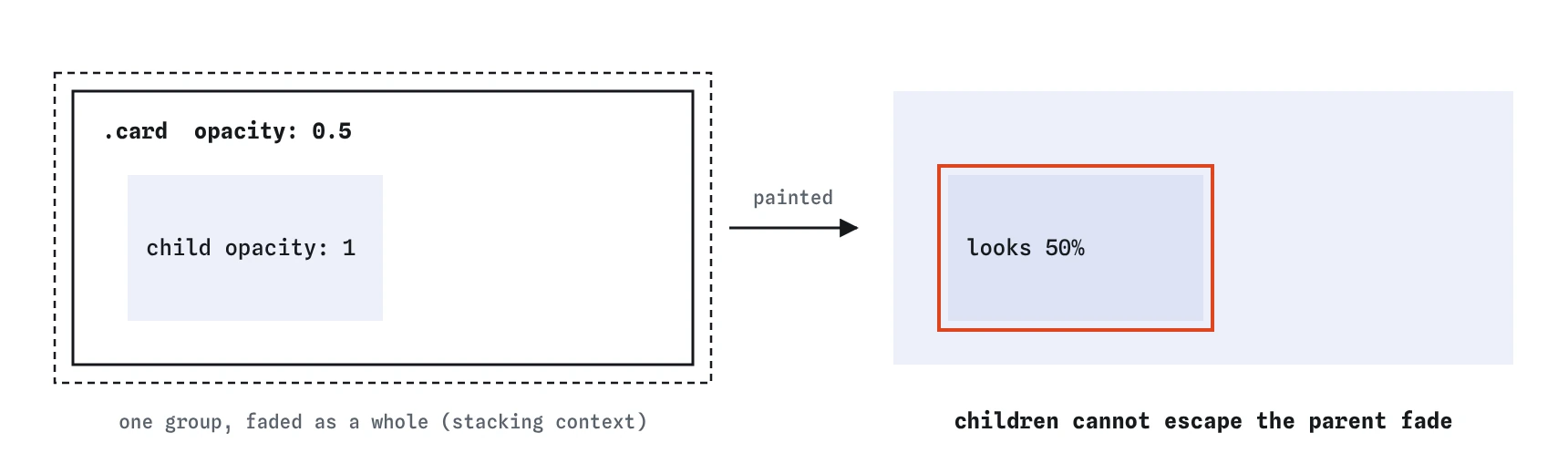
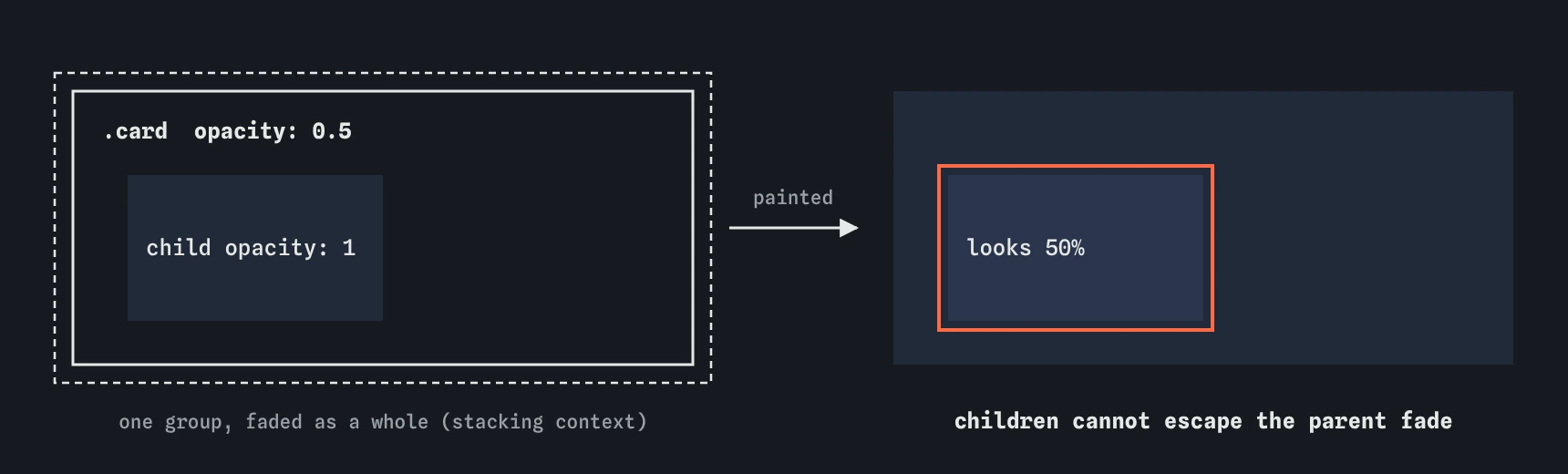
opacity: 1 still looks half faded, because the whole group was faded together.Which filter functions are there?
The filter property applies photo-style effects to the element's rendered pixels. Each function takes an amount. Common ones:
Filters work on anything: images, text, SVG icons, whole sections. The original image file never changes, so the same photo can show in colour in one place and grey in another.
.sold img {
  filter: grayscale(1);
}

.logo {
  filter: drop-shadow(0 2px 3px rgb(0 0 0 / 0.3));
}blur(4px)softens the element by a radius in pixels. Percentages are not allowed.brightness(1.2)lightens andbrightness(0.7)darkens. 1 means unchanged.contrast(1.3)increases contrast; values below 1 flatten it.grayscale(1)removes all colour;0.5removes half.saturate(1.5)makes colours stronger;saturate(0)is the same as fully grey.sepia(),hue-rotate()andinvert()exist too and suit special effects more than interfaces.drop-shadow(x y blur colour)casts a shadow from the visible shape, so a transparent PNG or SVG icon gets a shadow that follows its outline.
How do you combine filters?
List several functions in one filter value, separated by spaces. They run in order, each one working on the output of the last. filter: grayscale(1) brightness(1.1) greys the image and then lifts it slightly. Swapping the order changes the result for some combinations, especially with drop-shadow, which takes the colour adjustments of anything after it.
Like transform, a second filter declaration replaces the first entirely. A hover rule that sets filter: brightness(1.1) on a greyed image brings the colour back. If you want the grey to stay, repeat it: filter: grayscale(1) brightness(1.1).
Filters can transition and animate. A product image that goes from grayscale(1) to grayscale(0) on hover is a common gallery effect, and a short transition makes it feel gentle.
.gallery img {
  filter: grayscale(1);
  transition: filter 0.3s ease-out;
}

.gallery img:hover {
  filter: grayscale(0);
}
How do you make frosted glass with backdrop-filter?
The backdrop-filter property applies filter functions to whatever is behind the element, seen through its background. Give a label backdrop-filter: blur(8px) and a semi-transparent background, and the photo behind it blurs while the label's text stays sharp. The background must be partly transparent, or nothing shows through.
It is supported in all current browsers; Safari needed a -webkit- prefix until 2024. Still write a fallback that works on its own: choose a background colour opaque enough, such as 80% white, that the text is readable even with no blur at all. Then the blur is a nice extra. Check contrast against the brightest and darkest parts of the photo.
A common mix-up is using filter: blur() on the label itself, which blurs the label's own text and leaves the photo sharp.
.label {
  background-color: rgb(255 255 255 / 0.8);
  backdrop-filter: blur(8px);
}
What is mix-blend-mode for?
The mix-blend-mode property blends an element's colours with whatever is behind it, using the blend modes from image editors: multiply, screen, overlay, difference and more. multiply makes white disappear, which is handy for placing a logo with a white background on a coloured section. difference makes text invert against what is under it.
Blend modes depend heavily on the colours underneath, so test them on the real background and in dark mode. Like opacity, a blend mode other than normal creates a stacking context. Use it for decoration only, never for text that must stay readable.
.logo {
  mix-blend-mode: multiply;
}
How does clip-path cut shapes?
The clip-path property hides everything outside a shape. circle(50%) gives a round avatar without needing border-radius. inset(10px round 12px) trims the edges with rounded corners. polygon() takes a list of x and y points and can make triangles, arrows, slanted section edges and speech bubble tails.
Clipped areas are invisible and ignore clicks and hover. The element still takes up its full rectangle in the layout. clip-path can transition between two shapes of the same kind with the same number of points, which makes simple reveal effects possible. Firefox's DevTools has a shape editor that lets you drag polygon points directly.
.avatar {
  clip-path: circle(50%);
}

.banner {
  clip-path: polygon(0 0, 100% 0, 100% 85%, 0 100%);
}
Are filters slow?
Opacity is cheap. Like transform, the browser can usually fade a layer on the graphics card without repainting it, which is why fades stay smooth on any device.
Filters cost more. Blur is the expensive one: the larger the radius and the bigger the area, the more work each frame. A backdrop-filter on a sticky header has to be recalculated every time the page scrolls underneath, which can make scrolling choppy on low-end phones. Keep blur radii modest, keep blurred areas small, and avoid animating the blur radius itself. If scrolling stutters, toggle the filter off in DevTools and compare. The Performance panel shows long paint blocks when filters are the bottleneck.
What should you check in AI-written effect CSS?
Generated CSS often uses filter: blur() where backdrop-filter was meant, puts opacity on a card to fade its background and accidentally fades the text, or writes backdrop-filter with a fully transparent background so no fallback exists. It also tends to stack several expensive filters on large sections.
Check grayscale and saturate values too: they are on a 0 to 1 scale or percentages, and generated code sometimes writes grayscale(100), which the browser clamps to fully grey but which signals the author guessed.
Field notes
opacityfades an element along with everything inside it.- The
filterproperty applies photo-style effects such asgrayscale()andblur(). - Several filters in one value run in order, each working on the last one's output.
backdrop-filteraffects what sits behind an element, which gives a frosted glass look.
Easy to get wrong
Opacity fades the text along with the background. A transparent colour fades only the background and keeps the text readable.
filter blurs the element itself. backdrop-filter blurs what is behind it, and the solid-ish background is the fallback.
On a transparent PNG or SVG, box-shadow draws a rectangle. drop-shadow() follows the visible outline.
Questions people ask
Does a filter change the actual image file?
No. It changes how the browser draws the element. Saving or downloading the image gives the original.
Why is my z-index ignored after adding opacity?
Opacity below 1 creates a stacking context, so children are layered inside the element's group and cannot rise above things outside it.
Can I filter just the background image?
Not directly. Put the image in a pseudo-element or a separate element behind the content and filter that.
Is clip-path accessible?
Clipped content is hidden visually but still read by screen readers. Do not use it to hide information that should be hidden from everyone.