Why does CSS have so many units?
Different jobs need different reference points. Some sizes should be fixed (a 1px border), some should follow the reader's text size setting (body text), some should follow the parent (an icon next to a word), and some should follow the screen (a full-height banner). Each unit answers the question "relative to what?".
Every non-zero length needs a unit. padding: 16 is invalid and gets dropped. Zero is the exception: margin: 0 is fine because zero is zero in every unit. A space between number and unit, as in 2 rem, is also invalid.
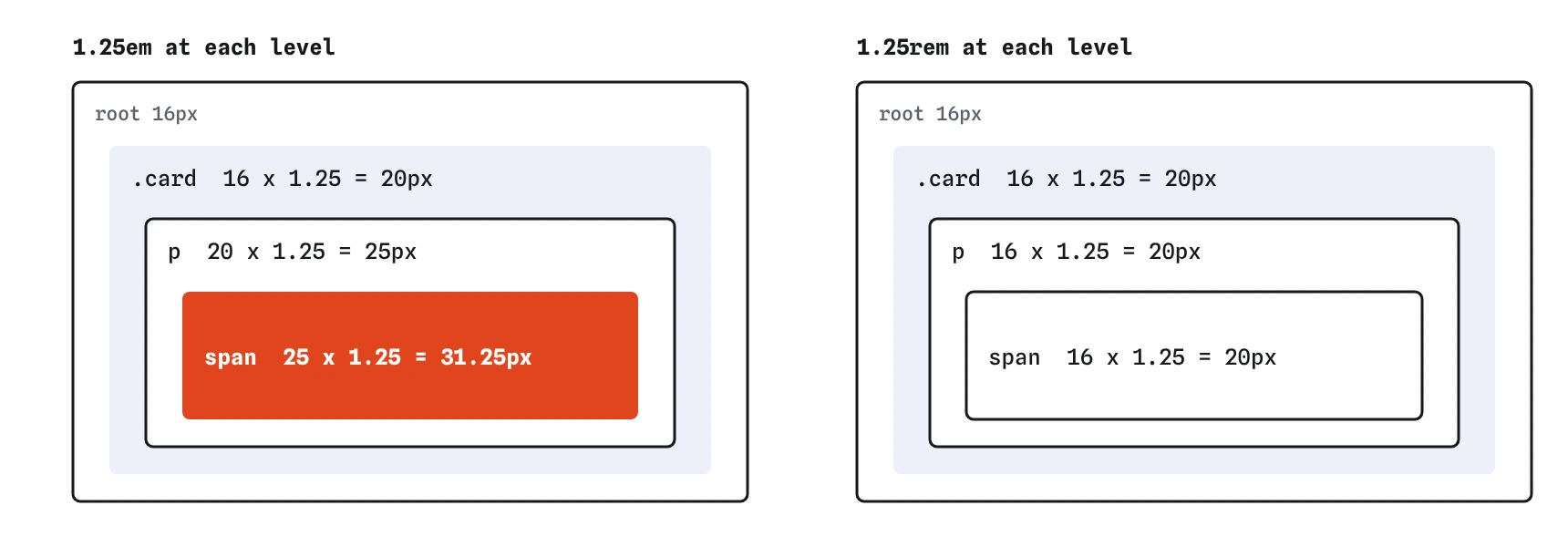
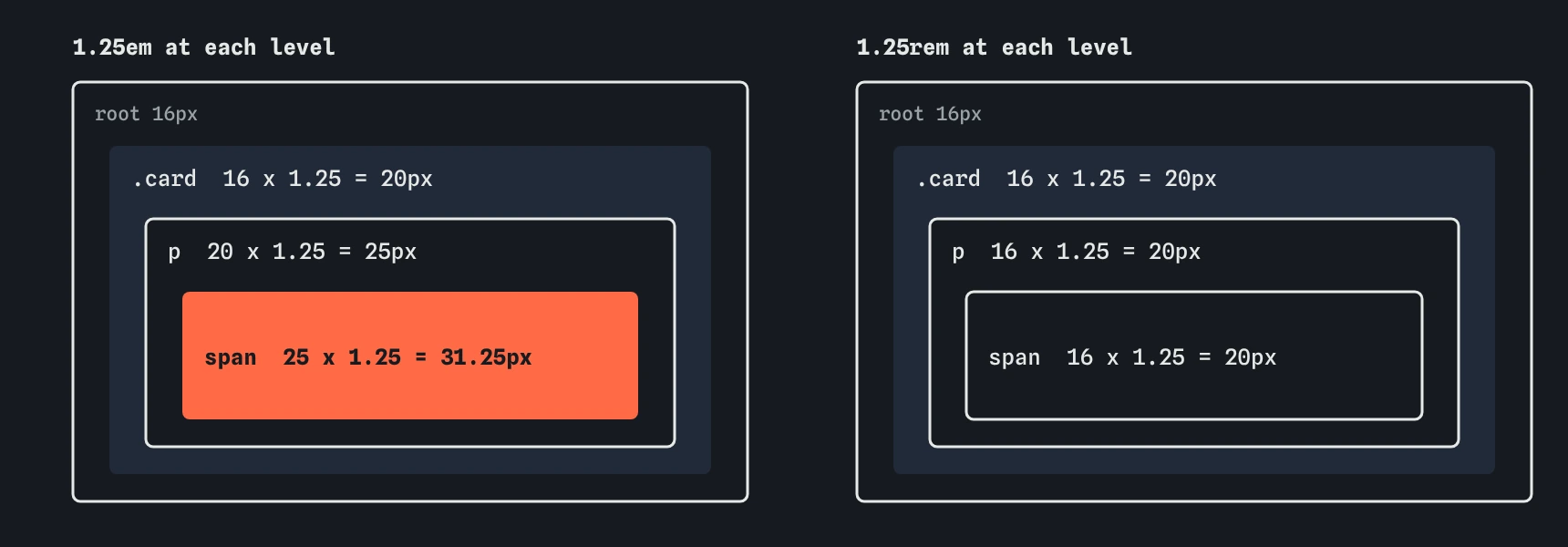
em multiplies the size it inherits, so the same value grows at every level. A rem always measures from the root, so the size stays put.When should you use px?
A CSS pixel is a fixed reference unit, about 1/96 of an inch at arm's length. It is not a hardware pixel: a phone with a 3x screen draws each CSS pixel with nine device pixels. Browser zoom still scales px values, so pixel layouts zoom fine.
The weakness of px shows up with the reader's default font size setting, which is separate from zoom. Someone who sets their browser text to 20px gets no benefit if your body text is fixed at 16px. Use px for things that shouldn't grow with text: borders, hairlines, shadows, small fixed gaps and media query breakpoints if you prefer them.
.card {
  border: 1px solid #ccc;
  box-shadow: 0 2px 6px rgb(0 0 0 / 0.15);
}
What is the difference between rem and em?
rem means root em: a multiple of the font size of the <html> element. With the default root size of 16px, 1rem is 16px and 1.5rem is 24px everywhere on the page. When a reader raises their default text size to 20px, every rem value grows with it.
em is a multiple of the current element's font size. For the font-size property itself, it uses the parent's font size. Inside a 20px card, 1.25em is 25px.
Use rem for font sizes and for spacing you want to stay consistent across the page. Use em for things that should scale with their own text, such as padding on a button (so a large button gets proportionally larger padding) or the size of an icon sitting inline with a word.
html {
  /* leave the reader's default alone */
}

h2 {
  font-size: 1.5rem;
}

.btn {
  padding: 0.5em 1em;
}
Why do em font sizes compound?
Each nested element multiplies the size it inherited. A card at 1.25em inside a 16px page is 20px. A paragraph at 1.25em inside that card is 25px. A <span> at 1.25em inside the paragraph is 31.25px. Move a component into a different container and its text size changes with it.
This is the classic reason to prefer rem for font sizes. It also explains odd results with nested lists styled with font-size: 0.9em: each level of nesting shrinks a little more. When you do want compounding, such as a small element that is always 85% of its surroundings, em is the right tool.
.card { font-size: 1.25em; }   /* 20px */
.card p { font-size: 1.25em; } /* 25px */
.card p span { font-size: 1.25em; } /* 31.25px */
What are percentages relative to?
It depends on the property, which is the main source of confusion. width: 50% is half the width of the containing block. font-size: 120% is 120% of the parent's font size, the same as 1.2em. Padding and margin percentages, even vertical ones, are based on the containing block's width.
A percentage height only works when the parent has a definite height. On a normal block whose height comes from its content, height: 50% computes to auto. This is a common reason a percentage height seems to do nothing.
Percentages suit fluid widths and images: max-width: 100% keeps an image inside its column at any screen size.
.photo {
  width: 100%;
  max-width: 600px;
}

img {
  max-width: 100%;
  height: auto;
}
When do viewport units make sense?
vw and vh are 1% of the viewport's width and height. 100vh is a full-screen banner on a desktop. On phones, the browser's address bar slides in and out, and 100vh is measured against the largest viewport, so the bottom of a full-height section can hide under the toolbar.
The newer units fix this. svh is the small viewport height with all toolbars visible, lvh the large one with toolbars hidden, and dvh follows the current state as it changes. Supported in all current browsers since 2023. Use svh when content must never be cut off, and dvh when you want the section to fill exactly what is visible right now.
Avoid vw for font sizes on its own. Text sized purely in vw doesn't respond to the reader's zoom or default size. If you want fluid type, combine it with rem inside clamp(), such as clamp(1.5rem, 1rem + 2vw, 2.5rem).
Also beware width: 100vw. On desktops with visible scrollbars, the viewport width includes the scrollbar, so the element is slightly wider than the page and causes horizontal scrolling. width: 100% is usually what you meant.
.hero {
  min-height: 60vh;
  min-height: 60svh;
}
What is ch good for?
1ch is the width of the "0" character in the current font. It is the natural unit for line length. Comfortable reading needs roughly 45 to 75 characters per line, and max-width: 65ch gets you close in any font, at any font size, without hand-tuning pixels.
It is approximate for proportional fonts, since letters vary in width, and exact for monospace fonts. It also suits input widths: width: 6ch fits a postcode field nicely.
article p {
  max-width: 65ch;
}

.postcode {
  width: 9ch;
}
Should you use the 62.5% trick?
The trick sets html { font-size: 62.5%; } so that 1rem equals 10px and mental maths gets easier: 1.6rem is 16px. It still respects the reader's setting because it is a percentage.
The cost is that every element that relies on the default size, including third-party widgets and anything you forget to restyle, now renders at 10px. You then set body { font-size: 1.6rem; } to undo the damage. Modern editors and DevTools show rem values converted to pixels, and calc() handles the odd awkward number, so the trick solves a problem that barely exists now. Leave the root size alone and think in sixteenths: 0.875rem is 14px, 1.125rem is 18px.
Why should line-height be unitless?
A unitless line-height: 1.5 is inherited as the number 1.5, and every element multiplies it by its own font size. A 16px paragraph gets 24px lines and a 40px heading gets 60px lines.
If you write line-height: 24px or 1.5em on body, children inherit the computed length. The 40px heading also gets 24px lines, and its wrapped lines overlap. Use a plain number on body, then tighten it for headings with another plain number like 1.15.
When reading AI-generated CSS on this topic, look for pixel line-heights, unitless lengths like padding: 16, 100vh heroes with no svh or dvh fallback, and px font sizes everywhere.
body {
  line-height: 1.5;
}

h1,
h2 {
  line-height: 1.15;
}
Field notes
- Each unit measures from a different reference point, so pick by the job.
remfollows the root font size, so1remis 16px by default.emsizes multiply as elements nest, which can grow text by surprise.- A unitless line height scales correctly with each element's own font size.
Easy to get wrong
A fixed length is inherited as-is, so larger headings get cramped, overlapping lines. A unitless number scales with each element's text.
Non-zero lengths need a unit. Without one, the browser throws the declaration away.
On desktops 100vw includes the scrollbar, which adds a horizontal scrollbar to the page.
In nested lists each level shrinks again with em. A rem value stays the same at every depth.
Questions people ask
Is rem better for accessibility than px?
For font sizes, yes. Rem values follow the reader's default text size setting, while px font sizes ignore it. Both scale with browser zoom.
Should media queries use em or px?
Either works in current browsers. Em breakpoints follow the reader's text size, so the layout switches when text gets too large for the column, which many developers prefer.
What is 1rem if I never set a root font size?
The browser default, which is 16px unless the reader changed it.
Does dvh cause layout jumps?
It can, because the value changes as toolbars appear and disappear. Use svh for stable layouts and save dvh for cases where filling the visible area exactly is more important.