What does display: grid set up?
Setting display: grid on an element makes it a grid container and each direct child a grid item. On its own it changes very little: with no columns defined, the grid has one column and every item gets its own row, which looks like normal block layout. The work starts when you describe the tracks.
A track is a column or a row. You define columns with grid-template-columns and rows with grid-template-rows, listing one size per track. The browser then draws lines between the tracks and places items into the cells, one per cell, left to right and top to bottom. That automatic filling is called auto-placement.
Unlike flexbox, grid sizes rows and columns together, so items line up in both directions. Turn on the Layout lens in the preview, or click the grid badge in DevTools, to see the tracks, gaps and line numbers drawn over the page.
.gallery {
  display: grid;
  grid-template-columns: 200px 200px 200px;
}
What is the fr unit?
The fr unit means a fraction of the free space in the grid container. The browser first gives fixed tracks (pixels, rem, percentages) and content-sized tracks their size, subtracts the gaps, and then shares what is left among the fr tracks in proportion to their numbers.
With 1fr 1fr 1fr, three columns get equal shares. With 2fr 1fr, the first column gets two thirds of the free space. Mixing works well: 240px 1fr is a fixed sidebar and a flexible main column, which stays correct at any container width.
One detail trips people up. A 1fr track has a minimum of auto, so it will not shrink below its widest content. A long word or a wide image can make one column wider than the others. Writing minmax(0, 1fr) instead lets the column shrink to its share and forces the content to wrap or overflow inside it.
.shop {
  display: grid;
  grid-template-columns: 240px 1fr;
}
How does repeat() save typing?
The repeat() function writes a pattern of tracks for you. repeat(4, 1fr) is four equal columns. The pattern can hold more than one size: repeat(2, 120px 1fr) gives four columns alternating fixed and flexible. You can mix it with other tracks, as in 200px repeat(3, 1fr).
Repeat also accepts the keywords auto-fit and auto-fill in place of the count, which lets the browser decide how many columns fit. That is the basis of responsive grids without media queries and is covered in the grid layouts lesson.
.gallery {
  display: grid;
  grid-template-columns: repeat(3, 1fr);
  gap: 8px;
}
How does gap work in a grid?
The gap property sets the space between tracks. One value applies to rows and columns; two values set row-gap then column-gap. Gaps are only between tracks, never around the outside, so use padding on the container if you also want an outer margin.
Gaps are taken out of the space before fr tracks are sized. Three 1fr columns with a 16px gap in a 332px container leave 300px to share, so each column is exactly 100px. You never need to subtract gaps from percentages yourself. The older names grid-gap, grid-row-gap and grid-column-gap still work as aliases, but use the short names in new code.
How do you place items on grid lines?
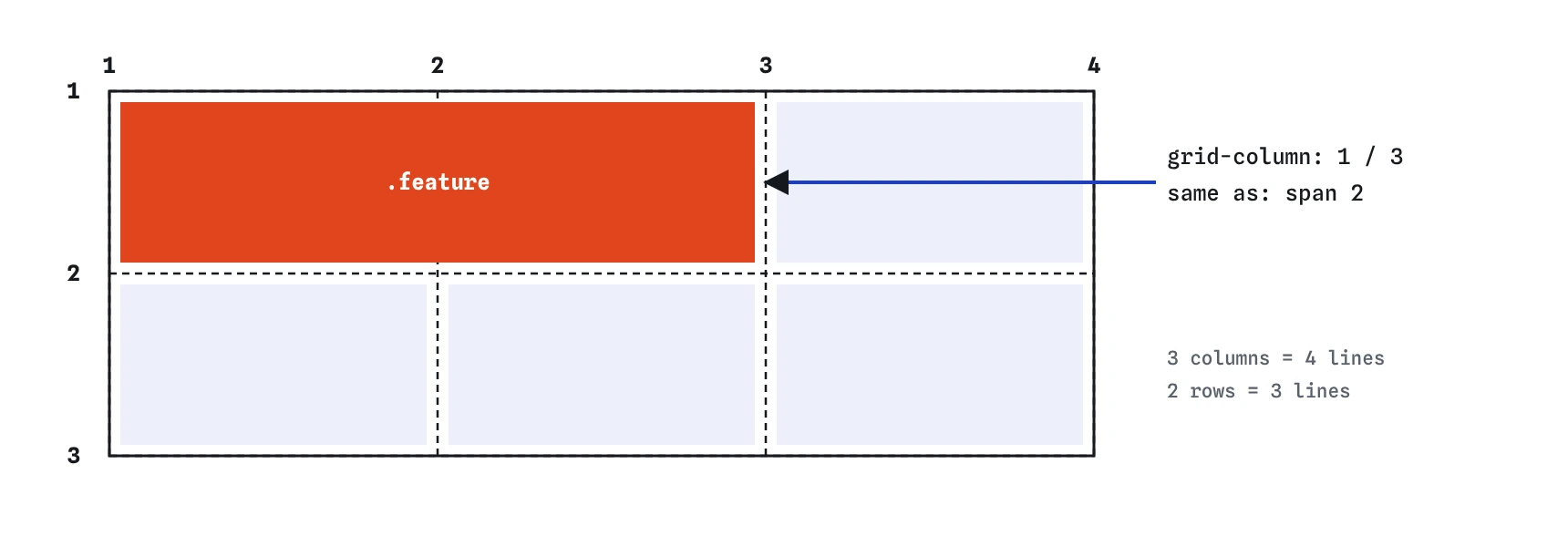
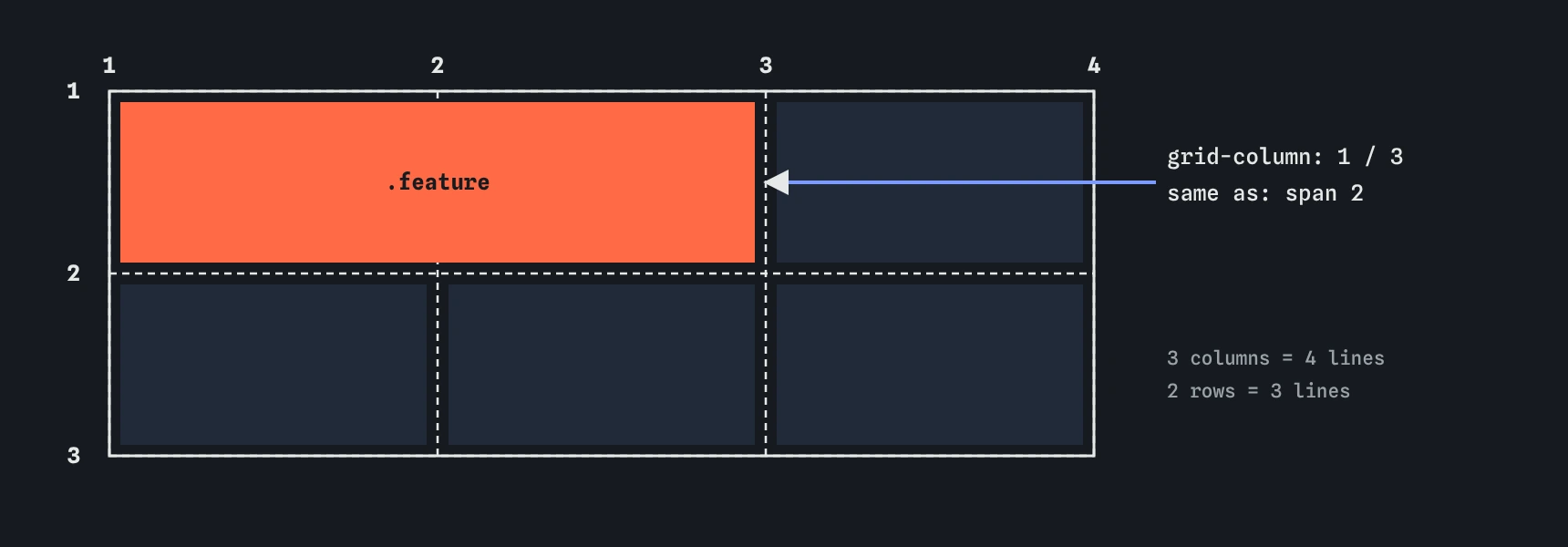
Grid lines are numbered from 1, starting at the start edge of the grid. A grid with three columns has four column lines. You place an item by naming the line it starts on and the line it ends on: grid-column: 1 / 3 puts it from line 1 to line 3, covering two columns. grid-row does the same for rows.
Negative numbers count from the end, so grid-column: 1 / -1 stretches an item across every explicit column, which is the usual way to make a full-width heading or footer inside a grid. Placed items take their cells first; auto-placed items then fill the remaining free cells in order.
Placing items out of source order has the same accessibility catch as flexbox order: tab focus and screen readers follow the HTML, so keep interactive content in a sensible source order.
.gallery .title {
  grid-column: 1 / -1;
}

.gallery .feature {
  grid-column: 2 / 4;
  grid-row: 1 / 3;
}
What does span do?
The span keyword says how many tracks to cover without fixing a start line. grid-column: span 2 makes the item two columns wide and lets auto-placement decide where it starts. That is usually what you want for a featured card in a gallery: bigger, but still flowing with the others.
You can combine a line and a span: grid-row: 2 / span 3 starts on row line 2 and covers three rows. If a spanning item does not fit at the end of a row, auto-placement moves it to the next row and leaves a hole. Adding grid-auto-flow: dense lets later small items fill those holes, at the cost of shuffling visual order.
.feature {
  grid-column: span 2;
}
Where do extra rows come from?
The tracks you define make up the explicit grid. When there are more items than cells, or you place an item past the last line, the browser adds tracks automatically. These form the implicit grid. In the demo only columns are defined, so every row is implicit.
Implicit rows are sized by grid-auto-rows, which defaults to auto, so each row is as tall as its tallest item. Set it to a length for a regular rhythm, such as grid-auto-rows: 160px for a photo wall. Similarly, grid-auto-columns sizes implicit columns, and grid-auto-flow: column makes auto-placement add columns instead of rows, which suits a horizontal scrolling strip.
.wall {
  display: grid;
  grid-template-columns: repeat(4, 1fr);
  grid-auto-rows: 160px;
}
How does minmax() keep tracks in range?
The minmax(min, max) function gives a track a size range. minmax(120px, 1fr) means never narrower than 120px, and otherwise take a share of the free space. On rows, grid-auto-rows: minmax(100px, auto) makes every row at least 100px tall but lets it grow when a card has more text, which avoids clipped content in fixed-height rows.
Common values for the max are 1fr and auto, and for the min a length or 0. minmax(0, 1fr) is the fix for the content-minimum problem described above. If the min is larger than the max, the max is ignored and the track is fixed at the min.
.notes {
  display: grid;
  grid-template-columns: repeat(2, minmax(0, 1fr));
  grid-auto-rows: minmax(100px, auto);
}
What should you check in AI-written grid CSS?
Look for fixed column counts that break on phones, such as repeat(4, 1fr) with no media query or container query, and for width values on grid items that fight their tracks. Check line numbers against the column count: an item placed on grid-column: 4 / 5 in a three-column grid creates an implicit fourth column without any warning.
Typos are common too: 1 fr with a space, span without a number, and grid-template-column without the final s. Each makes the declaration invalid, and the grid silently falls back to one column.
Field notes
display: gridmakes the direct children grid items, but you still need to define columns.- The
frunit hands out a share of the space left after fixed tracks are sized. repeat()writes a pattern of tracks, sorepeat(4, 1fr)gives four equal columns.grid-column: span 2makes an item two columns wide and lets the grid pick where.
Easy to get wrong
Percentages do not account for the gaps, so the columns plus gaps overflow the container. fr shares what is left after the gaps.
In a three-column grid, line 3 is not the last line. -1 always means the last explicit line.
Span needs a count. Without it the declaration is invalid and ignored.
A plain 1fr column will not shrink below its content, so one long word can make columns unequal.
Questions people ask
Does grid replace flexbox?
No. Use grid when items should line up in rows and columns, and flexbox for one row of content-sized items. Most pages use both.
Are grid line numbers affected by gaps?
No. A gap sits between two tracks but does not add lines. Three columns always have four lines.
Can grid items overlap?
Yes. Place two items on the same cells and they overlap; use z-index on the items to choose which paints on top.
What is the difference between grid-template-rows and grid-auto-rows?
The first sizes the rows you define. The second sizes any extra rows the browser adds for overflow items.