How should you align text?
The text-align property sets how lines sit inside their box: start, end, left, right, center or justify. Use start rather than left when you can. It means left in English and right in Arabic or Hebrew, so the same CSS works if the page is translated.
Left-aligned text with a ragged right edge is the easiest to read for paragraphs. Each line starts in the same place, so your eye returns to a fixed point. Centring is fine for a short heading, a button or a two-line caption. Centring a whole paragraph makes every line start somewhere new and slows reading down, which is a real problem for people with dyslexia.
The property aligns inline content inside a block. It does not move the block itself. If a card does not centre with text-align: center, that is why; centring a box is a layout job for margins, flexbox or grid.
.recipe h2 {
  text-align: center;
}

.recipe p {
  text-align: start;
}
When is justify a bad idea?
Justified text stretches the gaps between words so both edges are straight. In a wide column with long words broken by hyphens, as in a printed book, it looks tidy. On the web you rarely get those conditions. In a narrow column the browser has only a few words per line to work with, so some lines end up with huge gaps, and those gaps can line up into vertical rivers of white space.
If you want justified text, pair it with hyphens: auto and a lang attribute on the HTML, and keep the column wide. Check it at phone width before you ship. For most sites, start alignment is the safer choice; leave justify for long-form reading layouts that you have tested.
.essay {
  text-align: justify;
  hyphens: auto;
}
How do you style underlines?
The text-decoration shorthand sets the line, its style, colour and thickness in one go: text-decoration: underline wavy #c0392b 2px. Each part has a longhand: text-decoration-line, text-decoration-style, text-decoration-color and text-decoration-thickness. The line can be underline, overline, line-through or none.
The text-underline-offset property moves the underline further from the text. A small offset such as 0.15em stops the line from cutting through descenders like g and y, and it makes links look calmer. Use em values for offset and thickness so they scale when the font size changes.
Remember that the shorthand resets everything it covers. If an earlier rule set a decoration colour and a later rule writes text-decoration: underline, the colour goes back to the text colour. Use a longhand when you want to change one part.
a {
  text-decoration-color: #e0a96d;
  text-decoration-thickness: 0.08em;
  text-underline-offset: 0.18em;
}
Should you use text-transform or type capitals?
The text-transform property changes how letters display: uppercase, lowercase, capitalize or none. The HTML stays as written. That makes a real difference. Copying the text gives the original case in most browsers, and screen readers read the original too. Some screen readers spell out a word typed in real capitals as letters, so "NEW" may be read as N, E, W.
Type the text in normal sentence case and apply uppercase with CSS when it is a visual style, such as a small label above a heading. That keeps the content correct if the design changes. The capitalize value capitalises the first letter of every word, including small words such as "and", and it does not follow any style guide, so it rarely gives a proper title case.
How much letter-spacing do uppercase labels need?
Fonts are spaced for lowercase text. Capitals set at that spacing look crowded, especially at small sizes. Adding letter-spacing: 0.05em to 0.1em on an uppercase label opens it up and makes each letter easier to pick out. Use em so the spacing grows with the font size.
Do the opposite for large headings. Big display text often looks loose, and a small negative value such as -0.01em tightens it. Avoid positive letter-spacing on lowercase body text; it breaks up the shapes of words and makes reading slower.
The word-spacing property changes the gap between words instead. It is rarely needed. One use is a monospace code font that looks gappy, or a tight display face that needs a little more room between words.
.label {
  font-size: 0.8rem;
  text-transform: uppercase;
  letter-spacing: 0.08em;
}
How long should a line of text be?
Readable lines hold about 45 to 75 characters. Shorter lines make your eye jump back too often; longer ones make it hard to find the start of the next line. The ch unit is the width of the zero character in the current font, so max-width: 65ch gives roughly 65 characters per line in that font.
Set the limit on the text element, such as the paragraph or the article, and leave the layout container free. On a phone the screen is already narrower than 65ch, so the rule has no effect there; it only kicks in on wider screens. That is why it is safe to use everywhere.
The text-indent property indents the first line of a block. It is a print convention for marking new paragraphs. On screens, a margin between paragraphs is more common. Pick one, not both.
article p {
  max-width: 65ch;
}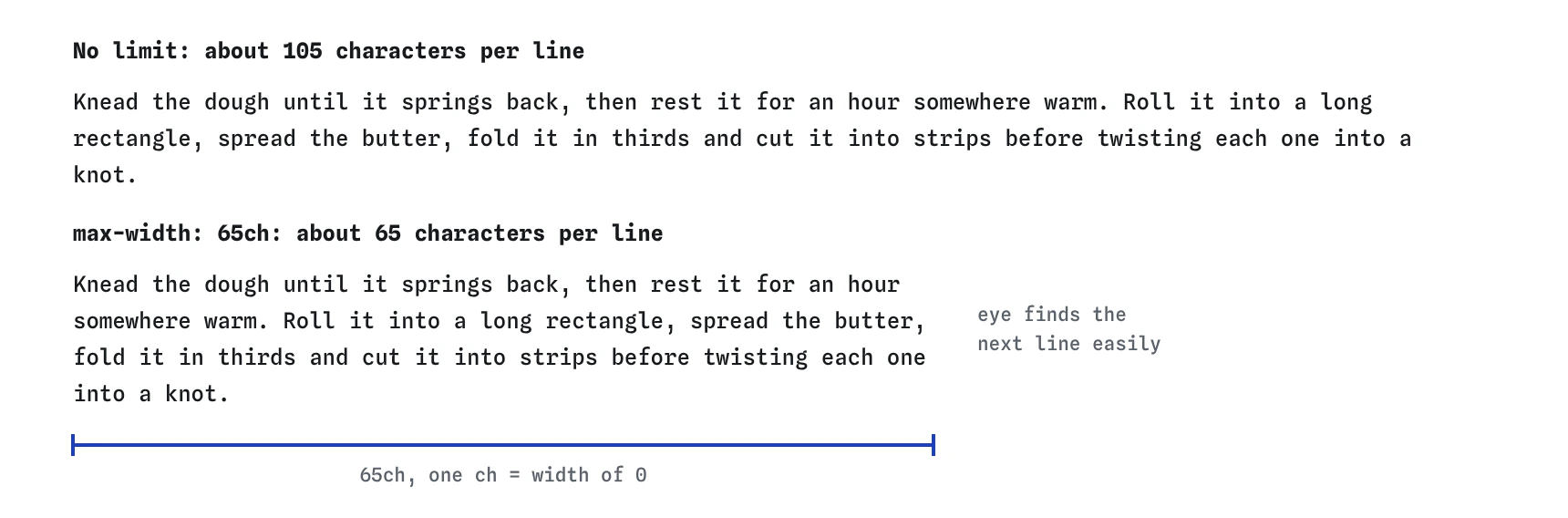
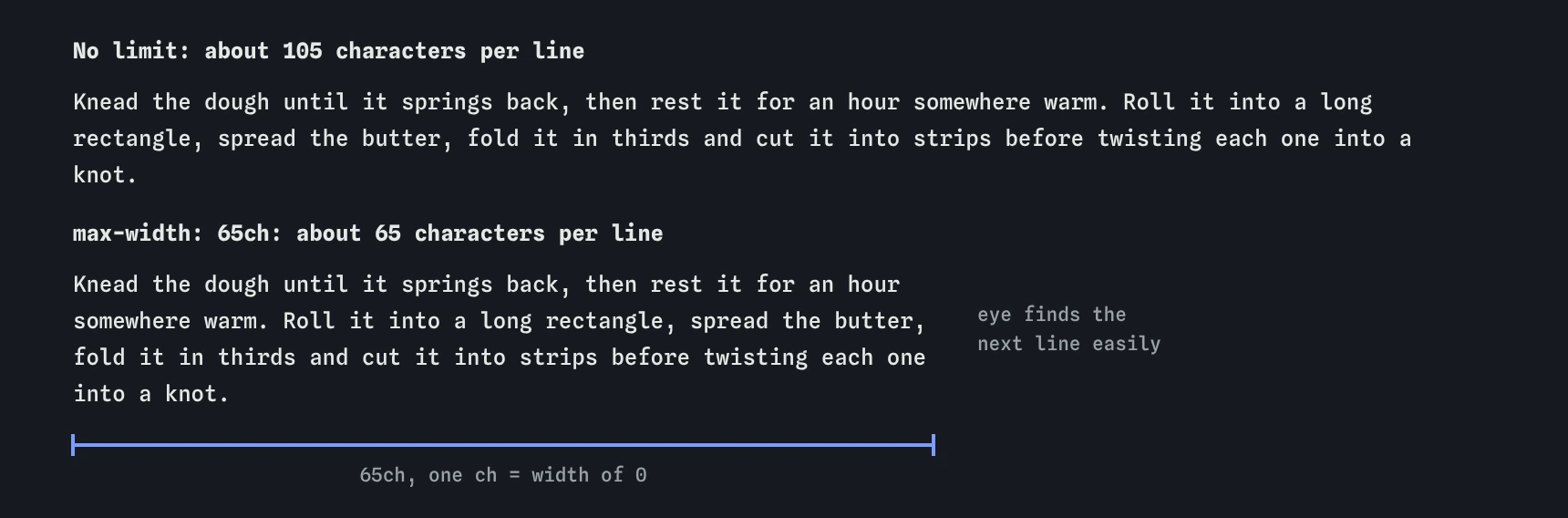
max-width: 65ch stops each line near 65 characters. Aim for 45 to 75; on a phone the screen is already narrower, so nothing changes there.What do text-wrap: balance and pretty do?
By default the browser fills each line as full as it can and then moves on. That leaves headings with a long first line and one word on the second. The text-wrap: balance value makes the browser even out the line lengths across the block, so a two-line heading splits near the middle. Browsers limit balancing to a few lines, so use it on headings, captions and short quotes.
The text-wrap: pretty value is for paragraphs. It looks at the last few lines and avoids leaving a single short word alone on the final line, called an orphan by many designers. It costs a little more work, which is why it is a separate value.
Support: balance works in all current browsers since 2024. pretty works in Chrome, Edge and Safari; Firefox does not support it yet and falls back to normal wrapping, which is harmless. You can add both today.
h1,
h2 {
  text-wrap: balance;
}

p {
  text-wrap: pretty;
}
How do you control wrapping and spaces with white-space?
HTML collapses runs of spaces and line breaks into one space. The white-space property changes that. The nowrap value keeps text on one line, useful for a price like "4.50 GBP" that should never split. The pre value keeps spaces and line breaks exactly as typed, as in a <pre> block. The pre-wrap value keeps them but still wraps long lines, which suits text people typed into a form.
Be careful with nowrap on anything longer than a few words. On a narrow phone it pushes the text out of its box and causes sideways scrolling. A non-breaking space ( ) between two specific words is often a better tool.
The hyphens: auto value lets the browser break long words with a hyphen at the end of a line. It needs a lang attribute on the page so the browser knows the language. It helps narrow columns and German text with long compound words a lot.
.price {
  white-space: nowrap;
}

.notes {
  white-space: pre-wrap;
}
What to check in AI-generated text CSS
AI tools tend to reach for the same patterns. Look for text-align: justify on narrow cards, centred paragraphs, uppercase applied to long sentences, letter-spacing in px that does not scale, and text-decoration: none on links inside paragraphs. Each makes the page harder to read.
Also look for capital letters typed into the HTML for a label, missing max-width on article text, and white-space: nowrap on headings. In DevTools, the Computed tab shows the final value of each property, and the Rendering panel can emulate a narrow screen to show where text breaks.
Field notes
- Use
startrather thanleftso alignment follows the text direction. - Justified text in narrow columns leaves ugly gaps between words.
- Uppercase labels look better with a little extra letter spacing.
- Lines of about 45 to 75 characters are the easiest to read.
Easy to get wrong
Centred paragraphs make each line start in a different place. Keep centring for short headings and buttons.
Pixel spacing stays the same when the font size changes, so it looks loose on small text and cramped on large text.
Typed capitals stay capitals in every design and some screen readers spell them out. CSS uppercase changes only the display.
Questions people ask
Why does text-align: center not centre my box?
It centres the inline content inside the box. To centre the box itself, give it a width and margin-inline: auto, or use flexbox or grid on its parent.
Is the ch unit exact?
No. It is the width of the zero digit, and most letters are narrower, so 65ch fits a few more than 65 average characters. It is close enough for line length.
Can I use text-wrap: balance on paragraphs?
Browsers only balance a small number of lines, so on long paragraphs it does nothing. Use pretty for paragraphs instead.
Why does my underline go through the letters?
By default it sits close to the baseline and descenders cross it. Add text-underline-offset and keep the default text-decoration-skip-ink: auto, which breaks the line around descenders.