Which property moves items along which axis?
Flex alignment comes down to two pairs of properties. The justify- properties work along the main axis, the direction items flow. The align- properties work along the cross axis. In the default row direction that means justify-content is horizontal and align-items is vertical. Switch to flex-direction: column and they swap, which is the most common source of confusion.
All of these go on the container except align-self, which goes on one item. There is no justify-self in flexbox; it is ignored on flex items, because the main axis is shared by the whole row. To move a single item along the main axis, use an auto margin, explained below.
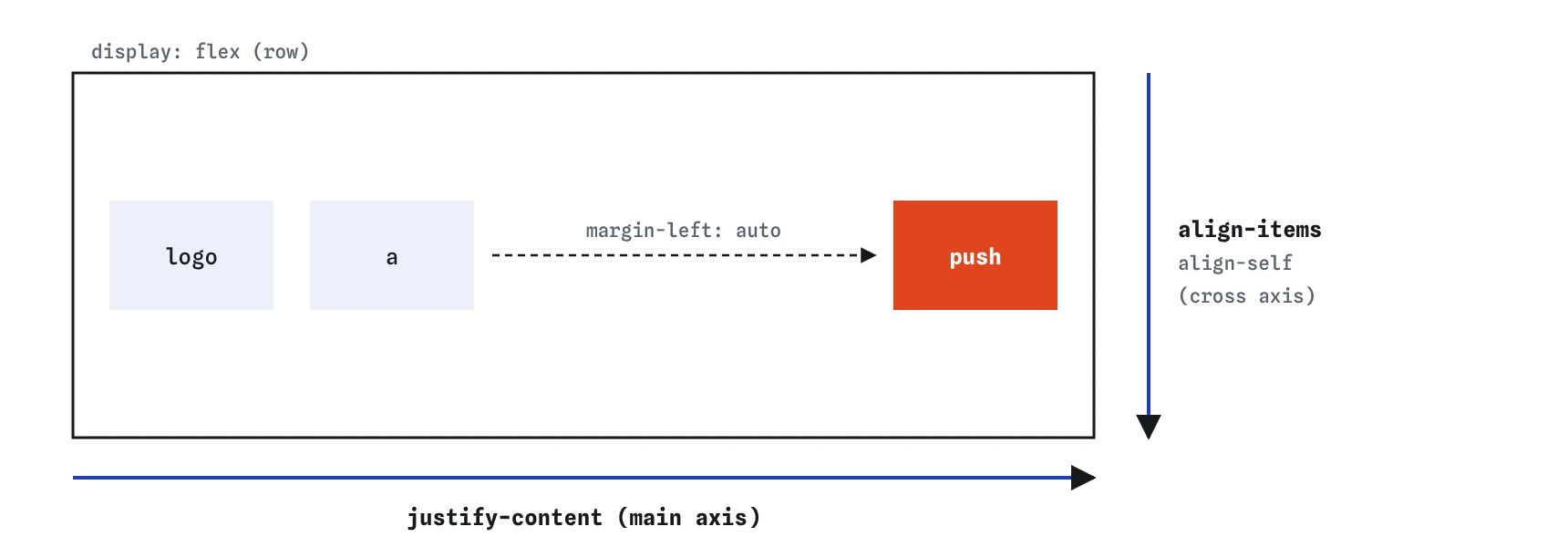
justify-content distributes items left to right and align-items places them top to bottom. An auto margin on one item eats the free space beside it and pushes it to the far end.How does justify-content share out the free space?
The justify-content property only has an effect when there is free space on the main axis: the items, gaps included, are narrower than the container. If any item has flex-grow, it takes the space first and justify-content has nothing left to distribute.
Use space-between for a bar with a title on the left and an action on the right. Use center for a short row of buttons. The space-around and space-evenly values are rarely the right look for interface rows; they put gaps at the outer edges that do not match the gaps between items.
.card-footer {
  display: flex;
  justify-content: space-between;
}flex-start(default) packs items at the start of the main axis.flex-endpacks them at the end.centerpacks them in the middle, with equal space either side of the group.space-betweenputs the first and last item on the edges and spreads the rest evenly.space-aroundgives each item equal space on both sides, so edge gaps are half the inner gaps.space-evenlymakes every gap, edges included, the same size.
Why are my flex cards all the same height?
The default value of align-items is stretch. Every item in a line is stretched across the cross axis to match the line, which in a single row means the height of the tallest item. That is why three cards with different amounts of text end up equal height in a flex row without any extra code, which is usually what you want.
Stretch only works when the item's cross size is auto. A card with a fixed height will not stretch. Stretch also explains a few surprises: an image placed directly in a flex row gets stretched tall and distorted, and a button next to a tall block grows to match it. Set align-items: flex-start on the container, or align-self: center on the one item, to stop that.
To push a button to the bottom of every equal-height card, make the card itself a column flex container and give the button margin-top: auto.
.card {
  display: flex;
  flex-direction: column;
}

.card .buy {
  margin-top: auto;
}
What do align-items and align-self accept?
The align-items property takes stretch, flex-start, flex-end, center and baseline. The baseline value lines items up by the first line of their text, which is the right choice for a row of labels in different font sizes, such as a price next to its unit.
The align-self property overrides align-items for one item. Its default is auto, meaning follow the container. Give a single avatar align-self: flex-start when the text beside it is long, so the avatar stays at the top instead of stretching. The same property on a sticky sidebar inside a flex row stops it filling the row height, which is what sticky needs.
.comment {
  display: flex;
  align-items: flex-start;
  gap: 12px;
}
When does align-content do anything?
The align-content property spaces out whole lines of items along the cross axis. A single-line flex container has nothing to space, so it does nothing there. It starts to matter only when the container has flex-wrap: wrap, has several lines, and is taller than those lines need.
Mixing it up with align-items is a very common mistake, from people and AI tools alike. If you want to centre items vertically in a bar, you want align-items. Reach for align-content when you have a wrapping tag cloud in a fixed-height box and want the lines bunched at the top instead of spread out.
.tag-cloud {
  display: flex;
  flex-wrap: wrap;
  align-content: flex-start;
  height: 160px;
}
How does margin-left: auto push items apart?
In a flex container, an auto margin takes all the free space on its side before justify-content gets any. Put margin-left: auto on one item and it, along with every item after it, is pushed to the right end. That is the cleanest way to build a nav with a logo on the left and links on the right, without wrapping the links in an extra element.
Auto margins work on both axes. margin-top: auto pushes an item to the bottom of a column. Auto margins on both sides of an item centre it. In right-to-left layouts, use the logical margin-inline-start: auto so the push follows the writing direction.
.nav {
  display: flex;
  align-items: center;
}

.nav .account {
  margin-left: auto;
}
How do you centre anything with flexbox?
Make the parent a flex container and set justify-content: center and align-items: center. The child is centred on both axes, whatever its size, and the text inside it is untouched. The parent needs a height larger than the child for vertical centring to show; a hero with min-height: 60vh or a fixed height is typical.
An even shorter version is margin: auto on the only child of a flex container. Grid offers place-items: center in one line, covered in the grid layouts lesson. Both are fine; pick the one that matches the rest of the component's layout.
Centring text inside the box is a separate job for text-align: center. Flex alignment moves boxes, and text alignment moves lines of text inside a box.
.hero {
  display: flex;
  justify-content: center;
  align-items: center;
  min-height: 60vh;
}
Why does my flex item overflow, and how does min-width: 0 fix it?
Flex items have an automatic minimum size: by default, an item cannot shrink below the width of its longest unbreakable content. A long URL, a wide table or a pre block inside an item therefore forces it wider than its share, and the row overflows its container or pushes neighbours off screen. The flex: 1 on the item does not help, because the minimum still applies.
Set min-width: 0 on the item (or min-height: 0 in a column) to let it shrink below its content. The content then wraps or scrolls inside the item instead. Pair it with overflow-wrap: anywhere for long words or overflow: auto for code. In DevTools, an overflowing flex item shows a computed min-width of auto and a box wider than its flex base size.
.post {
  flex: 1;
  min-width: 0;
}

.post pre {
  overflow: auto;
}
Field notes
- The
justify-properties work along the main axis and thealign-properties work across it. justify-contentonly moves items when there is free space left on the main axis.- Flex items stretch to the same height because
align-itemsdefaults tostretch. - Setting
justify-contentandalign-itemstocentercentres a child on both axes.
Easy to get wrong
On a single-line container, align-content does nothing. align-items places the items on the cross axis.
Flexbox ignores justify-self. An auto margin pushes one item along the main axis.
Images in a flex row stretch to the row height by default, which distorts them.
Without min-width: 0, long content stops the item shrinking and the row overflows.
Questions people ask
Why does justify-content: center not centre vertically?
In a row it works horizontally. Use align-items: center for vertical centring, or switch to a column if you want justify-content to work vertically.
Why does justify-content do nothing?
Usually an item has flex-grow or flex: 1 and takes all the free space, so there is nothing left to distribute.
Can I use place-items on a flex container?
It sets align-items and justify-items. The align part works; the justify part is ignored in flexbox.
Does align-items: center work without a height?
It works, but if the container is only as tall as its content there is no free space and nothing seems to move.