What do width and height set by default?
The width and height properties size the content box, or the border box if you use box-sizing: border-box. Their default value is auto, and auto means different things depending on the element. A block element such as <div>, <p> or <section> with width: auto stretches to fill its container. With height: auto it is exactly as tall as its content.
That default is usually what you want. Text wraps to the space available and the box grows to fit it. Most layout bugs around size come from replacing auto with a fixed number that only fits the content you tested with.
Inline elements such as <span> and <a> ignore width and height. Images are an exception because they are replaced elements: they have their own natural size, and width and height do apply.
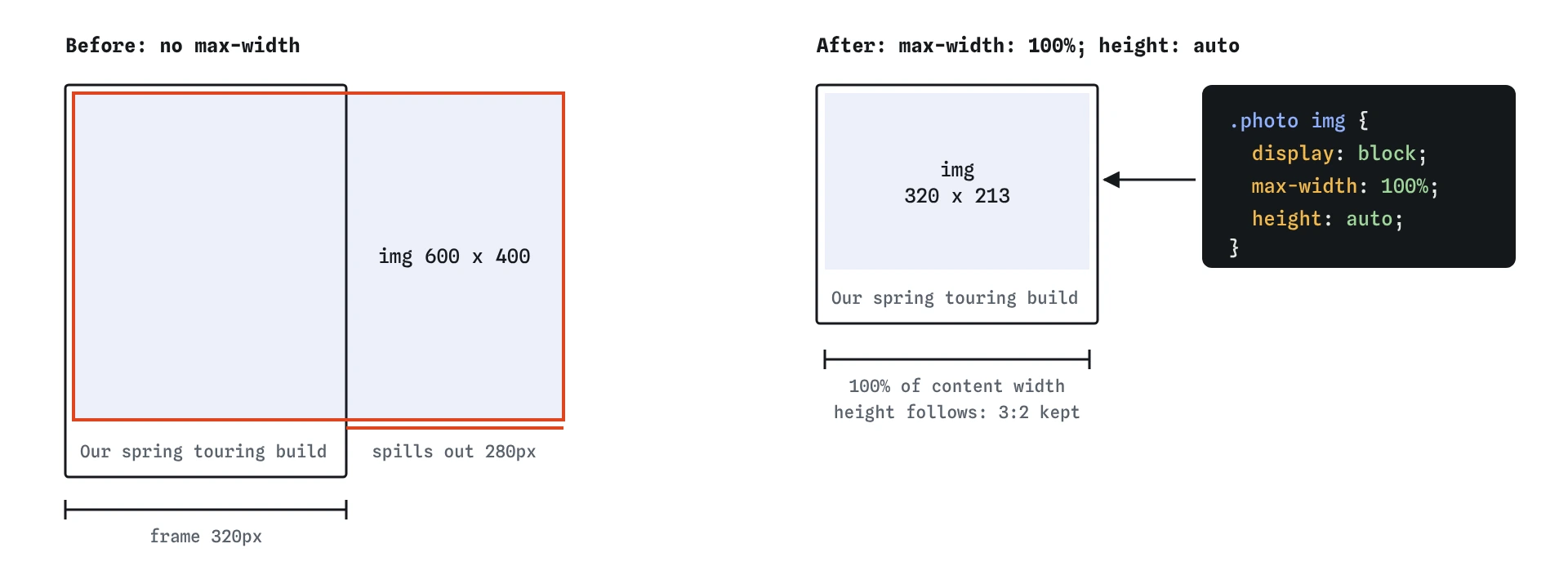
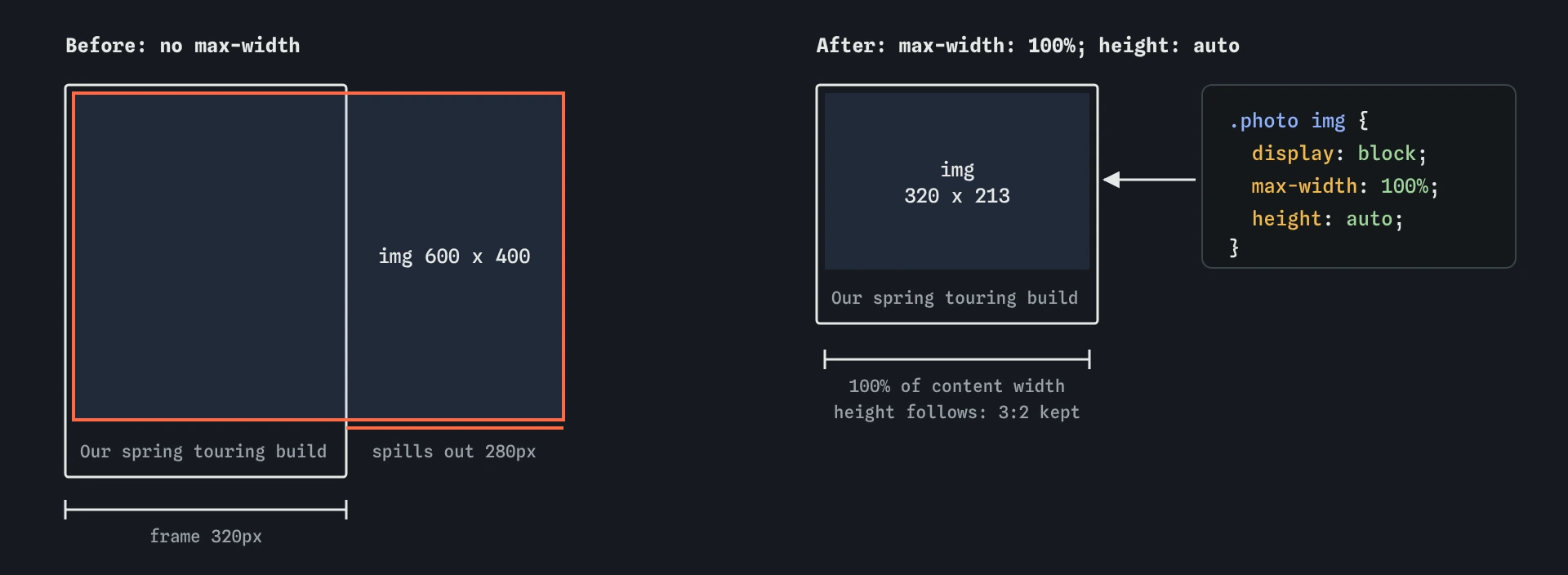
max-width: 100% caps it at the frame's content width, and height: auto keeps the 3:2 shape.Why are min and max limits safer than fixed sizes?
A fixed width: 600px is 600px on a 1400px monitor and 600px on a 360px phone, where it overflows and the page scrolls sideways. A max-width: 600px lets the box be as wide as its container up to 600px, and narrower when the screen is narrower. It gives you the line length you want on desktop and still fits on a phone.
The min-width property sets a floor. A button with min-width: 120px keeps a comfortable target size even when its label is the single word "Go". The height versions, min-height and max-height, work the same way vertically.
When limits conflict, min-width beats max-width, and both beat width. A box with width: 800px, max-width: 600px and min-width: 700px ends up 700px. Knowing that order helps when DevTools shows a width you did not expect.
.article {
  max-width: 65ch;
  margin-inline: auto;
}

.btn {
  min-width: 120px;
}
What are percentages measured against?
A percentage width is a share of the containing block's content width, usually the parent's. width: 50% inside a 600px column is 300px. Padding and margin percentages are also measured against the parent's width, even for top and bottom. That surprises people: padding-top: 10% depends on how wide the parent is, not how tall.
A percentage height needs a parent with a definite height. If the parent's height is auto, which it nearly always is, height: 50% behaves like auto. This is why height: 100% on a section often seems to do nothing. For full-screen panels, use viewport units such as min-height: 100dvh, which follow the visible screen height on mobile.
Inside flex and grid layouts, percentages resolve against the item's grid area or flex container in ways covered in those lessons. For ordinary block layout, remember the rule: horizontal and vertical percentages both read the parent's width, except height.
.hero {
  min-height: 100dvh;
}

.half {
  width: 50%;
}
What do min-content, max-content and fit-content mean?
These keywords size a box from its content instead of its container. The min-content value is the narrowest the box can be without overflowing, which for text is the width of the longest word. The max-content value is the width the content would take if it never wrapped, so a sentence sits on one line.
The fit-content value combines them: the box is as wide as its content needs, up to the space available, and then it wraps. That is ideal for a label, a caption or a callout that should hug short text but not overflow on long text. On a block element, width: fit-content with margin-inline: auto centres a box whose width you do not know in advance.
These keywords also work in min-width, max-width and grid track sizes. They are widely supported in all current browsers.
.tag {
  width: fit-content;
  padding: 4px 8px;
  background-color: #fdf6e3;
}
How does aspect-ratio work?
The aspect-ratio property gives a box a preferred shape. Set aspect-ratio: 16 / 9 and width: 100%, and the browser works out the height. It is the clean replacement for the old trick of padding-top percentages used to make video embeds keep their shape.
The ratio is a preference. If the content is taller than the ratio allows, the box grows to fit it, unless you also set overflow to something other than visible. For images and videos, combine it with object-fit: cover so the media fills the shape and crops the edges instead of stretching.
Images already get an aspect ratio from their width and height HTML attributes. Browsers use those to reserve space before the file arrives, which stops the page jumping as it loads. Keep the attributes in your HTML even when CSS controls the display size.
.gallery img {
  width: 100%;
  aspect-ratio: 4 / 3;
  object-fit: cover;
}
Why does every image need max-width: 100%?
An image without CSS displays at its natural width. A 1200px photo in a 360px phone column pokes out the side and makes the whole page scroll horizontally. Adding max-width: 100% caps the image at its container's width while letting smaller images stay at their natural size.
Pair it with height: auto. The height attribute in the HTML sets a fixed height, so without height: auto a narrowed image is squashed. With both, the image scales down and keeps its proportions.
Many projects put this in the base stylesheet for img, video and svg along with display: block, which removes the small gap below inline images. AI-generated CSS often sets width: 100% on images instead. That stretches small logos and icons to fill the container and makes them blurry.
img,
video {
  display: block;
  max-width: 100%;
  height: auto;
}
Why should you avoid fixed heights on text?
Text length changes. A shop owner edits a paragraph, a translation into German runs 30% longer, or a reader turns up their font size. A container with a fixed height cannot grow, so the extra text spills out over whatever comes next, or gets cut off if overflow: hidden is set.
Use min-height when you need boxes to line up or have a minimum presence. The box keeps the floor but grows with its content. For rows of equal cards, flex and grid layouts stretch items to match the tallest one with no heights at all.
To test sizing, change the browser zoom to 200% and resize the window down to phone width. Then paste a long word, such as a product code or an email address, into a heading. Anything that breaks under those three tests will break for a real visitor.
.card {
  min-height: 160px;
}
Field notes
- The default size
autolets a block fill its container's width. - A
max-widthadapts to small screens where a fixed width would overflow. - A percentage width is a share of the parent's content width.
- Images need
max-width: 100%andheight: autoto shrink and keep their shape.
Easy to get wrong
A fixed width overflows narrow screens and forces sideways scrolling. A maximum lets the box shrink while capping it on wide screens.
With width: 100%, a small image is stretched past its natural size and blurs. max-width only shrinks it.
Text that grows past a fixed height overflows onto the next element. min-height keeps the floor and lets the box grow.
A percentage height needs a parent with a set height, which is rarely the case. Viewport units work without one.
Questions people ask
What is the difference between 100vh and 100dvh?
On phones, vh uses the largest possible viewport, so a 100vh panel can hide behind the address bar. dvh follows the currently visible height. Supported in all current browsers since 2023.
What does ch mean in max-width: 65ch?
One ch is the width of the zero character in the current font. Around 60 to 75 characters per line is comfortable to read, so 65ch is a handy cap for article text.
Why is my image still overflowing with max-width: 100%?
Check that the parent itself has a limited width. If the parent grows to fit the image, 100% of it is still too wide. A flex item may need min-width: 0 to allow shrinking.
Can I animate height from 0 to auto?
Modern Chrome and Edge allow it with interpolate-size: allow-keywords. Other browsers jump instantly, so treat the animation as an enhancement.