What does position: static mean?
Every element starts as position: static. It sits wherever normal flow puts it, and the offset properties top, right, bottom and left have no effect. Neither does z-index on most static boxes. When you see offsets that seem to do nothing, check that the element actually has a position.
The other four values, relative, absolute, fixed and sticky, make an element positioned. Positioned elements accept offsets, can be layered with z-index, and act as the reference point for absolute descendants. Each value treats normal flow differently, which is the main thing to understand.
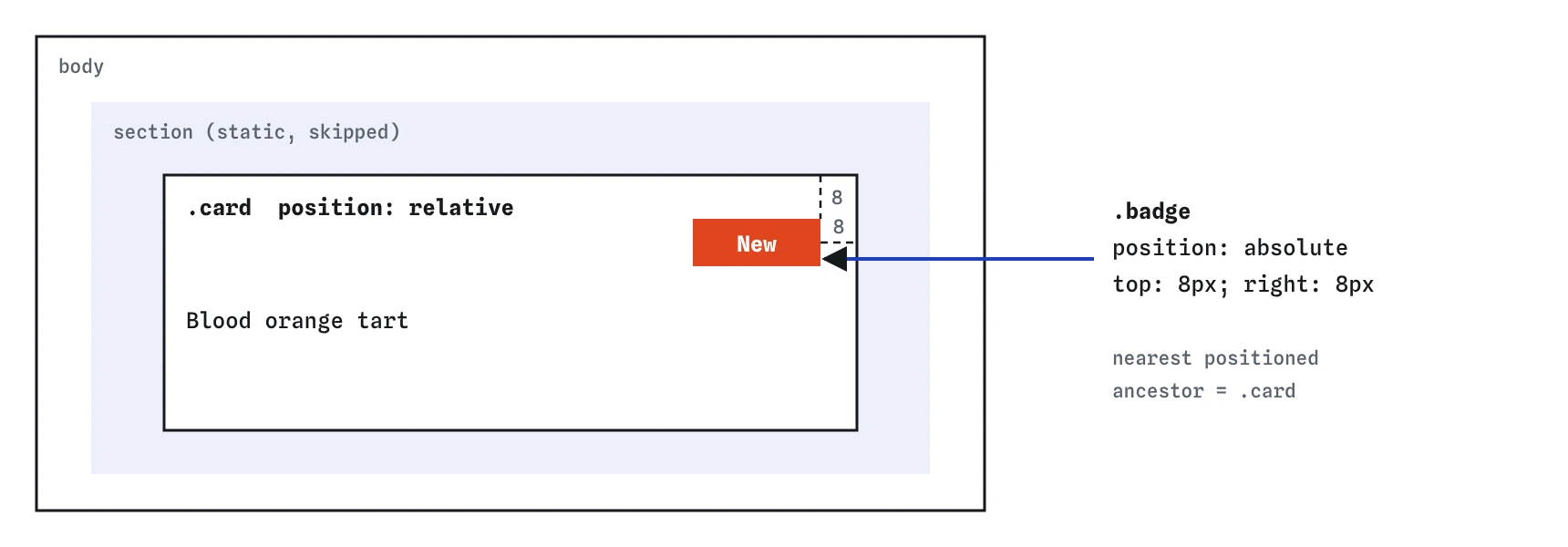
static. The section is skipped, so the card becomes the containing block and the 8px offsets are measured from the card's padding edge.What does position: relative do?
A relative box stays in normal flow. It takes up exactly the space it would as a static box, and its neighbours do not move. The offsets then shift where it is drawn, relative to that original spot. With top: 10px the box is painted 10px lower and may overlap whatever is below, while a gap is left where it was.
That visual nudge is rarely what you want. The common reason to write position: relative is the side effect: it makes the element a containing block for absolute children without moving it at all. A card with position: relative and no offsets looks unchanged, but now any absolute badge inside measures from the card.
.card {
  position: relative;
}
Which box does an absolute element measure from?
An absolute box is taken out of normal flow. It takes no space, and the content after it closes up as if it were not there. The browser then places it using the offsets, measured from its containing block: the padding edge of the nearest ancestor whose position is not static.
If no ancestor is positioned, the containing block is the initial containing block, which is the size of the viewport at the top of the page. That is why an absolute badge without a positioned parent jumps to the corner of the screen. It is the most common positioning bug, and AI tools produce it often when they add position: absolute to a child but forget the parent.
A few other properties also make an element the containing block for absolute children, including transform, filter and contain: paint. If an absolute element ends up in an unexpected place, look up its ancestors in DevTools for one of those.
.card {
  position: relative;
}

.card .badge {
  position: absolute;
  top: 8px;
  right: 8px;
}
How do top, right, bottom, left and inset work together?
Each offset sets the distance from one edge of the containing block to the matching edge of the box. Use top and left for a top-left corner, bottom and right for a bottom-right corner. Negative values push the box outside the containing block, which is how badges overlap a card's border.
If you set both left and right on an absolute box with width: auto, the box stretches between them. The inset shorthand sets all four at once in the same order as margin: top, right, bottom, left. inset: 0 makes an absolute overlay cover its containing block exactly, which is a tidy way to lay a dark gradient over a photo.
The logical versions inset-block-start and inset-inline-end follow the writing direction, so a badge set with inset-inline-end: 8px moves to the left corner on a right-to-left page.
.photo {
  position: relative;
}

.photo .shade {
  position: absolute;
  inset: 0;
  background-color: rgb(0 0 0 / 0.4);
}
How do you centre an absolute element?
The modern way is inset: 0 plus margin: auto plus a fixed size. With all four offsets at zero, the browser has spare space on every side, and auto margins split it evenly. The box needs a width and height or it stretches to fill the containing block.
If the size is unknown, use top: 50% and left: 50% to put the box's top-left corner in the middle, then transform: translate(-50%, -50%) to pull it back by half its own size. This works with any content but can blur text on some screens at odd pixel sizes. For centring a box in normal content, flexbox or grid is simpler than positioning.
.dialog {
  position: absolute;
  inset: 0;
  width: 240px;
  height: 120px;
  margin: auto;
}
When should you use position: fixed?
A fixed box is positioned relative to the viewport. It leaves normal flow like an absolute box and stays in the same place on screen when the page scrolls. It suits a cookie notice, a back-to-top button or a chat launcher.
Fixed elements cover content. A fixed header hides the top of every section you link to; add scroll-padding-top on the html element equal to the header height so anchor links land below it. On phones, a fixed bar also eats a big share of a small screen, so keep it short.
Like absolute positioning, fixed has an exception. If an ancestor has a transform, filter or perspective, the fixed box measures from that ancestor and scrolls with it. That surprises people who wrap a page in an animated container.
.to-top {
  position: fixed;
  right: 16px;
  bottom: 16px;
}
Why does position: sticky stop working?
A sticky box acts like a relative box until its scroll container scrolls it to a threshold, then it sticks there until its parent scrolls out of view. It stays in normal flow the whole time, so nothing jumps. It is the right tool for a section heading or a table header that should stay visible. Supported in all current browsers.
When sticky does nothing, there are three usual causes.
To debug, select the sticky element in DevTools and walk up the tree, looking for overflow in the Computed tab of each ancestor.
.log-header {
  position: sticky;
  top: 0;
}- No threshold. Sticky needs at least one of
top,bottom,leftorright. Without one it never sticks. - An ancestor has
overflow: hidden,autoorscroll. That ancestor becomes the scroll container, and if it is not the one actually scrolling, the box has nothing to stick within. Change it tovisible, or useoverflow: clip, which clips without creating a scroll container. - The parent is too short. A sticky box cannot leave its parent, so if the parent is barely taller than the sticky box, there is no room to stick. In a flex or grid parent, add
align-self: startso the item is not stretched to the parent's full height.
Which positions stay in flow, and what comes next?
Static, relative and sticky boxes keep their space in normal flow; their neighbours lay out around them as usual. Absolute and fixed boxes leave the flow; their space closes up and they float above the content. Keep that split in mind when deciding which value to use: if the rest of the page should not move, you probably want absolute or fixed.
Positioned elements also paint on top of non-positioned ones, and when two overlap you decide the order with z-index. That has its own rules about stacking contexts, covered in the next lesson on z-index.
Field notes
- Static boxes sit in normal flow and ignore offsets like
top. - A relative box keeps its space while you shift where it is drawn.
- An absolute box measures from its nearest positioned ancestor.
- Offsets set the distance from each edge of that containing box.
Easy to get wrong
Without a positioned ancestor, the badge measures from the page and jumps to the top corner of the screen.
Sticky needs a threshold. With no top, it behaves like a relative box and scrolls away.
Hidden overflow creates a scroll container that breaks sticky children. Clip hides overflow without that side effect.
A relative offset only moves the drawing and leaves a gap behind. Margin moves the box and everything after it.
Questions people ask
Does position: absolute remove an element from screen readers?
No. It only changes layout. Screen readers still read it in source order, so keep the HTML order meaningful even when the visual order differs.
Why does my absolute element overflow its parent?
Absolute boxes do not affect their parent's size. The parent does not grow to contain them, so give the parent enough padding or a minimum height.
Can I use position: sticky inside a flex row?
Yes. Add align-self: start to the sticky item so it is not stretched to the full row height, or it has no room to stick.
What is the difference between fixed and sticky?
Fixed leaves the flow and stays in one spot of the viewport all the time. Sticky stays in the flow and only sticks while its parent is on screen.