What changes when you set the input type?
The type attribute decides three things at once: which keyboard a phone shows, what the browser validates, and what value format gets submitted. A type="email" field brings up a keyboard with @, blocks submission of priya.example.com, and sends the text as typed. A plain text field does none of that.
An unknown or misspelt type, such as type="phone", falls back to text with no warning. That fallback is why old browsers never broke on new types, and it is also why typos go unnoticed. Check DevTools: the Elements panel shows the attribute you wrote, but input.type in the Console returns the type the browser actually uses.
Pick the type by what the data means, then adjust the keyboard with inputmode if needed. Never pick a type for its look. Styling belongs in CSS.
<input type="email" name="email" autocomplete="email">
<input type="url" name="website" placeholder="https://">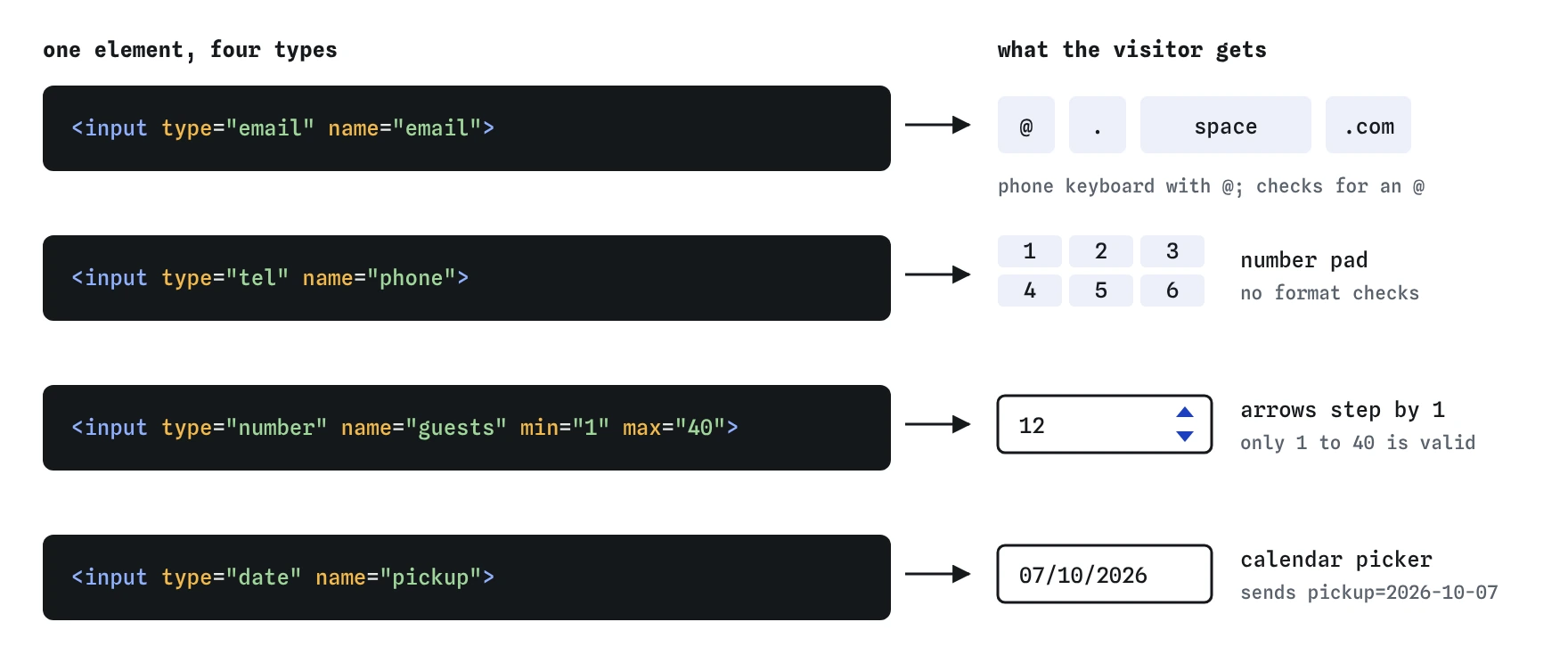
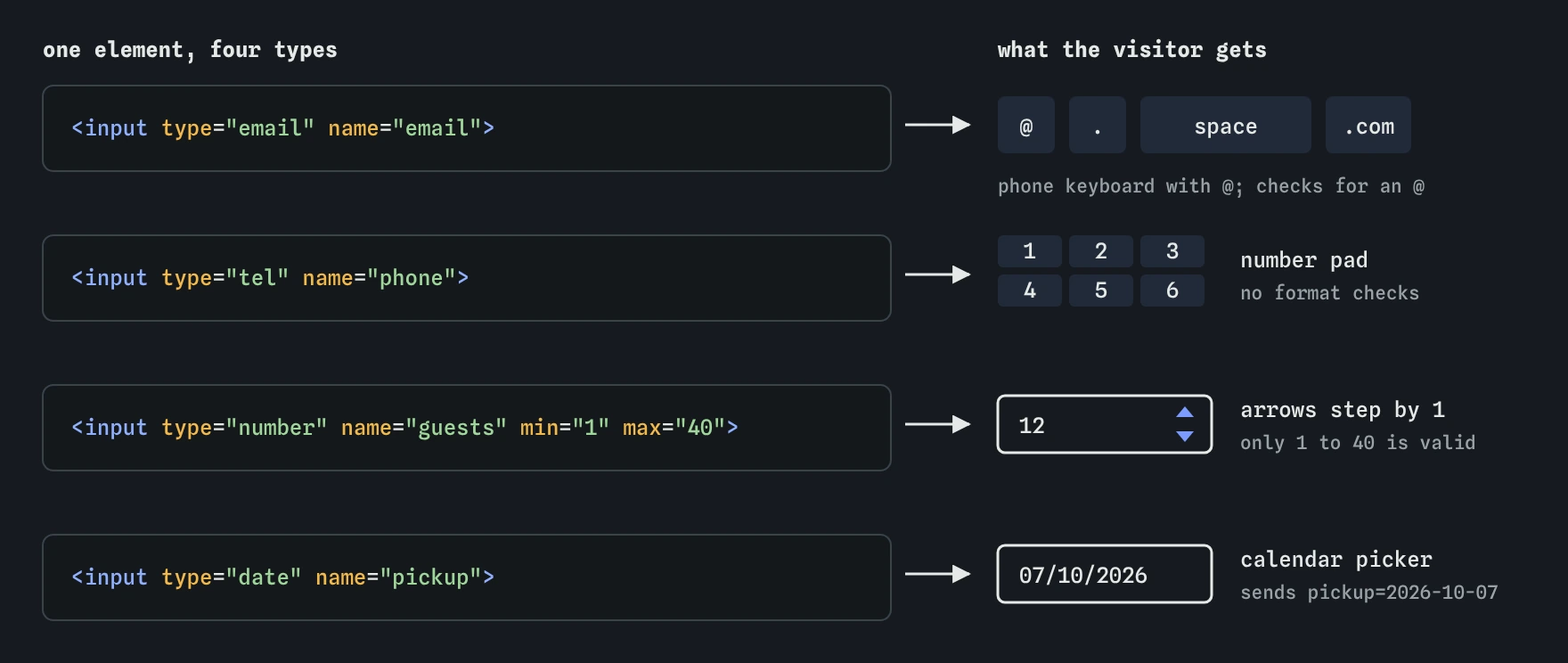
type swaps the keyboard, the control and the checks. Note that the date shows in the visitor's local format but is always sent as 2026-10-07.Which text-like type fits each field?
Several types look like a plain text box but behave differently. Choose by the content:
<input type="tel" name="phone" autocomplete="tel">
<input type="password" name="pw" autocomplete="current-password">textfor names, titles and anything without a fixed format. Names especially: never validate names with a pattern.emailchecks for a basiclocal@domainshape and shows an email keyboard. Addmultipleto accept a comma-separated list.telshows a phone keypad but does no validation, because phone formats vary by country. Keep+, spaces and leading zeros.urlrequires a scheme.example.comfails andhttps://example.compasses, which confuses users, so add a placeholder or prefillhttps://.searchmay show a clear button and lets some screen readers announce a search field. Pair it withrole="search"on the form.passwordmasks the characters. Offer a Show password toggle by switching the type totextwith atype="button"control.
When should a field be a number?
Use type="number" only for quantities you might do arithmetic on: number of guests, cake tiers, weight in grams. The browser adds spin buttons, rejects letters, and submits a plain decimal string with a dot, whatever the user's locale.
Identifiers that happen to be digits are not numbers. Card numbers, postcodes, phone numbers, account numbers and one-time codes need type="text" with inputmode="numeric". A number input strips leading zeros from some values, may turn long values into exponent notation, and changes the value when a user scrolls the mouse wheel over a focused field.
The step attribute defaults to 1, so 4.50 is invalid until you set step="0.01" or step="any". min and max set the range. Step is counted from min, so min="1" step="2" allows 1, 3, 5 and rejects 2.
Use type="range" when the exact value matters less than the position, like a volume control or a spice level from 1 to 5. Show the chosen value next to it with <output>, because a slider alone gives no precise reading.
<label for="guests">Guests</label>
<input id="guests" name="guests" type="number" min="1" max="40" step="1">
<input name="price" type="number" min="0" step="0.01">
How do date and time inputs behave?
The browser draws a native picker for date, time, datetime-local, month and week. The displayed format follows the user's locale, so a reader in Leeds sees 06/10/2026 and a reader in Ohio sees 10/06/2026. The submitted value is always ISO: 2026-10-06 for a date, 14:30 for a time, 2026-10-06T14:30 for datetime-local.
Set min and max in the same ISO format to block past dates or limit bookings to the next three months. step on a time input is in seconds, so step="900" offers fifteen-minute slots in browsers that honour it in the picker.
datetime-local has no time zone. If a bird club in Melbourne posts a walk at 07:00 and the server stores it as UTC, you need to send the zone separately. month and week remain unsupported in Firefox and Safari desktop, which fall back to text, so validate their format on the server.
For a birth date, three separate text fields for day, month and year are often easier than a picker that starts at today and makes the user scroll back decades.
<label for="pickup">Pickup date</label>
<input id="pickup" name="pickup" type="date" min="2026-10-07" max="2026-12-31">
How do checkbox, radio, file and colour inputs submit?
A checkbox submits its value only when checked. With no value attribute it sends on. An unchecked checkbox sends nothing at all, so the server must treat a missing key as false. Radios with the same name form one group and send the value of the chosen one.
A file input needs method="post" and enctype="multipart/form-data" on the form, or the server receives only the file name. Narrow the picker with accept="image/png,image/jpeg" or accept=".pdf", allow several with multiple, and on phones capture="environment" opens the rear camera. The accept filter is a hint only. Check type and size on the server.
A type="color" input always submits a lowercase seven-character hex value such as #3a7d44. It cannot hold transparency or named colours.
<form action="/upload" method="post" enctype="multipart/form-data">
  <label for="photo">Cake photo</label>
  <input id="photo" name="photo" type="file" accept="image/*">
  <button>Upload</button>
</form>
What are hidden inputs safe for?
A type="hidden" input submits a value the user does not see: an order ID, the page the user came from, a CSRF token generated by the server. It has no label and is skipped by keyboard and screen readers.
Hidden is not secret. The value sits in the page source and anyone can change it in DevTools before submitting. Never put a price, a discount or a user role in a hidden field and trust it on arrival. The server should look those up from its own records.
<input type="hidden" name="csrf" value="9f2c71e0">
<input type="hidden" name="return_to" value="/cart">
How does inputmode differ from type?
The inputmode attribute changes only the on-screen keyboard. It adds no validation and does not change the submitted value. Values include numeric, decimal, tel, email, url, search and none.
Use it to fix the keyboard on a text field whose type you chose for good reasons. A postcode with inputmode="numeric" gets a digit pad and keeps leading zeros. A price field with inputmode="decimal" shows a decimal point. Pair it with pattern when you also want the browser to check the format.
Use enterkeyhint to relabel the Enter key on mobile: search, next, send or done. It changes the label only, and the form still decides what Enter does.
<input name="postcode" inputmode="numeric" pattern="[0-9]{4,5}" autocomplete="postal-code">
<input name="amount" inputmode="decimal" enterkeyhint="done">
What do AI tools get wrong with input types?
Generated forms tend to repeat the same handful of mistakes. When you review one, look for these:
type="number"on card numbers, postcodes, phone numbers and verification codes.- Number fields for money with no
step, so any price with pence or cents fails validation. - Invented types like
type="phone"ortype="datetime", which fall back to text without any warning.datetimewas dropped from the standard years ago. - File inputs inside a form with no
enctype. - Hidden inputs carrying prices or permissions that the server then trusts.
- Strict
patternrules on names or emails that reject real people, such as names with apostrophes or emails with a plus sign. - Test on a real phone as well. Tap each field and confirm the keyboard matches what the field asks for.
Field notes
- The
typeattribute changes the phone keyboard, the checks and the value that gets sent. - Use
type="number"only for amounts you might add up, such as guests. - Date and time types give people a picker drawn by the browser.
Easy to get wrong
A card number is an identifier, not a quantity. number drops leading zeros and adds pointless spin buttons.
The default step of 1 makes 4.50 invalid. Set a step that matches the precision you need.
Without multipart encoding, only the file name is sent, not the file.
There is no phone type. The browser falls back to text without telling you, so the user gets a letter keyboard.
Questions people ask
What format does input type=date send?
Always YYYY-MM-DD, such as 2026-10-06, regardless of how the date is displayed to the user.
Should I use type=tel or type=number for phone numbers?
Use tel. It shows a phone keypad and keeps symbols like + and leading zeros.
How do I allow decimals in a number input?
Set step to the precision you want, like step="0.01", or step="any" for no restriction.
Is a hidden input secure?
No. Anyone can view and change it. Use it for convenience values and validate them on the server.
Why does my unchecked checkbox not appear in the request?
Browsers only submit checked boxes. Treat a missing key as false on the server, or pair it with a hidden input of the same name sent before it.
Can I style the native date picker?
Only the field itself, through CSS. The pop-up calendar is drawn by the browser and cannot be styled. If you need a custom calendar, build it with care for keyboard and screen reader use.