What turns an a element into a real link?
The <a> element is a hyperlink only when it has an href attribute. With href, it is focusable with Tab, announced as "link" by screen readers, opens with Enter, and gets a context menu with options such as copy link and open in new tab. Without href, it is a placeholder that does none of those things.
Everything between <a> and </a> becomes clickable and forms the link's accessible name. That can be text, an image, or a whole card containing a heading and a paragraph. Since HTML5, <a> may wrap block content as long as it does not contain other interactive elements such as buttons or nested links.
Links go somewhere; buttons do something. If clicking changes the URL or loads a new document, use <a href>. If it opens a menu, submits data or toggles a panel on the same page, use <button>. Mixing them up breaks keyboard expectations: Space activates buttons but scrolls the page on a link.
<a href="https://birdclub.example/events">Upcoming walks</a>
<button type="button">Show map</button>
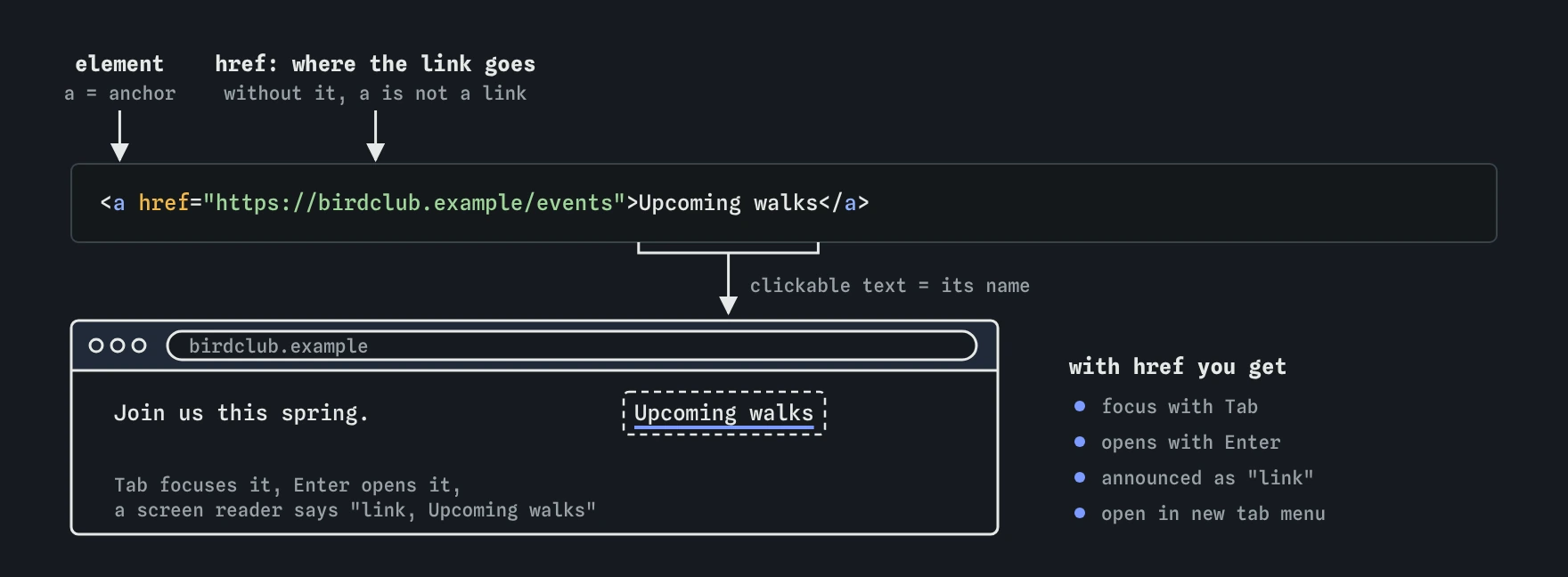
href is what makes <a> a real link. The text between the tags is what people click and what screen readers read out, so it should name the destination, like "Upcoming walks".When should you use an absolute or a relative URL?
An absolute URL includes the scheme and host: https://birdclub.example/about. Use it for links to other sites, in emails and RSS feeds where there is no base page, and in canonical and Open Graph tags.
A relative URL is resolved against the current document. about.html points to a file in the same folder, ../index.html goes up one folder, and /contact starts from the site root. Root-relative paths are the most predictable choice inside a site, because they work the same from any page depth and survive a move to a new domain.
Watch for the <base href> element. If a page sets one, every relative URL resolves against it, including fragment links like #top, which then point to another page. Protocol-relative URLs such as //cdn.example/x.js are legacy; write https:// explicitly.
<a href="/walks/2026/heron-point">Heron Point walk</a>
<a href="../gallery/">Back to the gallery</a>
How do you link to a spot on the same page?
Give the target element an id, then link to it with # plus that id. The browser scrolls to the element and moves the sequential focus starting point there, so the next Tab press continues from the target. You can combine a page and a fragment: guide.html#install.
The id must match exactly, including case, and must be unique on the page. href="#top" and href="#" both scroll to the top of the document. A sticky header can hide the target after the jump; fix that in CSS with scroll-margin-top on the targets instead of adding spacer elements.
Chromium, Safari and Firefox also support text fragments, like #:~:text=nesting%20season, which scroll to and highlight matching text. They are handy for sharing, though you cannot style the highlight much and the text must match the page exactly.
<nav><a href="#feeding">Feeding tips</a></nav>
<h2 id="feeding">Feeding tips</h2>
<style>h2 { scroll-margin-top: 4rem; }</style>
How do you write link text that works out of context?
Screen reader users often pull up a list of every link on the page. In that list, ten links that all say "click here" or "read more" are useless. Write text that names the destination: "Read the 2026 nesting survey" tells people what they get.
Avoid putting the URL itself as visible text unless people need to copy it, as in printed material. Screen readers spell out long URLs character by character.
If a design demands short "Read more" links on cards, add the missing context with visually hidden text inside the link, or make the card heading the link. Avoid aria-label that differs from the visible text, since voice control users say what they see, and a mismatch means "click read more" does nothing.
<a href="/news/nesting-survey">
  Read more<span class="visually-hidden"> about the nesting survey</span>
</a>
What do mailto: and tel: links do?
A mailto: link opens the visitor's default email program with the address filled in. You can add subject and body as query parameters, percent-encoding spaces as %20. Many people have no desktop email client configured, so always show the address as visible text they can copy.
A tel: link lets phones start a call and lets desktops hand off to a calling app. Use the international format without spaces in the href, and show a readable version as the link text. Safari on iOS also turns plain phone numbers into links automatically; turn that off with <meta name="format-detection" content="telephone=no"> if it mangles order numbers.
Addresses in mailto: links get harvested by spam bots. Obfuscation tricks slow them a little but hurt accessibility. A contact form or a dedicated inbox with good filtering is usually the better trade.
<a href="mailto:[email protected]?subject=Heron%20Point">[email protected]</a>
<a href="tel:+441632960123">01632 960123</a>
Should links open in a new tab?
Setting target="_blank" opens the link in a new tab or window. Use it rarely. People can already open a new tab when they want one, and an unexpected tab breaks the back button, which is the most used navigation control on the web.
Reasonable cases are a help page opened beside a half-filled form, or a PDF people will consult while working. When you do use it, say so in the link text or with an icon that has a text alternative, such as "(opens in new tab)".
Browsers now treat target="_blank" as if rel="noopener" were set, so the new page cannot reach back through window.opener and redirect your tab. Writing rel="noopener" explicitly is harmless. Other target values are _self (the default), _parent, _top, or the name of an iframe.
<a href="/help/booking" target="_blank">Booking help (opens in new tab)</a>What do rel and download change?
The rel attribute describes how the linked page relates to yours. Search engines and browsers read it.
<a href="/files/walk-map.pdf" download="heron-point-map.pdf">Download the walk map (PDF, 1.2 MB)</a>rel="nofollow"asks search engines not to pass ranking credit. Google treats it as a hint.rel="sponsored"marks paid or affiliate links, andrel="ugc"marks links in user comments and forum posts.rel="noopener"blockswindow.opener;rel="noreferrer"also strips theRefererheader, so the target cannot see where the visitor came from.rel="external"andrel="me"add meaning;meis used to verify profile links on sites such as Mastodon.- The
downloadattribute tells the browser to save the file instead of opening it, optionally with a suggested filename. It only works for same-origin URLs, blob URLs and data URLs; cross-origin files open normally. - State the file type and size in the link text so people on slow or metered connections can decide before they tap.
How should links look and behave?
Keep links visually distinct from body text. Underlines are the clearest signal. If you remove them, the WCAG contrast rules require a 3:1 difference between link colour and text colour plus another cue on hover and focus, which is hard to get right, so most sites should keep the underline in running text.
Never remove the focus outline without a replacement. Keyboard users rely on it to see where they are. Use :focus-visible to show a clear ring for keyboard focus without showing it on mouse clicks.
Give touch targets enough room. WCAG 2.2 asks for at least 24 by 24 CSS pixels for targets, or enough spacing between them, so a row of tiny footer links can fail on phones.
a { text-underline-offset: 0.15em; }
a:focus-visible { outline: 3px solid #1a5fb4; outline-offset: 2px; }
How do you check links and spot AI mistakes?
Press Tab through the page. Every link should receive focus in a sensible order, show a visible ring, and announce a meaningful name. In Chrome DevTools, the Accessibility pane shows each link's computed name and role. Lighthouse flags links without names and links whose names are not descriptive.
AI-generated markup has some repeat offenders. Look for <a href="#" onclick="..."> used as a button, <div onclick> used as a link, "Click here" link text, target="_blank" on every external link, and <a> wrapping a <button>, which is invalid nesting. Also check for invented URLs: a model will happily produce a plausible href to a page that does not exist, so run a link checker before publishing.
Field notes
- An
<a>element becomes a real link only when it has anhref. - Use absolute URLs for other sites and relative ones within your own.
- Link to a spot on the page with
#followed by an element's id. - Link text should describe the destination, never just say "click here".
Easy to get wrong
A fake link announces as a link, reacts to Enter but not Space, adds a useless history entry, and jumps to the top of the page if the script fails.
Link lists in screen readers show only the link text. "Click here" says nothing about the destination.
Interactive content cannot nest inside a link. Browsers and screen readers handle the double control inconsistently and keyboard users may hit two tab stops.
Removing focus outlines leaves keyboard users with no idea where they are on the page.
Spaces and local formats in the href can fail on some dialers and abroad. Put the international number in the href and the friendly format in the text.
Questions people ask
Can I put a heading and paragraph inside a link?
Yes. Since HTML5, <a> can wrap flow content such as a whole card, as long as there is no other interactive element inside it. Keep the content short, since screen readers read it all as the link name.
Do I still need rel="noopener" with target="_blank"?
Current browsers apply it automatically. Adding it is harmless and protects users on very old browsers.
Should external links get an icon?
It is optional. If you use one, give it text such as "external site" via visually hidden text, and keep it consistent across the site.
Are javascript: URLs allowed in href?
They work, but they break middle-click and copy link, and content security policies often block them. Use a button with an event listener instead.
How do I link to a specific page of a PDF?
Add #page=4 to the URL. Most built-in PDF viewers in browsers support it, though behaviour in standalone readers varies.
Does nofollow stop a page from being indexed?
No. It is a hint about ranking credit for that one link. Use noindex in a robots meta tag on the target page to keep it out of search results.