What does an HTML comment look like?
A comment opens with <!-- and closes with -->. Anything between the two is ignored by the renderer. The browser still keeps the comment in the DOM as a comment node, but it draws nothing for it and screen readers never announce it.
Comments can sit almost anywhere: between elements, inside the <head>, before the <html> tag, or across many lines. A multi-line comment is the same syntax with line breaks inside it. You cannot put a comment inside a tag, so <p <!-- note --> class="intro"> breaks the tag instead of hiding the note.
Two rules from the parser trip people up. The text inside a comment should not contain -- followed by > early, because the first --> closes the comment. And comments do not nest. If you wrap a block that already contains a comment, the inner --> ends the outer comment and the rest of your "hidden" code appears on the page.
<!-- Opening times come from the club secretary -->
<p>Walks start at 9am.</p>

<!--
  Winter schedule:
  walks move to 10am from November.
-->
What are comments good for?
Good comments explain intent that the markup cannot show. "Keep this list in date order" or "Footer links must match the sitemap" tell the next person something they would otherwise get wrong. A comment that repeats the code, such as <!-- paragraph --> above a <p>, adds reading time and nothing else.
Comments also mark the start and end of long blocks. When a template has a 200-line footer, a note like <!-- end site footer --> after the closing tag helps you match it up while scrolling. In small files, clean indentation does the same job better.
Teams use comments for short to-do notes too. Keep them specific, put a name or date on them, and clear them out before a page goes live. A page full of old notes is harder to read and leaks your working process to anyone who opens the source.
- Explain a decision: why a link opens a PDF, why an image has empty alt text.
- Warn about a dependency: "The form id is used by the booking script."
- Mark the end of a long block in a template.
- Leave a dated to-do that someone will actually act on.
How do you comment out code while debugging?
Wrapping markup in a comment is the quickest way to switch it off without deleting it. If a section breaks the layout, comment it out, reload, and see whether the problem goes away. That tells you where to look in a few seconds.
Most editors toggle a comment with Ctrl+/ on Windows and Linux or Cmd+/ on a Mac. Select the lines first and the editor wraps them correctly. This is safer than typing the markers by hand, because a missing --> hides the rest of the page.
Commented-out code should be temporary. Once you know the fix, delete the dead block. Version control such as Git keeps the old version if you ever need it, so there is no reason to ship a page with a graveyard of old markup at the bottom.
<!--
<section class="promo">
  <h2>Spring sale</h2>
  <p>Binoculars 20 percent off.</p>
</section>
-->
Why must secrets never go in a comment?
Every comment is sent to every visitor. Anyone can press Ctrl+U or open DevTools and read it. Search engines and scrapers download it too. A comment is private only in the sense that it does not render.
Real leaks happen this way: an API key left in a note, a staging password "for testing", an internal URL, a customer email, or a comment saying a page is "unprotected until we add login". Attackers search page source for exactly these strings.
Keep keys and passwords on the server or in environment settings that never reach the browser. If a secret has already been published in a comment, removing the comment is not enough. Treat the key as exposed and replace it, because copies may already sit in caches and archives.
How does the browser treat spaces and line breaks?
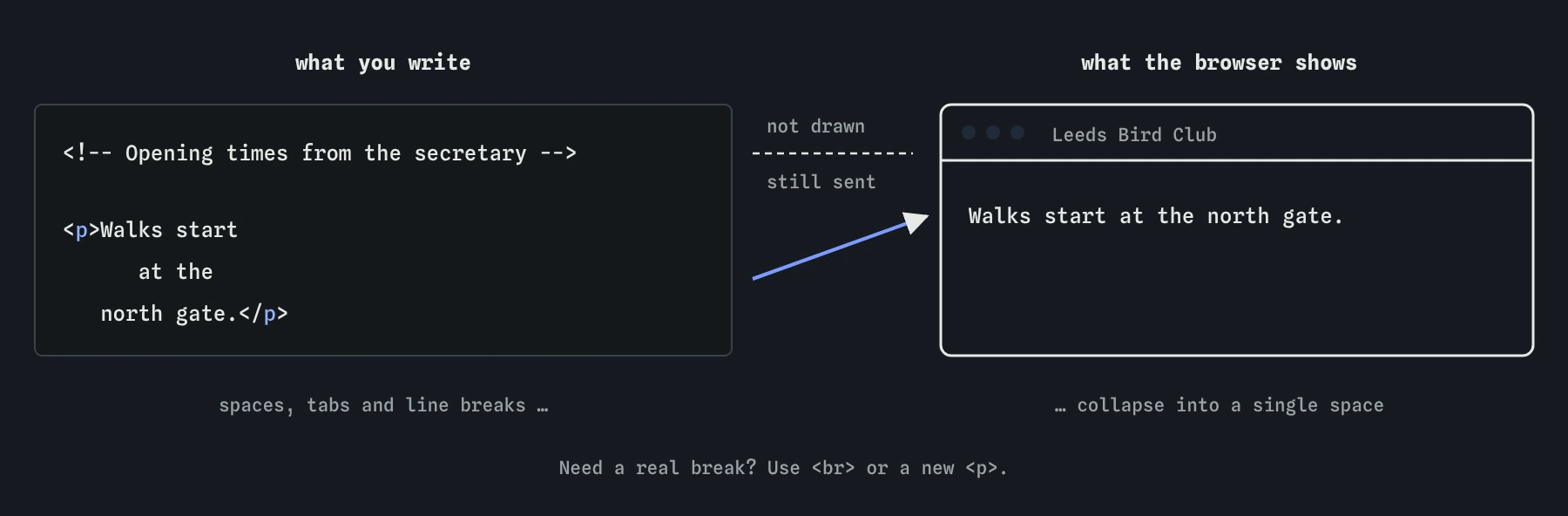
In normal text, the browser collapses whitespace. Any run of spaces, tabs and line breaks becomes a single space when the page is drawn. Whitespace at the start and end of a block, such as a paragraph, is dropped. That is why pressing Enter in your code does not start a new line on the page.
This rule lets you format source code freely. You can split a long paragraph across several lines, indent nested elements and line up attributes, and the reader sees one tidy paragraph. The collapsing is done by CSS rules applied to normal text, which is why CSS can also change it.
To get a real line break inside text, use <br> for places where the break is part of the content, such as lines of an address or a poem. For new ideas, start a new <p>. Stacking <br> tags or empty paragraphs to make space is a layout job and belongs to CSS margin.
<p>Walks start
      at the
   north gate.</p>
<!-- Shows as: Walks start at the north gate. -->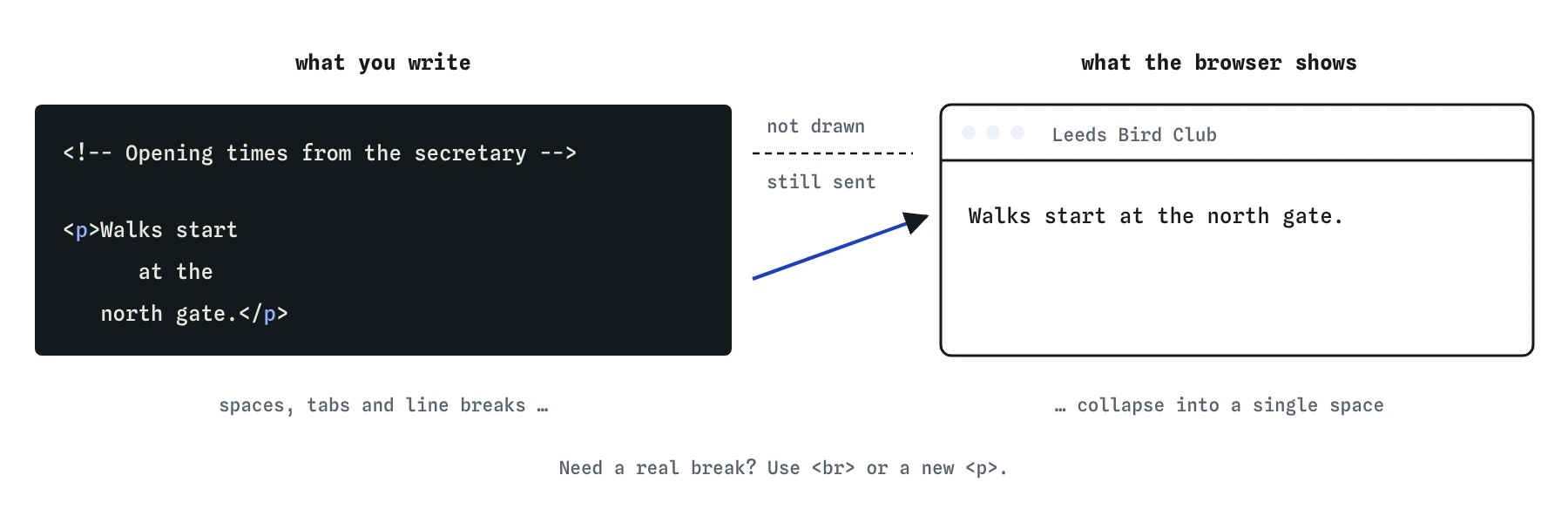
Why does indentation still matter if the browser ignores it?
Indentation is for humans. Two spaces per nesting level makes it obvious which <li> belongs to which <ul> and where a <section> ends. Most unclosed-tag bugs are spotted in seconds in well-indented code and take minutes to find in a flat wall of tags.
Pick one style and stay with it: spaces or tabs, two or four wide. A formatter such as Prettier, built into many editors, can apply it on save. Teams usually add a shared settings file so everyone produces the same layout.
Indentation does add a few bytes to the file. Servers compress HTML with gzip or Brotli, and repeated spaces compress extremely well, so the cost on a real page is close to zero. Readability wins.
When does whitespace change what you see?
Inside <pre>, whitespace is kept exactly as typed. Spaces, tabs and line breaks all show up, which is what you want for code samples and text art. One detail: a single line break straight after the opening <pre> tag is dropped, so you can start the content on the next line without getting a blank first line.
Between inline elements, a collapsed space is still a space. Two links or buttons on separate lines in your code get a gap between them on the page, while the same elements written with no whitespace between them touch. When a layout has a mystery few-pixel gap between inline images or inline-block boxes, this is usually the cause. Modern layouts with flexbox or grid ignore those gaps.
The entity is a non-breaking space. It does not collapse and it stops a line from wrapping at that point, so it is useful in "10 km" or "Page 3". Using rows of to indent or align text is fragile: it breaks on narrow screens and screen readers may pause on it.
<pre>
function hello() {
  return "hi";
}
</pre>

<a href="/walks">Walks</a><a href="/join">Join</a>  <!-- no gap -->
<a href="/walks">Walks</a>
<a href="/join">Join</a>              <!-- one space -->
How do you check comments and whitespace in DevTools?
Open DevTools with F12 and look at the Elements panel. Comments appear in grey as <!-- ... --> nodes. If text you expected to see is shown in grey, a comment swallowed it, usually because a closing --> is missing or a nested comment ended early.
View Source (Ctrl+U) shows the raw file with your exact spacing. The Elements panel shows the parsed tree, where whitespace-only text nodes are usually hidden. Comparing the two helps you tell a parsing problem from a styling problem.
When an AI tool writes HTML for you, scan its comments before you publish. Generated code often includes notes like "replace with your API key", placeholder emails or long explanations aimed at you instead of at future maintainers. Delete anything that is instructional, outdated or sensitive.
Field notes
- A comment starts with
<!--and ends with-->. - Comments are hidden on screen but anyone can read them in the source.
- Never put passwords or other secrets in a comment.
- The browser turns runs of spaces and line breaks into a single space.
Easy to get wrong
Comments do not nest. The first closing marker ends the whole comment, so the paragraph and a stray --> appear on the page.
Comments are sent to every visitor and are easy to read in View Source. Secrets belong on the server, and an exposed key must be replaced.
Rows of non-breaking spaces fake alignment that falls apart on small screens. Use CSS or a table if the data really has columns.
A line break in the source collapses to a space. Use br when the break is part of the content, or a new paragraph for a new idea.
Questions people ask
Can visitors see HTML comments?
They stay off the rendered page. Anyone can read them in View Source or DevTools. Treat every comment as public.
How do I write a multi-line comment in HTML?
Use the same markers and put line breaks between them. There is no separate multi-line syntax in HTML.
Why are my extra spaces not showing?
Browsers collapse runs of whitespace in normal text to a single space. Use pre, a CSS white-space setting, or a non-breaking space where one is really needed.
Do comments slow down a page?
A few short comments make no measurable difference. Large blocks of commented-out code add download size and should be deleted.
Can I use // or /* */ comments in HTML?
No. Those work inside script and style blocks only. In HTML markup, only the <!-- --> form is a comment.