How do I choose between a button and a link?
Ask what happens when it is activated. If the user goes somewhere, a new page, a new URL, a fragment further down the page, use an <a href>. If something happens on the current page, such as submitting a form, opening a menu, adding to a basket or playing a video, use a <button>.
The visual style does not matter. A link can look like a big green button and a button can look like plain text. Users of screen readers hear the role, link or button, and expect matching behaviour: links open on Enter, buttons respond to Enter and Space, and links show up in the screen reader's links list while buttons appear in the form controls list.
An awkward case is a link that changes data, such as Delete in a table row. A GET request that deletes is dangerous because crawlers, link prefetching and browser previews may follow it. Make it a button inside a small POST form instead.
<a href="/menu" class="btn">See the menu</a>
<button type="button" class="btn" aria-expanded="false">Filters</button>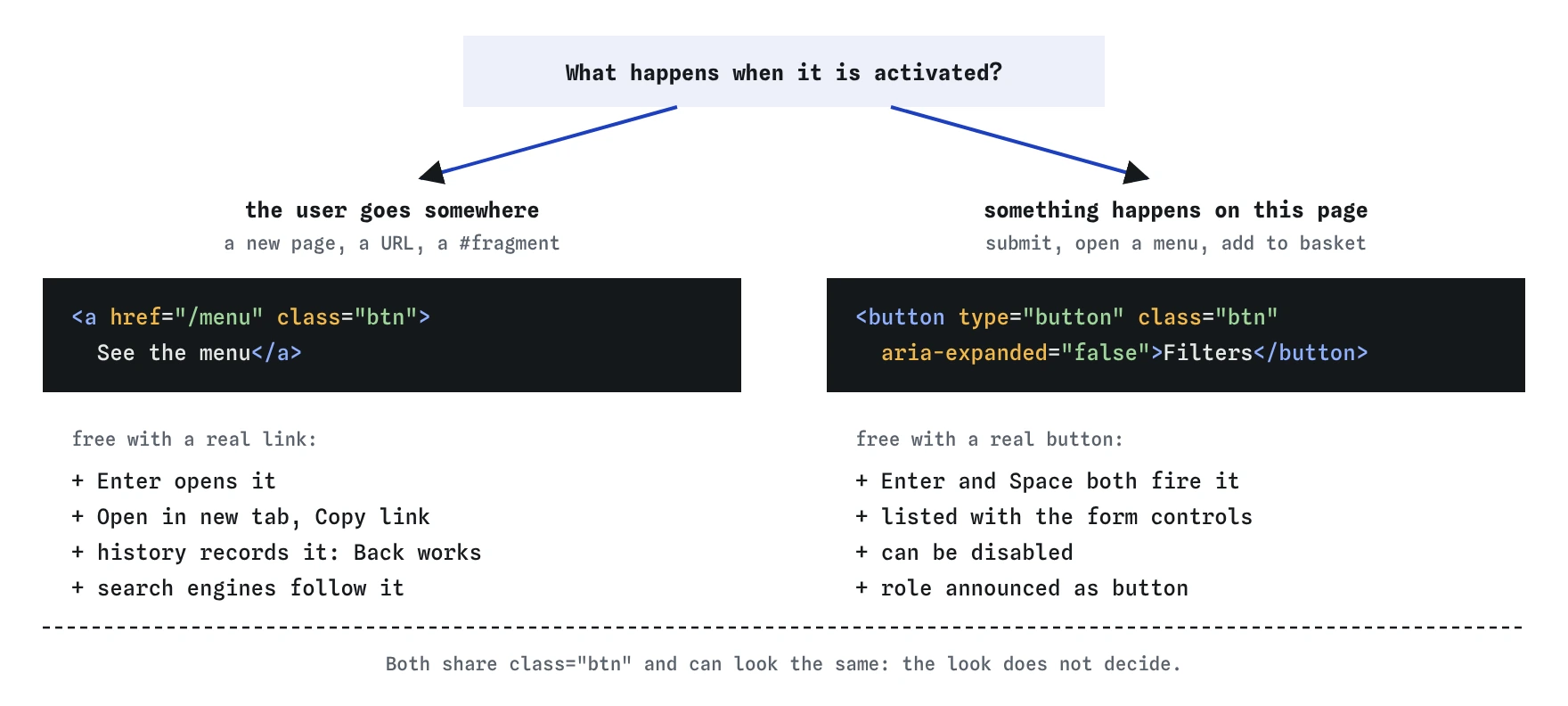

<a href>, doing something here means <button>, and each brings its own keyboard and browser behaviour for free.What do links and buttons give you for free?
A real <a href> is focusable, opens on Enter, shows its URL in the status bar on hover, and offers Open in new tab, Copy link and Save link in the context menu. Middle-click and Ctrl or Cmd click open it in a new tab. Search engines follow it and the browser history records it, so Back works.
A real <button> is focusable, fires on Enter and on Space, gets the button role, and can be disabled. Inside a form it submits by default. Space fires on key up, which gives users a chance to move away and cancel.
Rebuilding this with a div needs tabindex, a role, keydown handlers for both keys and focus styles, and it still misses the context menu and history behaviour. The native element is shorter and more complete.
What are the three button types?
type="submit" is the default. It submits the form the button belongs to, after validation. type="button" does nothing on its own and is the right choice for any button that runs a script. type="reset" restores every control to its initial value, which users seldom want and often hit by mistake.
Always write the type attribute, even for submit. It shows intent to the next reader and protects against accidents when someone later wraps the markup in a form. A button outside any form does nothing when it has the default type, so a missing type there is harmless until the layout changes.
Submit buttons can override the form's settings for one click with formaction, formmethod, formenctype, formtarget and formnovalidate. A Preview button with formtarget="_blank" opens the preview in a new tab while Publish posts normally.
<button type="submit">Book table</button>
<button type="submit" formaction="/preview" formtarget="_blank">Preview</button>
<button type="reset">Clear form</button>
What does disabled do, and when should you avoid it?
A disabled button cannot be focused, clicked or submitted, and its name and value are left out of the form data. Screen readers either skip it or read it as dimmed. Browser default styling fades it, often below readable contrast.
Disabling the submit button until a form is valid looks tidy but hides the reason from users. They press it, nothing happens, and they cannot tab to it to find out why. Leave it enabled and show error messages on submit. If you do need to block a second click while a request is in flight, aria-disabled="true" keeps the button focusable while your script ignores clicks.
Links have no disabled attribute. An <a> without href is a placeholder: not focusable, no link role, no click behaviour. Use that, or render plain text, when a link is not available.
<button type="submit" aria-disabled="true">Saving...</button>Can a button live outside its form?
Yes. The form attribute connects a button to a form by id, wherever the button sits in the document. A sticky footer with Save and Cancel, or a modal header with a Done button, can submit a form elsewhere on the page. The button behaves as if it were inside: it validates and submits that form, and its name and value are included.
Form-associated inputs, selects and textareas accept the same attribute, so a filter panel in a sidebar can belong to the results form in the main column.
<form id="profile" action="/profile" method="post">...</form>
<div class="sticky-bar">
  <button type="submit" form="profile">Save changes</button>
</div>
Why is a clickable div wrong?
A div with an onclick handler works for a mouse user and fails everyone else. It is not in the Tab order, so keyboard users cannot reach it. It has no role, so a screen reader reads Save as plain text. It ignores Enter and Space. Voice control users saying Click Save may get nothing, because the software looks for buttons and links.
Adding role="button" and tabindex="0" fixes the announcement and focus, but you still owe keydown handling for Enter and Space and a visible focus style. At that point the honest fix is <button type="button"> with the default styles reset in CSS.
The same applies to <a> without href and to href="#" used for actions. The hash version adds a history entry or scrolls to the top on click, and screen readers announce a link that goes nowhere.
.text-button {
  background: none;
  border: 0;
  padding: 0;
  font: inherit;
  color: inherit;
  cursor: pointer;
}
What should link and button text say?
Screen reader users often pull up a list of all links or buttons on a page and read them out of context. Read more, Click here and five buttons called Edit become a list of identical, meaningless items. Write text that makes sense alone: Read the full opening hours, Edit delivery address.
If the design needs short visible text, add hidden context with a visually hidden span, or use aria-label that starts with the visible words so voice control users can still say what they see. An icon-only button needs an accessible name, either aria-label or hidden text, and the SVG inside should have aria-hidden="true".
Links that open a new tab with target="_blank" should say so in the text or with an icon that has a text alternative. Modern browsers apply noopener behaviour by default, so rel="noopener" is no longer needed for safety in current browsers, though it does no harm.
Links that download a file can use the download attribute and should name the format and size, such as Price list (PDF, 240 KB).
<button type="button" aria-label="Close menu">
  <svg aria-hidden="true" focusable="false">...</svg>
</button>
<a href="/prices.pdf" download>Price list (PDF, 240 KB)</a>
How do you check buttons and links, especially in AI-written code?
Unplug the mouse, or ignore it, and press Tab through the page. Every control should get a visible focus ring, links should open with Enter, and buttons should respond to Enter and Space. Then open the Accessibility tree in DevTools and confirm each control's role and name.
AI-generated markup repeats a familiar set of problems. Look for these:
- Clickable
divandspanelements withonclickand no role or keyboard handling. <a href="#">orhref="javascript:void(0)"on toggles, tabs and modal openers.- Buttons with
onclick="location.href=..."that should be links. - Buttons inside forms with no
type, which submit by accident. - Icon-only buttons with no accessible name.
- Links nested inside buttons or buttons inside links, which is invalid and confuses every assistive technology.
Field notes
- Use a link when the user goes somewhere and a button when something happens.
- A button in a form submits it unless you give it another type.
- Use
type="button"for actions that should not send the form.
Easy to get wrong
The div cannot be focused or triggered from the keyboard and is not announced as a button.
Toggling a menu is an action, not navigation. A fake link scrolls to the top and misleads screen reader users.
Navigation belongs in a link so it can be opened in a new tab, bookmarked, and crawled.
A disabled submit button gives no reason and cannot be focused. Keep it active and show errors on submit instead.
Without text or aria-label, screen readers announce only button, with no hint of what it does.
Questions people ask
Should I use a button or a link for navigation?
Use a link. Anything that takes the user to a new URL is navigation, even if it is styled as a button.
What is the default type of an HTML button?
submit. Inside a form, a button with no type attribute submits the form, so set type="button" for buttons that only run scripts.
Can I put a button inside a link?
No. Interactive content cannot be nested inside an <a> or <button>. Pick one element and style it.
How do I disable a link?
Links have no disabled attribute. Remove the href so it becomes a plain placeholder, or render text instead of a link.
Is aria-label enough for an icon button?
It gives the name. Also add type="button" when it sits in a form and hide the icon from assistive tech with aria-hidden="true".
Do I still need rel="noopener" on target="_blank" links?
Current browsers apply noopener by default for _blank. Adding it is harmless and protects very old browsers.