How are tags, elements and content related?
A tag is the text in angle brackets. An element is the whole thing: the start tag, its content and the end tag. In <p>Fresh rye today.</p>, the <p> and </p> are tags, the sentence is the content, and together they make one paragraph element in the DOM.
People use the words loosely, and that rarely causes trouble. It helps to be precise when debugging, though. The parser can create elements you never wrote tags for, such as <tbody> inside a table, and it can end an element earlier than your end tag suggests. The Elements panel in DevTools always shows elements, so that is where you look when the tags in your file and the result disagree.
<p>Fresh <strong>rye</strong> today.</p>What are the rules for nesting?
Elements must close in the reverse order they opened, like brackets in maths. If you open <a> and then <strong>, close </strong> first. Overlapping tags trigger the parser's adoption agency algorithm, which reshuffles elements in ways that are hard to predict.
Each element also has a content model that says what it may contain. A <p> holds phrasing content only: text, links, <em>, <img> and similar. Putting a <div>, <ul> or <h2> inside a paragraph makes the parser close the paragraph before it. A <ul> or <ol> may only contain <li> children (plus script-supporting elements). An <a> may wrap block content such as a whole card, but must never contain another link or a button.
When styles seem to apply to the wrong things, check nesting first. In DevTools the tree shows where the parser actually closed each element.
<!-- Allowed: a link wrapping a whole card -->
<a href="/events/dawn-chorus.html" class="card">
  <h3>Dawn chorus walk</h3>
  <p>Sunday 5am, Roundhay Park</p>
</a>
Which elements have no closing tag?
Void elements cannot have content, so they have no end tag. The full list in the Living Standard is area, base, br, col, embed, hr, img, input, link, meta, source, track and wbr. Writing </br> or </img> is an error; browsers treat </br> as <br> and silently drop most others.
The trailing slash in <br /> is allowed and ignored. It comes from XHTML habits and from tools like Prettier that add it by default. On a non-void element the slash means nothing: <div /> opens a div that stays open until something closes it, which can swallow the rest of the page into that div. Write non-void elements with explicit end tags every time.
<img src="/img/robin.jpg" alt="Robin on a fence post" width="800" height="600">
<input type="email" name="email" autocomplete="email">
How do you write attributes correctly?
Attributes go in the start tag as name and value pairs: name="value". Names are case-insensitive, and lowercase is the convention. Values can be unquoted if they contain no spaces, quotes, =, <, > or backticks, but quoting every value with double quotes avoids a whole class of bugs when values change later.
Boolean attributes such as disabled, required, checked, hidden and open are true whenever they are present, whatever their value. disabled="false" still disables the button. To turn one off, remove the attribute, or in JavaScript set the property: button.disabled = false.
If you repeat an attribute on the same element, the browser keeps the first one and drops the rest. That is a common source of missing classes when two snippets are merged.
Some attributes are enumerated and only accept listed keywords. type="phone" on an input is invalid; the browser falls back to text without warning. The correct keyword is tel.
<button type="submit" disabled>Join the club</button>
<input type="tel" name="phone" required>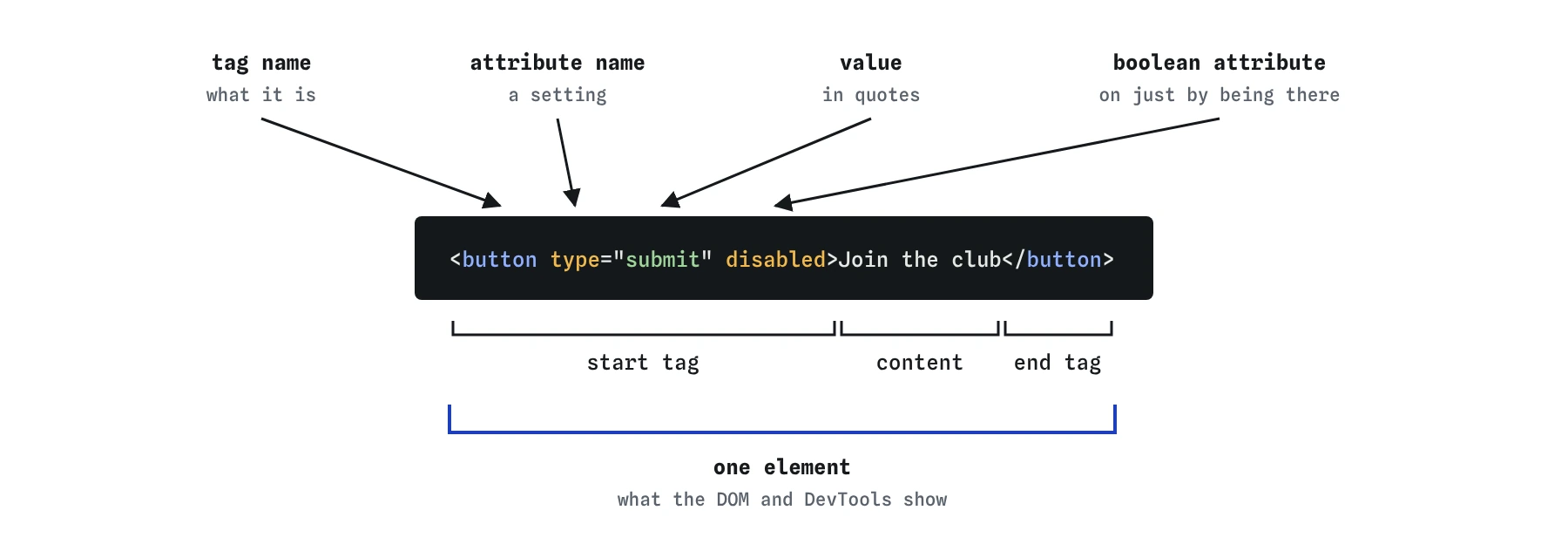
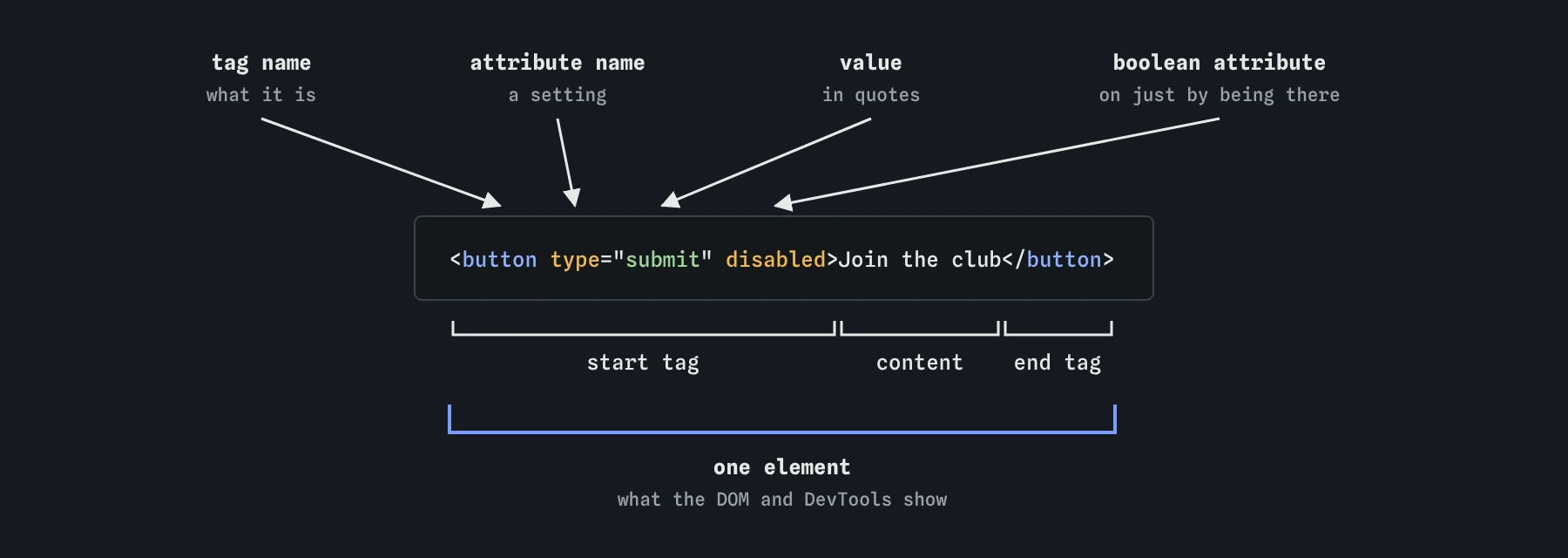
name="value" pairs, and a boolean one like disabled needs no value at all.What do id and class each do?
An id names one element and must be unique in the document. Use it as a link target (href="#contact"), to connect a <label for> to its input, and for ARIA references such as aria-describedby. Duplicate ids break all three: the label points at the first match and the second input loses its name for screen readers.
A class groups any number of elements for styling and scripting. An element can carry several classes separated by spaces. Prefer classes for CSS, because id selectors have very high specificity and are hard to override later.
Choose names that describe purpose, such as event-card or price, rather than appearance such as red-text. The design will change; the purpose usually will not.
<section id="events">
  <article class="event-card featured">...</article>
  <article class="event-card">...</article>
</section>
Which other global attributes are useful?
Global attributes work on every element. The ones you will use most:
langmarks the language of a passage so it is pronounced correctly.titleadds a tooltip on hover. It is unreliable on touch screens and for keyboard users, so never put information only there.hiddenremoves an element from display and from the accessibility tree. CSSdisplayset on the element can override it, which surprises people.tabindex="0"makes a custom widget focusable in source order.tabindex="-1"makes something focusable by script only. Positive values reorder focus for the whole page and almost always create a confusing tab order.data-*attributes store small pieces of information for scripts, such asdata-price="3.50", read in JavaScript throughelement.dataset.price.inertmakes a whole subtree unfocusable and unclickable, which is handy behind an open modal.dirsets text direction, anddir="auto"is useful for user-generated text in unknown languages.
What do AI tools commonly get wrong with elements and attributes?
Generated code often contains attributes that look plausible but do not exist, such as alt-text, aria-role or type="phone". It also writes aria-hidden="false" and disabled="false" expecting them to switch things off. Search the output for ="false" and question every instance.
Other frequent issues are duplicate ids from copied components, <div> elements placed inside <p> or <span>, self-closed non-void elements such as <div /> or <textarea /> copied from JSX, and ARIA roles added to elements that already have them, like <button role="button">. JSX also uses className and htmlFor; in plain HTML those must be class and for.
To check, run the validator, then in DevTools run document.querySelectorAll('[id]') and look for repeated values. Tab through the page to confirm that anything clickable is reachable.
Field notes
- An element is a start tag, its content and its end tag together.
- Elements must close in the reverse order they were opened.
- Void elements such as
<img>and<br>have no end tag. - A boolean attribute like
hiddenworks just by being present.
Easy to get wrong
Elements must close in the reverse order they opened.
Any presence of a boolean attribute makes it true. Remove it to turn it off.
A paragraph cannot contain a div. The parser closes the paragraph early and leaves a stray empty </p>.
Duplicate attributes are ignored after the first. Put multiple classes in one space-separated value.
The slash does nothing on a non-void element, so the div stays open and swallows the following content. Self-closing syntax only belongs on void elements.
Questions people ask
Should I write <br> or <br />?
Both are valid. The slash is ignored in HTML, so plain <br> is common, but use whichever your project prefers consistently.
Do attribute values need quotes?
Only if they contain spaces or characters like quotes, =, < or >. Quoting every value is the simplest habit.
Can two elements share an id?
No. An id must be unique in the document. Use a class when several elements need the same name.
Are HTML tags case-sensitive?
No, but lowercase is the universal convention and is required in XHTML and for SVG attribute names that use camelCase.
Can I make up my own attributes?
Use data-* names, such as data-category, for your own information. Other invented attributes are invalid, are ignored by the browser and may clash with future standard attributes.
What is the difference between an attribute and a property?
The attribute is what you wrote in HTML. The property is the live value on the DOM object. For an input, the value attribute sets the starting text while the value property changes as the user types.